
How is the Tazk POS sidebar organised?
The sidebar runs top to bottom from daily work to setup: Dashboard, documents and contacts first, then Point Of Sale, Sales, Purchases, Inventory, Services, Payments, Cash & Bank and Accounts, then schemes, targets and reports, and finally Configuration, Settings and Health Audit. Menus with an arrow open a sub-menu. Which menus you see depends on your plan and your role.
Dashboard, templates, contacts, approvals and calendar
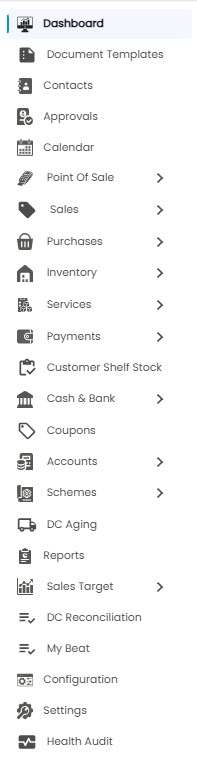
| Menu | What it does |
|---|---|
| Dashboard | Home screen with KPI cards and charts — Dashboard Overview |
| Document Templates | Layouts for printed documents — Document Templates |
| Contacts | Individuals, customers, vendors and employees, in five folders — Individual Contacts, Customer Contacts, Vendor Contacts, Employee Contacts and Starred Contacts |
| Approvals | Requests waiting for your decision — Approvals |
| Calendar | Events on a calendar — Calendar |
Point Of Sale
| Sub-menu | What it does |
|---|---|
| Sales Counter | Fast counter billing — Sales Counter |
| POS Report | Counter bills and sessions — POS Report |
| Daily Report | The day’s sales and collections — Daily Report |
| Find Product | Look up a product’s price and stock — Find Product |
Sales
| Sub-menu | What it does |
|---|---|
| Ecom Orders | Orders from your online store — Ecom Orders |
| Sales Orders | Customer orders before invoicing — Sales Orders |
| Invoices | GST sales invoices — Invoices |
| Delivery Challans | Goods sent before or without an invoice — Delivery Challans |
| Receivables | What customers owe you — Receivables |
| Receipts | Money received from customers — Receipts |
| Credit Notes | Sales returns and credits — Credit Notes |
| Quotation | Price quotes to customers — Quotation |
| Customer Price List | Special prices per customer — Customer Price List |
| OEM Activations | Manufacturer activations of sold units — OEM Activations |
Purchases
| Sub-menu | What it does |
|---|---|
| Purchase Orders | Orders placed with vendors — Purchase Orders |
| Bills | Vendor bills that bring stock in — Bills |
| Payables | What you owe vendors — Payables |
| Payments | Money paid to vendors — Purchase Payments |
| Debit Notes | Purchase returns — Debit Notes |
| Vendor Price List | Agreed purchase prices per vendor — Vendor Price List |
Inventory
| Sub-menu | What it does |
|---|---|
| Stocks | Stock on hand by product and location — Stocks |
| Lot Traceability | Follow a lot, batch or serial number — Lot Traceability |
| Product Master | Your products, prices and tax — Product Master |
| Stock Transfer | Send stock to another location — Stock Transfer |
| Stock Receive | Accept stock sent to your location — Stock Receive |
| Stock Reconcilate | Match system stock to a physical count — Stock Reconcilate |
| Sync Inventory | Bring stock figures back in line — Sync Inventory |
Services and Payments
| Sub-menu | What it does |
|---|---|
| Services → ServiceDashboard | Overview of service jobs — Service Dashboard |
| Services → New Service | Book a service job — New Service |
| Services → Payment | Payments against service jobs — Service Payment |
| Payments → Analytics | How money came in and went out — Payment Analytics |
| Payments → Pay In / Pay Out | Cash put into or taken out of the till — Pay In / Pay Out |
| Payments → Expenses | Business expenses — Expenses |
| Customer Shelf Stock | Stock on customers’ shelves — Customer Shelf Stock |
Cash & Bank, Coupons and Accounts
| Sub-menu | What it does |
|---|---|
| Cash & Bank → Cash In Hand | Cash box balances and movements — Cash In Hand |
| Cash & Bank → Denomination | Count cash by note and coin — Denomination |
| Cash & Bank → Loan Accounts | Business loans and repayments — Loan Accounts |
| Cash & Bank → Cheques | Cheques received and issued — Cheques |
| Cash & Bank → Bank Reconciliation | Match payments to the bank statement — Bank Reconciliation |
| Coupons | Discount coupons — Coupons |
| Accounts → Ledgers | Every account and its entries — Ledgers |
| Accounts → Journal Entry | Manual accounting entries — Journal Entry |
| Accounts → Chart of Accounts | Account groups and ledgers — Chart of Accounts |
Schemes, DC, Reports, Sales Target and My Beat
| Menu | What it does |
|---|---|
| Schemes → DashBoard | Overview of trade schemes — Schemes Dashboard |
| Schemes → New Schemes | Create a scheme — New Schemes |
| Schemes → Schemes Receivables | What schemes owe you — Schemes Receivables |
| DC Aging | How long delivery challans have been open — DC Aging |
| Reports | All reports — Reports |
| Sales Target → Dashboard | Target progress at a glance — Sales Target Dashboard |
| Sales Target → Company Targets | Targets for the company — Company Targets |
| Sales Target → Salesman Targets | Targets per salesman — Salesman Targets |
| Sales Target → Achievement | Actual against target — Achievement |
| Sales Target → Incentive Plans | How incentives are earned — Incentive Plans |
| Sales Target → Incentive | Incentives earned — Incentive |
| Sales Target → What-If | Try out target and incentive scenarios — What-If |
| DC Reconciliation | Settle delivery challans — DC Reconciliation |
| My Beat | A salesman’s customers to visit — My Beat |
Configuration, Settings and Health Audit
| Menu | What it does |
|---|---|
| Configuration | How billing, inventory and approvals behave — Configuration |
| Settings | Company info, locations, users, roles, cash and bank, payment methods — Settings |
| Health Audit | Checks your data for problems — Health Audit |
Note: Menus are switched on by your company’s plan and then filtered by your role’s permissions. A cashier, for example, may see only the Dashboard and Point Of Sale. Administrators change role permissions in Settings.