
What does the Service Dashboard show?
The Service Dashboard (Services → ServiceDashboard) counts your repair job cards by status — Total Jobcard, Open, Assigned, Work In Progress, Waiting For Parts, Repair Done, Delivered and Closed — and lists job cards with their target delivery date and a progress bar coloured by how close the delivery date is. Click a row to open the job card.
What do the cards show?
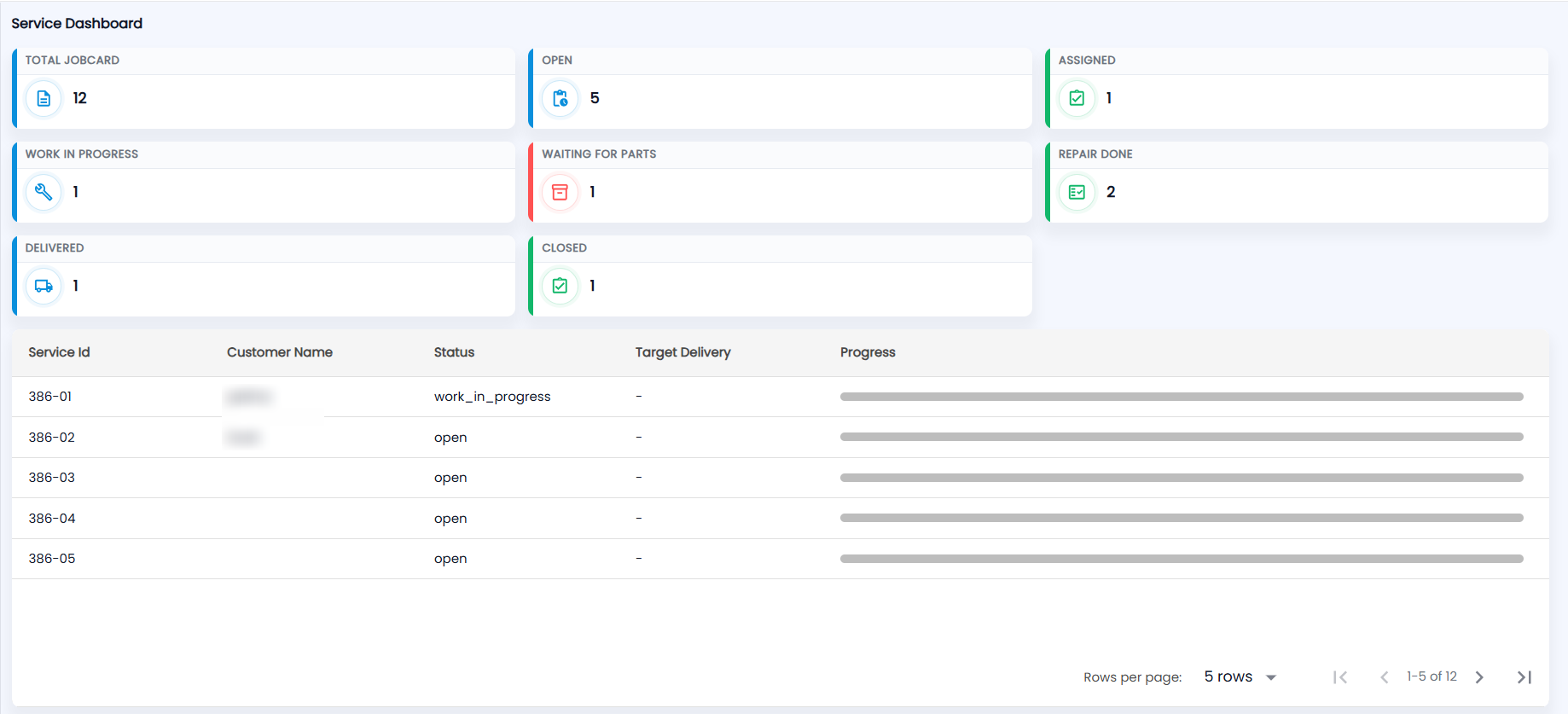
Open Services → ServiceDashboard. Eight cards count your job cards:
| Card | What it counts |
|---|---|
| Total Jobcard | All job cards |
| Open | Booked, not yet assigned |
| Assigned | An engineer has been put on it |
| Work In Progress | Being repaired |
| Waiting For Parts | On hold for parts |
| Repair Done | Ready for the customer |
| Delivered | Handed back to the customer |
| Closed | Finished and closed |
What is the delivery list?
Below the cards is a list of job cards with Service Id (for example 386-01), Customer Name, Status (shown as stored, for example work_in_progress or open), Target Delivery (a dash if none is set) and Progress. It shows 5 rows per page by default. The progress bar colour tells you how urgent the delivery is:
| Colour | Meaning |
|---|---|
| Red | Target delivery date has passed |
| Orange | Due today or tomorrow |
| Green | Due later |
| Grey | No target delivery date set |
Click a row to open its job card. You can export the list as PDF or CSV.
To book a new repair or work a job card, see New Service. Payments taken against job cards are listed in Service Payment.