
How do I see the notes and coins in my cash box in Tazk POS?
Open Cash & Bank → Denomination. It lists the cash boxes that have Allow Denomination switched on and shows the count and value of each note and coin they hold, next to the Cash In Hand balance. Switch to By Date to see the notes and coins entered on one day instead.
Why can’t I see the Denomination menu?
Denomination only appears when at least one cash box has Allow Denomination switched on. A cash box that does not record notes per transaction has nothing to count, so it is not listed, and when no cash box uses denominations the menu is hidden and the page cannot be opened. Counts are captured on each cash entry once the setting is on.
What does the cash box list show?
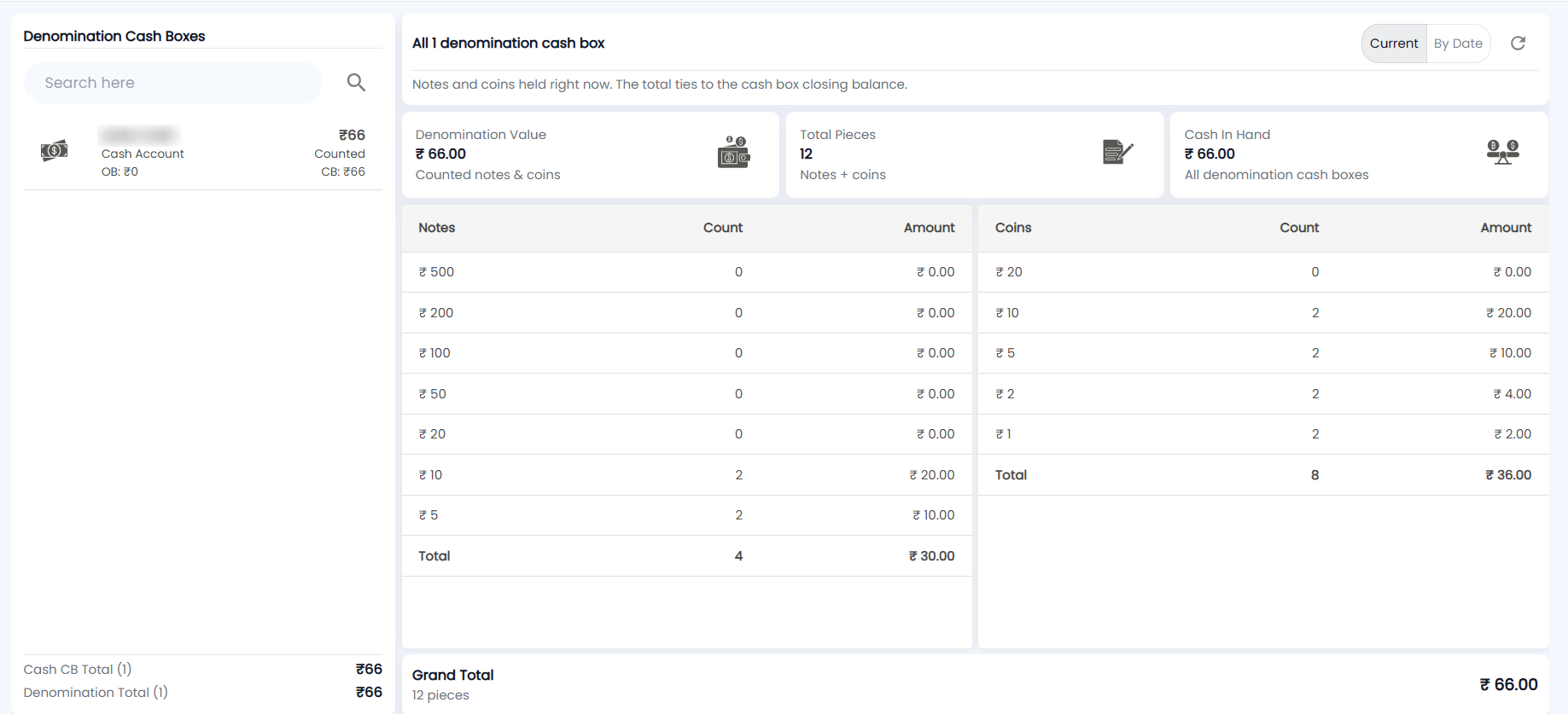
The left panel, Denomination Cash Boxes, lists the denomination-enabled cash boxes at the location chosen in the header. Search by name. Each row shows the cash box name, its opening balance (OB), the value of the notes and coins counted in it (Counted) and its closing balance (CB). The footer shows Cash CB Total and Denomination Total for the boxes listed.
Click a cash box to see only its breakdown; click it again to go back to all boxes.
What is the difference between Current and By Date?
| View | What it shows |
|---|---|
| Current (default) | The notes and coins held right now. The total ties to the cash box closing balance. You can pick one cash box or see all of them. |
| By Date | The notes and coins entered on the chosen Date across the selected location(s) — the day’s movement, not a closing balance. It is not split per cash box, so picking By Date clears the cash box selection. |
Use the Refresh icon to reload the figures.
What do the cards and tables show?
| Card | What it shows |
|---|---|
| Denomination Value | Value of the counted notes and coins (or those entered on the date) |
| Total Pieces | Number of notes plus coins |
| Cash In Hand | Closing balance of the selected cash box, or of all denomination cash boxes. Shown in the Current view only |
The heading above the cards says what you are looking at, for example All 1 denomination cash box — Notes and coins held right now. The total ties to the cash box closing balance. Below the cards, the Notes table (₹500, ₹200, ₹100, ₹50, ₹20, ₹10, ₹5) and the Coins table (₹20, ₹10, ₹5, ₹2, ₹1) list each denomination with its Count and Amount, each with a Total row. The Grand Total bar at the bottom shows the overall value and number of pieces.