
What does the DC Aging report show in Tazk POS?
DC Aging tracks every delivery challan (DC) from dispatch until it is invoiced or returned. It shows how many days each DC has been open, which aging bucket it is in, how much is shipped, invoiced, returned and still open, and — lot by lot — whether each IMEI is open, activated or invoiced. Lots that are activated but not invoiced are marked To be Invoiced; click that chip to bill all of a dealer's activated lots in one invoice.
Where do I find DC Aging?
- DC Aging in the sidebar, Reports → Transactions → DC Aging, or Sales Man → DC Aging — the standalone report, titled DC Lifecycle, with three views: Header view, Lot view and Open DC's.
- Sales → Delivery Challans — the Lot wise and Dealer Wise tabs show the same lot view and dealer rollup inside the DC page.
- A dealer's page in Customer Contacts has a DC Aging tab with that dealer's tiles and lots.
What do DC Status and Activated / Invoiced mean?
| DC Status | Meaning |
|---|---|
| Open | Still at the dealer, nothing activated or invoiced yet |
| To be Invoiced | The dealer has activated the stock (OEM activation) but you have not invoiced it |
| Closed | Invoiced or returned — nothing left at the dealer |
In the lot view, Activated / Invoiced shows the furthest a lot has got: Invoiced (hover for the invoice number), Returned, Activated, or a dash. Recon Status shows the last mark a field user made on DC Reconciliation: Sold, Still on Shelf, Not on Shelf or Return Requested, with Recon By naming who marked it.
What are the aging buckets?
Days are counted from the DC date. Open DCs fall into 0-30, 31-60, 61-90, 91-180 or 180+. A closed DC has no bucket (a dash) and sorts to the bottom of the list.
What do the tiles at the top show?
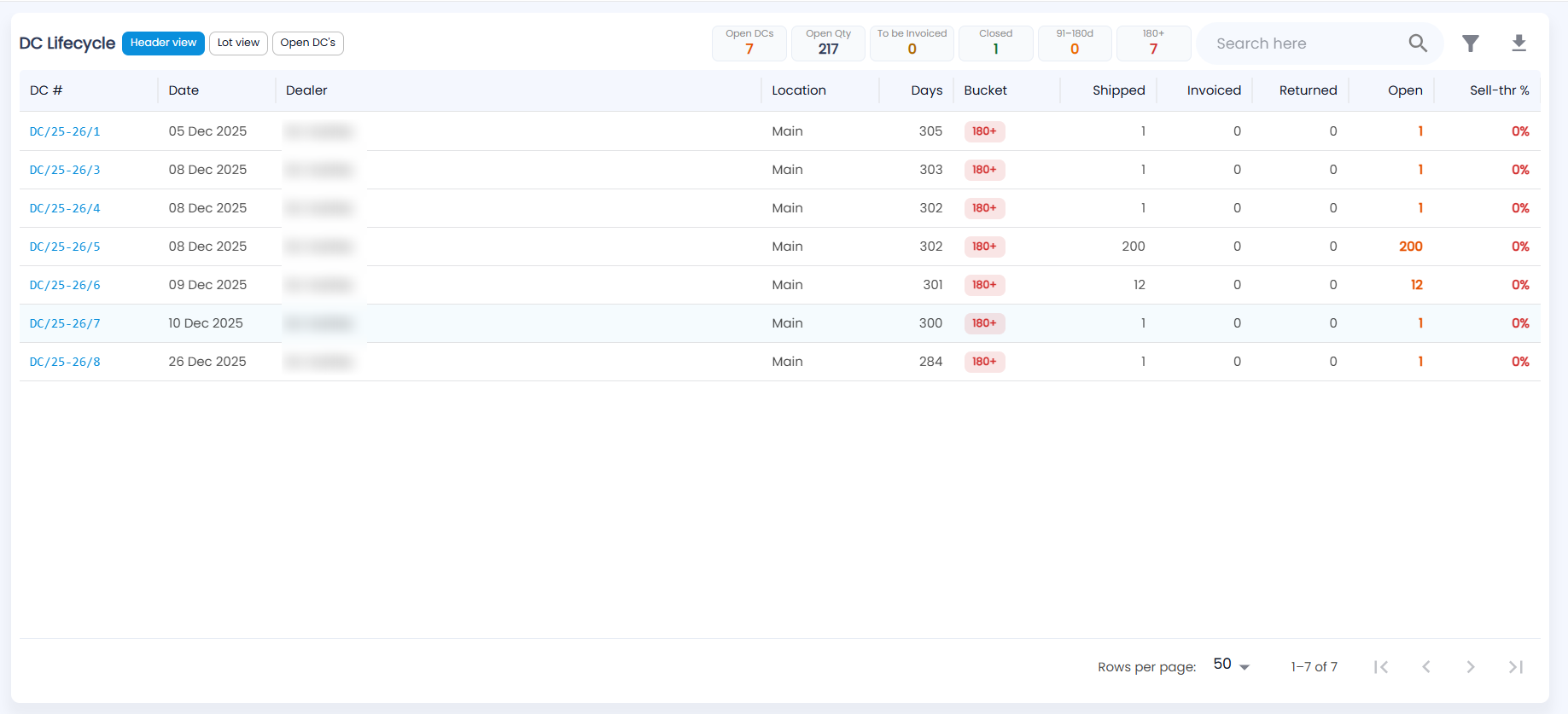
| Tile | What it counts |
|---|---|
| Open DCs | DCs where nothing has been activated yet |
| Open Qty | Units still pending across open DCs |
| To be Invoiced | DCs or lots activated but not invoiced |
| Closed | Invoiced or returned |
| 91–180d / 180+ | Open DCs in the two oldest buckets |
Click a tile to filter the list by it; click it again to clear. The Lot wise tab also shows Open Lots, Not on Shelf and Open Lot Value.
What is in each view?
| View | Columns |
|---|---|
| Header view (one row per DC) | DC #, Date, Dealer, Location, Days, Bucket, Shipped, Invoiced, Returned, Open, Sell-thr % |
| Lot view (one row per IMEI / lot) | IMEI / Lot, Item, Dealer, DC #, DC date, Value, Days, Bucket, Activated, DC Status, Recon Status, Recon By |
| Open DC's (one row per dealer) | Dealer, Open DCs, Open Lots, Value, Oldest DC, Max Days, Worst Bucket |
Click a DC to open it on the Delivery Challan page, where its menu has Cancel, Return and Convert to invoice. Click a dealer in Open DC's to see all their open lines with the tiles Open Lots / Items, Open Lots Value, To be Billed, Not on Shelf and Oldest Days, and export them to Excel.
In the Header view, Open quantities show in orange and Sell-thr % (the share already invoiced) in red while it is low. Use the search box, the filter icon and the download icon (Export Excel) in the title row.
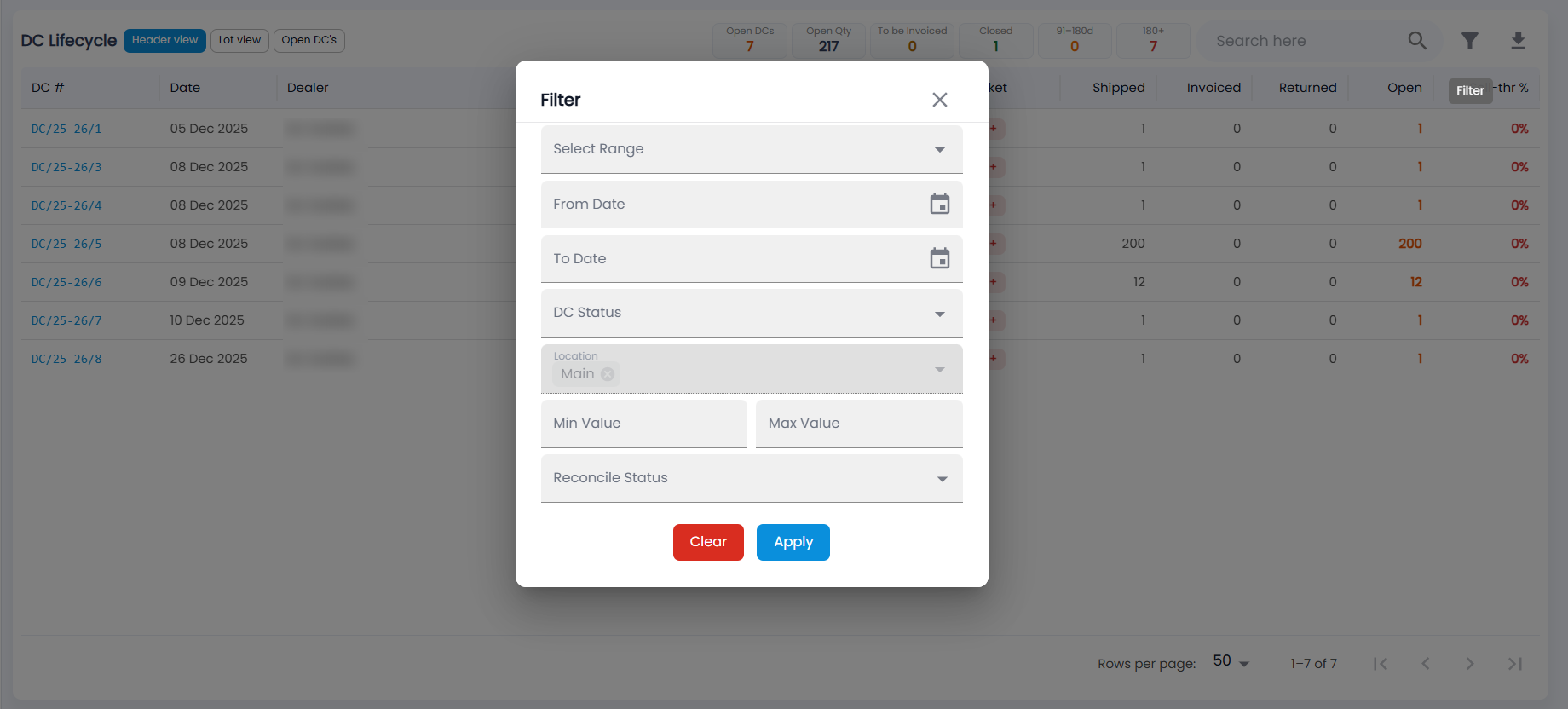
The filter has Select Range, From Date / To Date, DC Status, Location (your location is already chosen), Min Value / Max Value and Reconcile Status; then Apply or Clear. The list shows 50 rows per page by default.
How do I invoice a dealer's activated lots?
- Find a row whose DC Status is To be Invoiced.
- Click the chip ("Convert all of this dealer's activated lots into one invoice").
- Tazk collects every activated, not-yet-invoiced lot of that dealer across all their DCs and opens one invoice for them. From the standalone report, you are taken to the Delivery Challan page to finish it.
- Check and save the invoice. The lots then show Invoiced and the DC closes when nothing is left open.
Will Tazk warn me about old DCs?
Yes. Every morning at 9:00 Tazk notifies you when an open DC reaches 91, 151 or 178 days, and sends sales managers and administrators a daily digest of DCs aged 91 days or more. Salesmen are alerted only for their own customers.