
How do I set up request types in Tazk Service Desk?
The kinds of requests customers raise — each with its own stages, starting priority and team. A request type says what kind of request a ticket is — Complaint, Repair, Installation, Billing… Each one follows a workflow (its stages), starts at a priority and goes to a team. Tazk starts you with a ready-made set; keep what fits and switch off the rest.
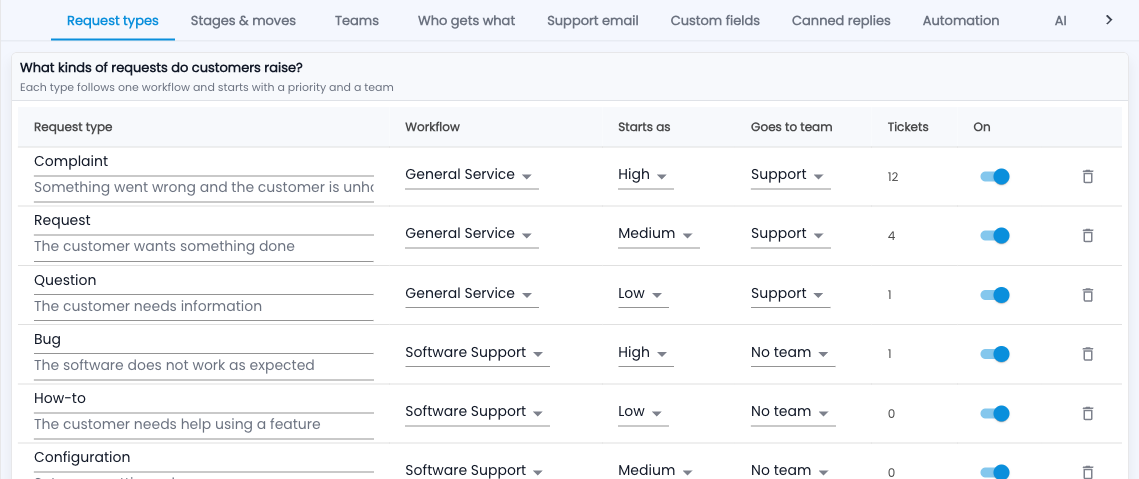
How do I set up request types?
- Go to Service Desk › Setup › Request types.
- Rename a type or change its description by clicking into it.
- Pick its Workflow, the priority it Starts as, and the team it Goes to.
- Switch On off for types you don’t use — they disappear from forms but old tickets keep them.
An example
An appliance dealer keeps Installation, Repair and Warranty claim on the Appliance Service workflow going to the Support team, and switches off Bug and Access.
Common questions
Can I delete a type that has tickets?
Switch it off instead. Tickets keep their type so reports stay right.