
How do I use canned replies in Tazk Service Desk?
Save the answers your team gives often; insert them with one click and they fill in the customer’s details. Canned replies save typing and keep answers consistent. Merge fields such as {first_name} and {ticket_no} fill in from the ticket when inserted.
How do I set up canned replies?
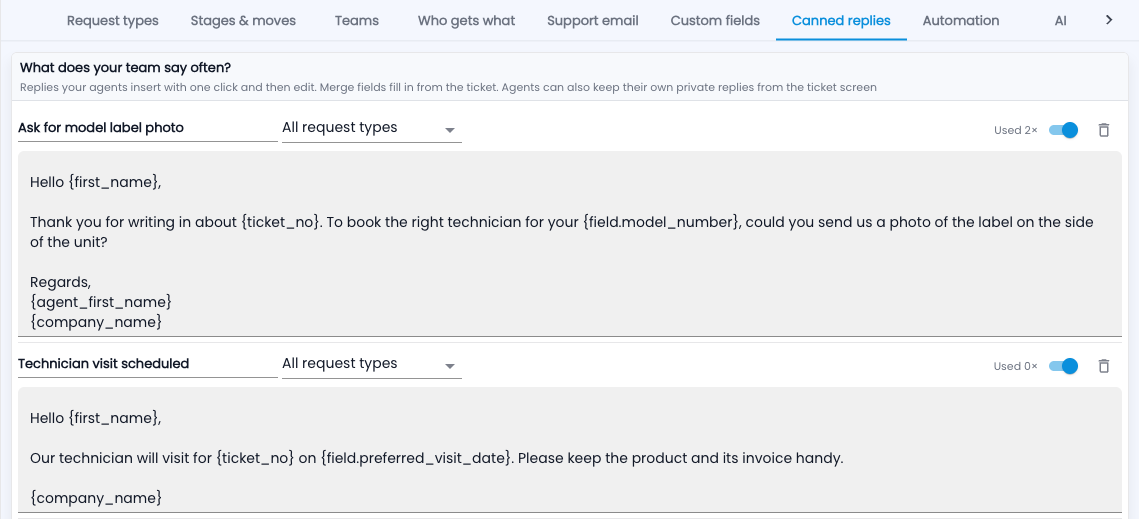
- Go to Setup › Canned replies and add a reply with a clear name.
- Write it using merge fields: {first_name}, {ticket_no}, {agent_first_name}, {company_name}, or any custom field like {field.model_number}.
- Limit it to one request type if it only makes sense there.
- On a ticket, click Insert reply, pick it, check the text and send.
Common questions
Can I keep my own replies?
Yes — agents can save personal replies from the ticket screen. Only replies saved here are shared with everyone.
Which replies get used?
“Used 2×” next to each one tells you.