
How do I use the Tazk Service Desk API and webhooks?
Let your shop, app or ERP create and update tickets, and get ticket events sent to your own systems. An API key lets another system create, read and update tickets. A webhook sends each ticket event — created, replied, moved, solved, rated — to an address of yours as it happens.
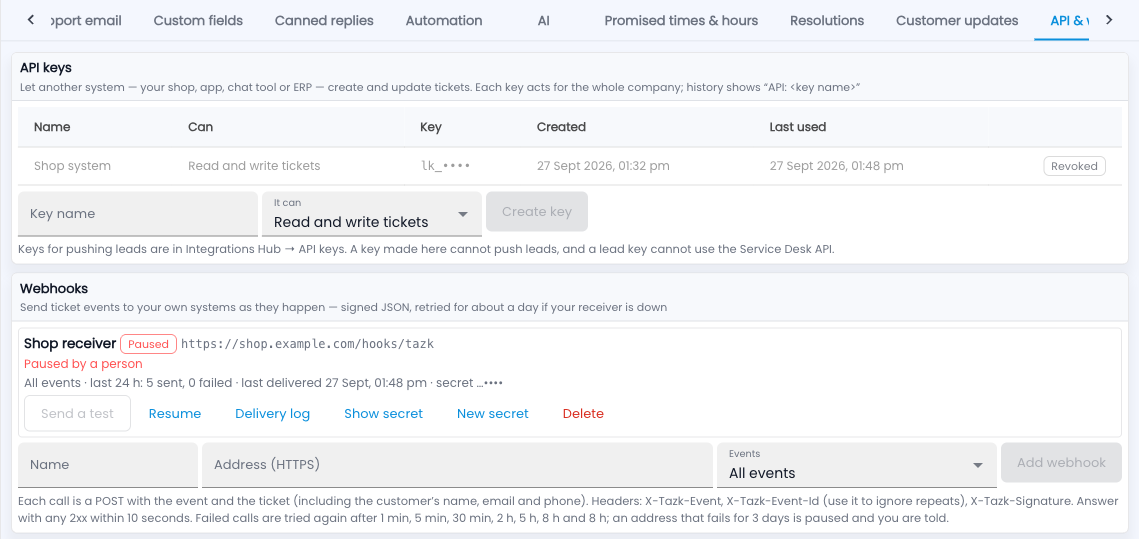
Steps: an API key
- Go to Setup › API & webhooks, type a key name (for example “Shop system”) and choose Read tickets or Read and write tickets.
- Click Create key and copy it now — it is shown only once.
- Send it in the X-API-Key header. The reference on the same tab lists every call.
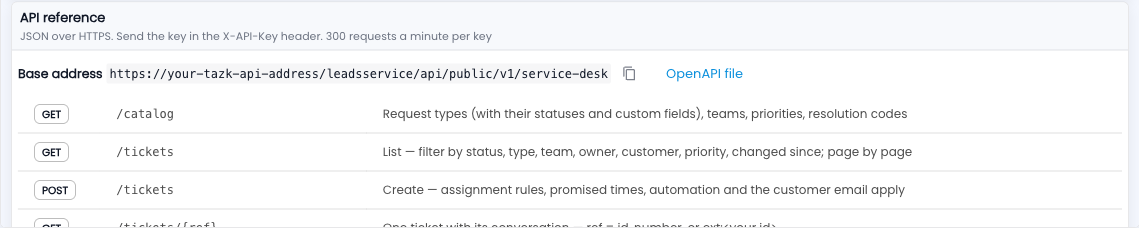
Steps: a webhook
- Under Webhooks, give it a name and an HTTPS address, and pick the events.
- Click Add webhook, then Send a test.
- Check each call’s X-Tazk-Signature with the webhook’s secret, and answer with any 2xx within 10 seconds.
Common questions
What if my system is down?
Failed calls are tried again after 1 min, 5 min, 30 min, 2 h, 5 h, 8 h and 8 h. An address that fails for 3 days is paused and you are told.
How do I avoid duplicate tickets?
Send an Idempotency-Key with each create, or your own reference as external_ref.
Who shows as the author?
History shows “API: <key name>”.