
How does AI help agents in Tazk Service Desk?
Ticket summaries, suggested type and priority, and reply drafts — on your own AI account, with customer details hidden. Service Desk AI is free with the Service Desk: it runs on your own Google Gemini, OpenAI or Claude account, so the provider bills you directly for what you use. It only suggests — nothing on a ticket changes until someone on your team clicks.
How do I set up AI help?
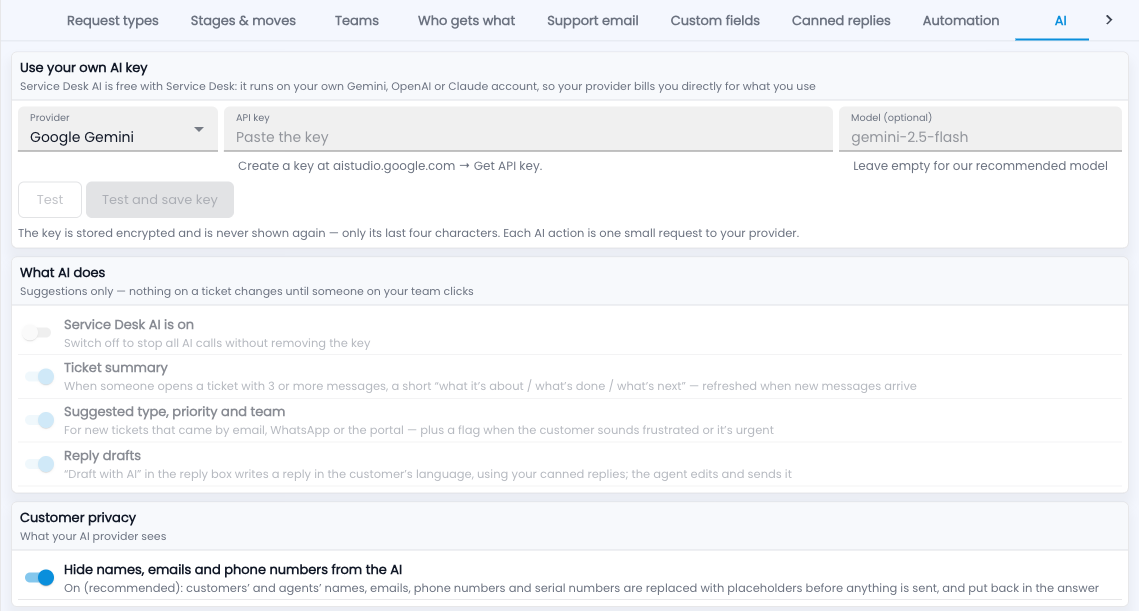
- Create a key with your provider (for Gemini: aistudio.google.com → Get API key).
- Go to Setup › AI, choose the provider and paste the key.
- Click Test and save key.
- Choose what AI does: ticket summaries, suggested type, priority and team for new tickets, and reply drafts.
- Keep Hide names, emails and phone numbers from the AI on.
Common questions
What does the AI see?
With privacy on, names, emails, phone numbers and serial numbers are replaced with placeholders before anything is sent, and put back in the answer.
Is the key safe?
It is stored encrypted and only its last four characters are ever shown.
What works without a key?
Duplicates, similar tickets, “solved before” and the insights in Reports need no AI key.