
How do I add custom fields to tickets in Tazk Service Desk?
Ask for the details each kind of request needs — a model number, a site address — and decide when they are required. Every business needs a few extra details. Custom fields add them to the new-ticket form and the ticket, per request type.
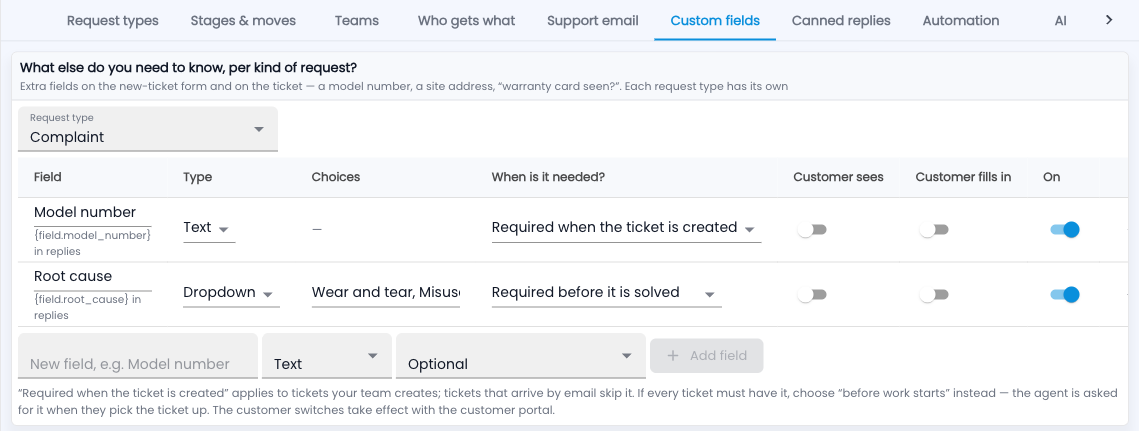
How do I set up custom fields?
- Go to Setup › Custom fields and pick the request type.
- Type the field name, pick its type (Text, Number, Date, Dropdown or Yes / No), and click Add field.
- Choose When is it needed? — optional, when the ticket is created, before work starts, before it is solved, or before it is closed.
- Switch on Customer sees or Customer fills in to show it on the customer portal.
An example
“Root cause” as a dropdown, required before it is solved: nobody can close a repair without saying why it failed — and Reports can group by it.
Common questions
Can I use a field in a reply?
Yes — each field shows its merge code, like {field.model_number}, for canned replies.
Emails skip “required when created” — why?
A customer’s email can’t fill it in. Use “before work starts” if every ticket must have it.