
What is in the Tazk Payroll sidebar menu?
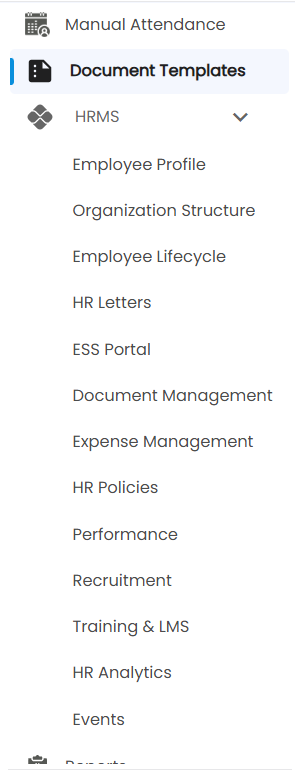
The sidebar lists Dashboard, Message, Travel History, Contacts, Chat, Calendar, Leave Management, Approvals, Today Attendance, Shifts, Salary, Loans, Claims, Attendance Process, Salary Process, Live Location, Manual Attendance, Document Templates, HRMS, Reports, Configuration and Settings. Only HRMS expands into a sub-menu, with 13 screens. Shifts and Salary each open one page with tabs. The items you see depend on your role and plan.

What does each menu item open?
| Menu item | What it is for |
|---|---|
| Dashboard | Work hours, attendance, events and wishes, live check-ins and location-wise attendance — see Dashboard Overview. |
| Message | One inbox for requests, approvals, payslips, claims, wishes and announcements, plus internal mail — see Messages. |
| Travel History | An employee's route for any day on a map, with stops and playback — see Travel History. |
| Contacts | Employee records with personal, application, payroll and payment details. |
| Chat | Internal messaging between team members. |
| Calendar | Birthdays, join dates, anniversaries, holidays and loan dues. |
| Leave Management | Team leave calendar, pending approvals and absence register; your own leave, balances and policies — see Leave Management. |
| Approvals | Approve or reject leave, permission, attendance correction, loan and claim requests. |
| Today Attendance | Who checked in and out today, with date navigation. |
| Shifts | Shift Management — tabs for Overview, Create Shift, Schedule Shift and View Shift. |
| Salary | Salary Management — tabs for Overview, Templates, Compliances, Salary Structure and Assign Salary. |
| Loans | Employee loans, EMIs, manual payments and write-offs. |
| Claims | Approved expense claims, their payment status and payments — see Claims. |
| Attendance Process | Monthly attendance corrections and processing. |
| Salary Process | Monthly payroll — compute salaries, upload incentives and deductions, generate payslips. |
| Live Location | Field employees' positions today on a map — see Live Location. |
| Manual Attendance | Mark Check In, Break Start, Break End and Check Out for an employee. |
| Document Templates | Design, publish and version the payslip and HR letter templates — see Document Templates. |
| HRMS | Sub-menu of 13 HR screens, from Employee Profile to Events — each has its own article. |
| Reports | Attendance, salary, statutory, reference, tax and log reports. |
| Configuration | Policy Management (week off & holiday, attendance and leave policies), General settings, holidays and special permissions, approvals, devices, and SMS, mail and WhatsApp. |
| Settings | Company info, users, user roles, themes and subscription. |
What is under the HRMS sub-menu?
Click HRMS to expand it: Employee Profile, Organization Structure, Employee Lifecycle, HR Letters, ESS Portal, Document Management, Expense Management, HR Policies, Performance, Recruitment, Training & LMS, HR Analytics and Events.
Where did the older menu items go?
| Older item | Where it is now |
|---|---|
| Shifts → Create / Schedule / View Shift | Tabs on the Shifts page. |
| Salary → Salary Structure / Assign Salary | Tabs on the Salary page. |
| Announcement | Announcements you receive are in Message → Announcements, and live ones scroll across the dashboard. |
| Employee Verification, Employee Documents | HRMS → Document Management. |
| QR Generator, Face Attendance, Offline Attendance | Shown only when that attendance method is turned on in Configuration. |
| Travel History (inside Live Location) | Its own Travel History menu item, and still a tab on Live Location. |
Note: Your administrator decides which items each role sees, and can rename them, so your sidebar may be shorter or use different names. Some items, such as Travel History, depend on your plan.