
Table Of Contents
Social Media


CRM Lead Management in Chennai - How to Capture, Assign, and Close Leads With Clear Ownership
Every Chennai sales manager has had this conversation at least once. A lead slips through. The manager asks the team who was handling it. One rep says they thought it was assigned to someone else. Another says they called once, got no answer, and assumed a colleague would follow up. The prospect, meanwhile, has already moved to a competitor who responded faster and followed up more consistently.
The lead was not lost because of the product. It was not lost because of the price. It was lost because of a single, fixable problem: no one owned it.
Clear lead ownership is the foundation of a high-performing sales team. And a properly configured CRM lead management system in Chennai is what makes that ownership possible, not as an aspiration, but as an enforced, visible, tracked reality that every person on the team understands and operates within. This guide covers how to set up your CRM to capture leads cleanly, assign them with logic, move them through a structured pipeline, and close them with full accountability from the first form fill to the final signature.
Why Lead Ownership Is the Real Problem in Most Chennai Sales Teams
Before talking about software, it is worth understanding why ownership breaks down in the first place. It is rarely because of bad intentions. It is almost always because of bad systems.
When leads arrive through multiple channels such as a website enquiry, a JustDial callback, a walk-in, or a referral, and there is no defined rule for who receives each type of lead, assignment becomes ad hoc. The first person to see it picks it up. Or nobody picks it up because everyone assumes someone else will. Or the manager forwards it on WhatsApp and the rep does not see the message for hours.
Even when assignment works correctly, the next failure point is handoff. When a lead moves from marketing qualification to sales, or from one rep to a more senior closer, the context rarely travels with it. The receiving rep does not know what was promised, what objections were raised, or what the prospect's timeline is. They restart the conversation from scratch, which frustrates the prospect and wastes time.
CRM lead management software in Chennai solves both problems, ownership and handoff, by making every assignment explicit, every conversation logged, and every transition documented in a way that the entire team can see and rely on.
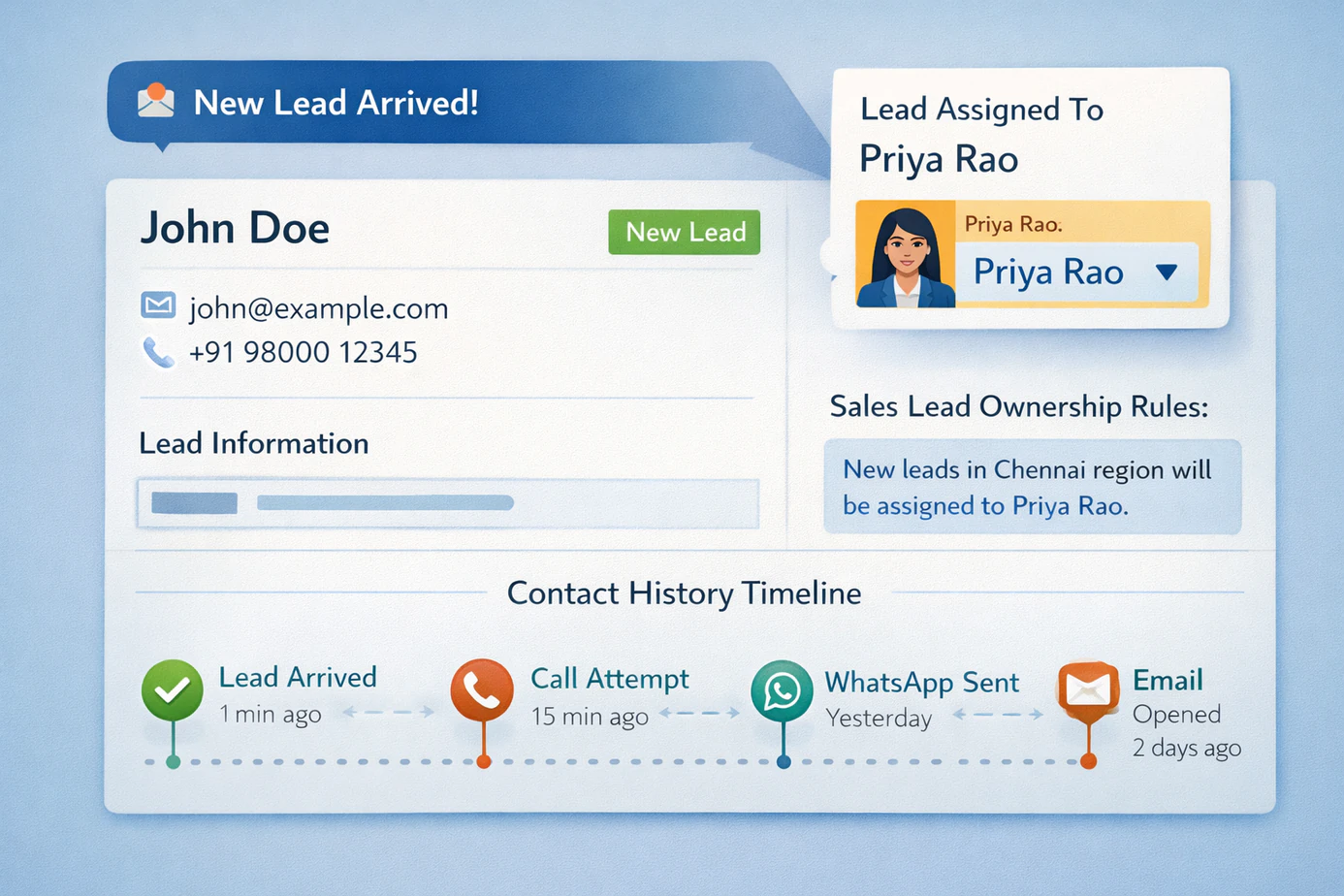
What a CRM Lead Management System Should Do - Beyond Basic Contact Storage
Many businesses in Chennai have a CRM. Far fewer have a CRM that is actually configured to manage leads properly. There is a big difference between using a CRM as a digital address book and using it as a live system that drives sales behaviour. Here is what genuine CRM lead management functionality looks like.
Structured Lead Capture Into the CRM
Every lead source, web forms, ad platforms, phone calls, chat widgets, referrals, and walk-ins, should feed directly into the CRM without manual entry. When a prospect fills out a website form at 11 PM, they should appear in the CRM within seconds, not the next morning when someone checks an inbox. When a lead arrives from JustDial or IndiaMart, it should carry source attribution with it so manager reports can show exactly where that lead came from. Automatic capture also removes common manual-entry errors such as wrong phone numbers, missing source data, and leads that never make it into the system at all.
CRM Pipeline Setup With Stage-Specific Rules
A pipeline is useful only if it reflects how your sales process actually works, not a generic template copied from another market. Your CRM pipeline setup should include stages that match your business context, and each stage should have defined rules for what qualifies a lead to move forward. Reps should not be able to move a lead from Qualified to Proposal Sent without a logged qualification call. Leads should not close as Won without a confirmed deal value. If you want the deeper pipeline design piece, see our guide on lead tracking software in Chennai.
Role-Based Access Control
Not everyone on the team needs to see everything. A junior sales rep does not need revenue reports. A marketing executive should not be able to edit deal values. An external partner should only see the leads assigned to them. Role-based access ensures each user sees exactly what they need to do their job effectively, and nothing more. That matters for both data security and day-to-day usability.
- Sales Rep - view and update only their assigned leads.
- Team Lead - view team leads, manage follow-up, and run team-level reports.
- Sales Manager - full pipeline visibility, assignment control, and all reports.
- Admin - full system access including configuration, integrations, and permissions.
Lead Assignment in a CRM: The Three Models Chennai Teams Use
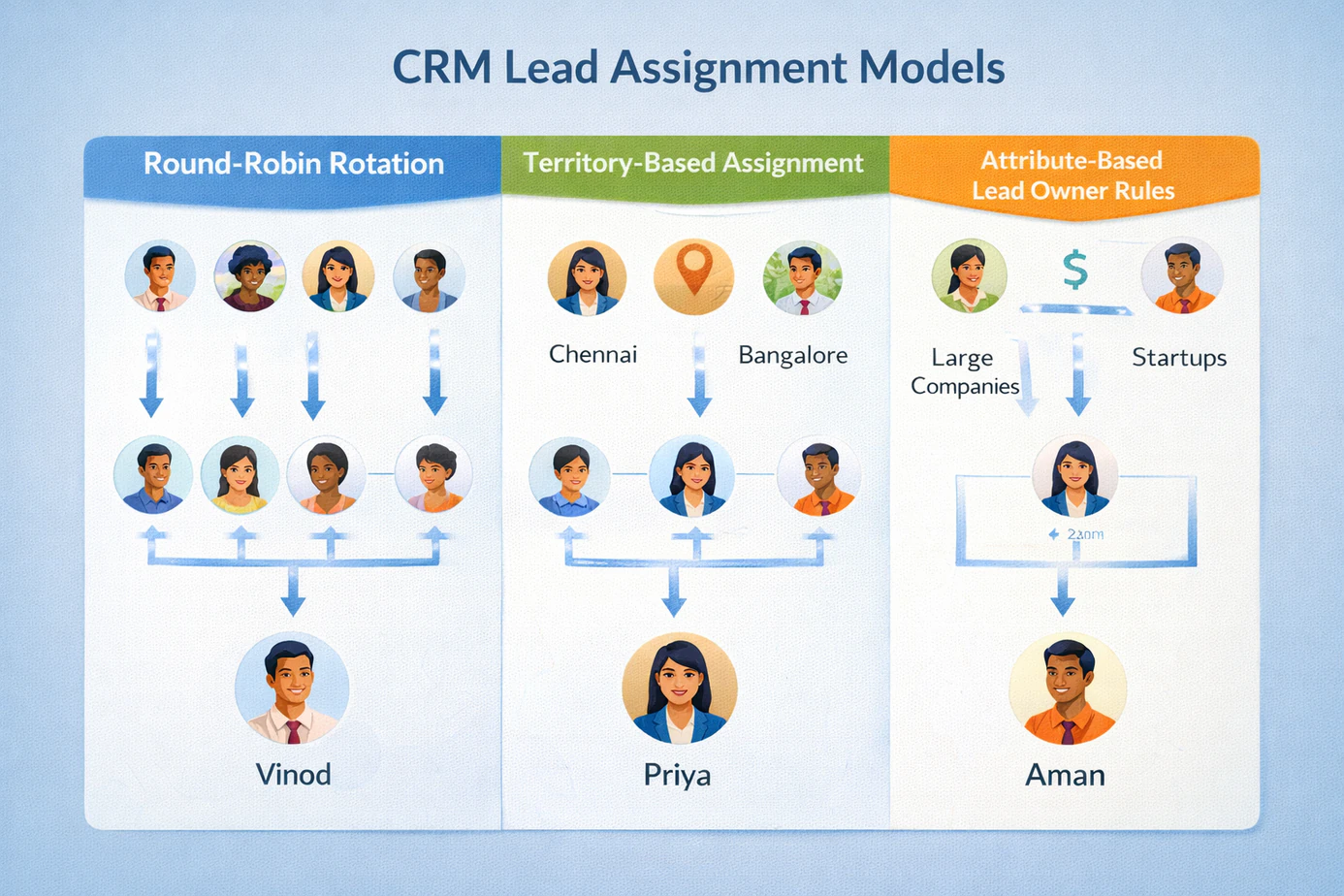
Lead assignment is where most CRM implementations either succeed or fail. Chennai sales teams usually rely on one of three models, each with its own strengths and the right context for using it.
Round-Robin Assignment
In a round-robin model, leads are assigned to reps in a rotating sequence. Rep A gets lead 1, Rep B gets lead 2, Rep C gets lead 3, then the cycle repeats. This works well when your leads are relatively similar in value, geography, and product interest, and when your reps have comparable skill and capacity. It distributes workload fairly and removes the feeling of favoritism in lead allocation. The challenge is that pure round-robin does not account for current capacity. Good CRM software should support capacity-aware round-robin that skips reps who are already above a defined active-lead threshold.
Territory Assignment
In a territory model, leads are assigned based on an attribute such as geography, industry, company size, or product interest. All North Chennai leads go to one rep. Manufacturing leads go to another. Product-line enquiries go to specialists. Territory assignment works well when in-person access matters, when reps have specialized knowledge, or when your product range is broad enough that focus improves performance. The challenge is balance. One territory may produce far more leads than another, so the territory map needs regular review.
Lead Owner Rules Based on Lead Attributes
The most flexible approach uses configurable lead-owner rules that combine multiple factors. For example, high-value Google Ads leads may go to senior reps, lower-ticket JustDial leads may go to junior reps using round-robin, and certain pincodes may always route to a territory owner. This model takes more work upfront, but it produces the most intelligent and scalable distribution for complex teams. Strong CRM lead management systems in Chennai support this type of conditional assignment logic natively.
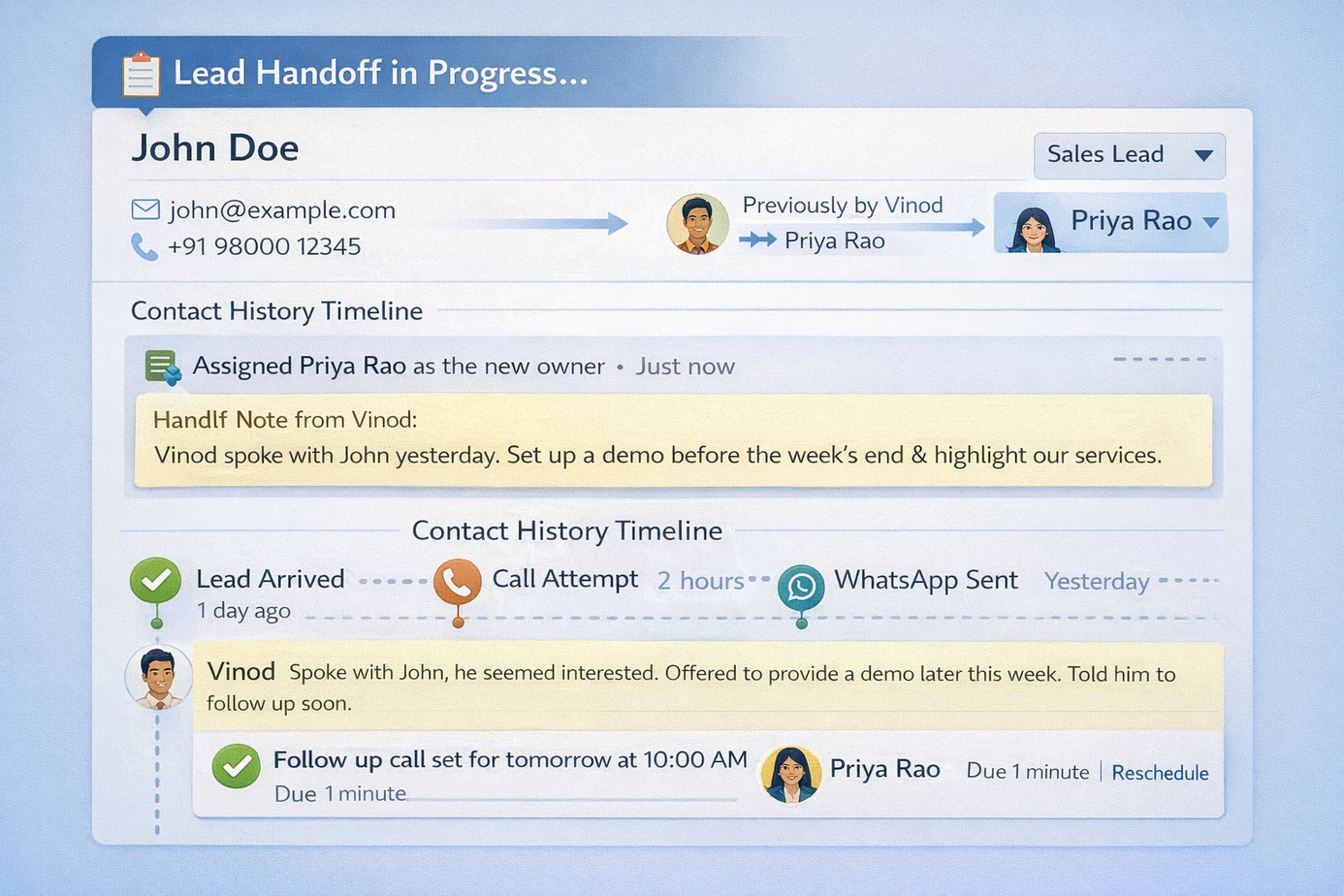
The Contact History Timeline: Why It Matters More Than Any Other CRM Feature
If you asked most sales managers to name the single most valuable feature in a CRM, many would say pipeline view or reporting. But there is a strong argument that the contact history timeline, the complete chronological record of every interaction with a lead, is even more valuable.
Every other feature in a CRM tells you the current state of a lead. The contact history tells you the story of how it got there. When a rep opens a lead record and sees that the prospect was called six times over two weeks, responded well to an email about a specific feature, attended a demo, asked about integration with existing software, and then went quiet for 10 days, they have everything needed for an informed next conversation.
This is also what makes handoffs work. When a lead transitions from one rep to another because of territory change, role change, or the need for a more senior closer, the incoming rep can review the full history and continue exactly where the previous rep stopped. For Chennai sales teams with any level of rep turnover, the contact history timeline is what preserves institutional knowledge in the system instead of in individual people's heads.
The Sales Handoff Process: Getting It Right Inside Your CRM
The sales handoff is one of the highest-risk moments in any deal. Whether it is a handoff from marketing to sales, from one rep to another, or from sales to account management after closure, poorly executed handoffs are where good leads go to die. A well-configured CRM makes the handoff process structured and reliable.
- Define handoff criteria clearly. A handoff should happen only when specific criteria are met, not when it simply feels right.
- Require a handoff note at every transfer. The note should capture what was discussed, what was promised, the prospect's key concern, and the recommended next step.
- Notify the incoming owner immediately on phone and email with the lead details and handoff note.
- Set a mandatory first-touch deadline for the incoming rep so the new owner follows up within the same day or within a fixed SLA window.
- Log the ownership transfer, reason, and handoff note inside the contact history timeline so later reviewers understand why the lead changed hands.
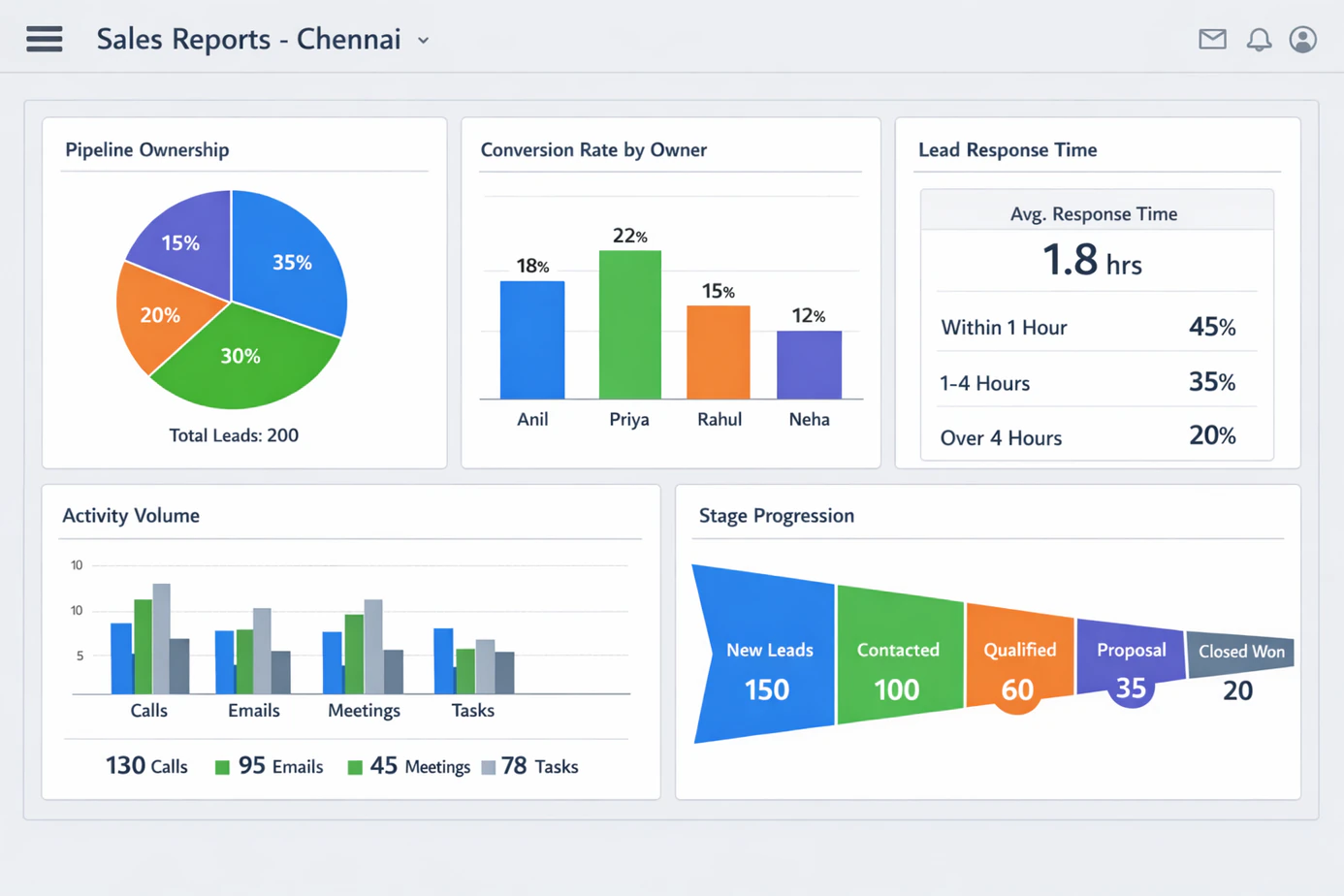
CRM Reports for Managers: The Five You Should Run Every Week
A CRM is only as valuable as the decisions it enables. For sales managers in Chennai, these are the five reports that should be reviewed every week without exception.
Pipeline Ownership Report
This report shows the distribution of active leads across the team by owner, how many leads each rep has at each pipeline stage, the total value of their pipeline, and how it has changed from last week. Use it to identify reps who are overloaded, reps who are underloaded, and assignments that need rebalancing.
Conversion Rate by Owner
This report compares each rep's stage-by-stage conversion rates. If one rep converts qualified leads to wins at 35 percent and another converts at 12 percent, there is a coaching opportunity hidden in that gap. The data opens the conversation. The manager's job is to identify what behaviour, skill, or workflow difference explains the gap.
Lead Response Time by Owner
How quickly is each rep making first contact after a lead is assigned? This is effectively a speed test for your sales process. Faster first response time usually correlates strongly with better conversion outcomes, especially on inbound leads. A rep averaging 12-minute first touches will often outperform a rep averaging 4 hours on otherwise similar lead types.
CRM Activity Report
This report shows the weekly volume of logged calls, emails, meetings, and messages by rep. It is not a perfect measure of quality, but it is a strong early warning signal. A rep who logged only a handful of activities across a large active pipeline is almost certainly neglecting follow-up. A rep with consistent activity volume is more likely to be managing their pipeline actively.
Stage Progression Report
This report shows how quickly leads move from one stage to the next and where they are getting stuck. A lead sitting in Proposal Sent for three weeks without movement is either misclassified or needs intervention. A lead moving from Contacted to Won unusually fast is worth understanding too. Both slow deals and fast deals teach you something useful about process quality.
Setting Up Role-Based Access in Your CRM: A Practical Guide for Chennai Teams
Role-based access is one of those settings that gets configured once and then rarely revisited, but getting it right from the start prevents serious problems later. Here is a practical approach for a typical Chennai sales operation.
- Map your team roles before touching the software. List every role and the exact data that role needs.
- Build access levels around job function, not seniority alone. A senior rep does not automatically need manager-level reports.
- Restrict edit permissions more tightly than view permissions so coordination stays easy while accidental data changes stay limited.
- Audit access quarterly. Teams change, territories change, and permissions drift unless someone reviews them deliberately.
Choosing the Best CRM Software for Lead Management in Chennai
When evaluating the best CRM software for lead management in Chennai, the features that matter most for the capture-assign-close workflow are specific and worth testing explicitly during demos.
Test lead capture integrations with Indian platforms: Ask the vendor to demonstrate a live lead coming in from JustDial or IndiaMart and appearing in the CRM in real time. If this requires manual import, a workaround, or a third-party connector, factor that operational friction into your evaluation.
Test the assignment logic with your actual scenarios: Do not settle for the vendor's cleanest demo. Give them your real assignment rules, territory-based with round-robin fallback, capacity-aware routing, escalation for high-value leads, and ask them to configure it live. The gap between we support that and watch us do it right now is often significant.
Request a demo of the contact history timeline for an old lead: Ask to see a lead that has had multiple owners, logged calls, sent emails, and weeks of notes. The timeline view of a messy, real-world lead tells you more about daily usability than a polished new-demo record ever will.
Evaluate the mobile experience independently: Get hands-on with the mobile app before deciding. Log a lead, move a stage, add a note, and set a follow-up reminder from a phone. If those tasks take too many taps or too much navigation, field adoption will suffer.
Ask about Indian-specific configurations: Check INR support, Indian phone-number handling for duplicate detection, timezone behaviour, and whether support works in IST with practical response times during Chennai business hours. These details affect daily usability more than brochures admit.
How CRM Lead Management Connects to Your Full Sales Ecosystem
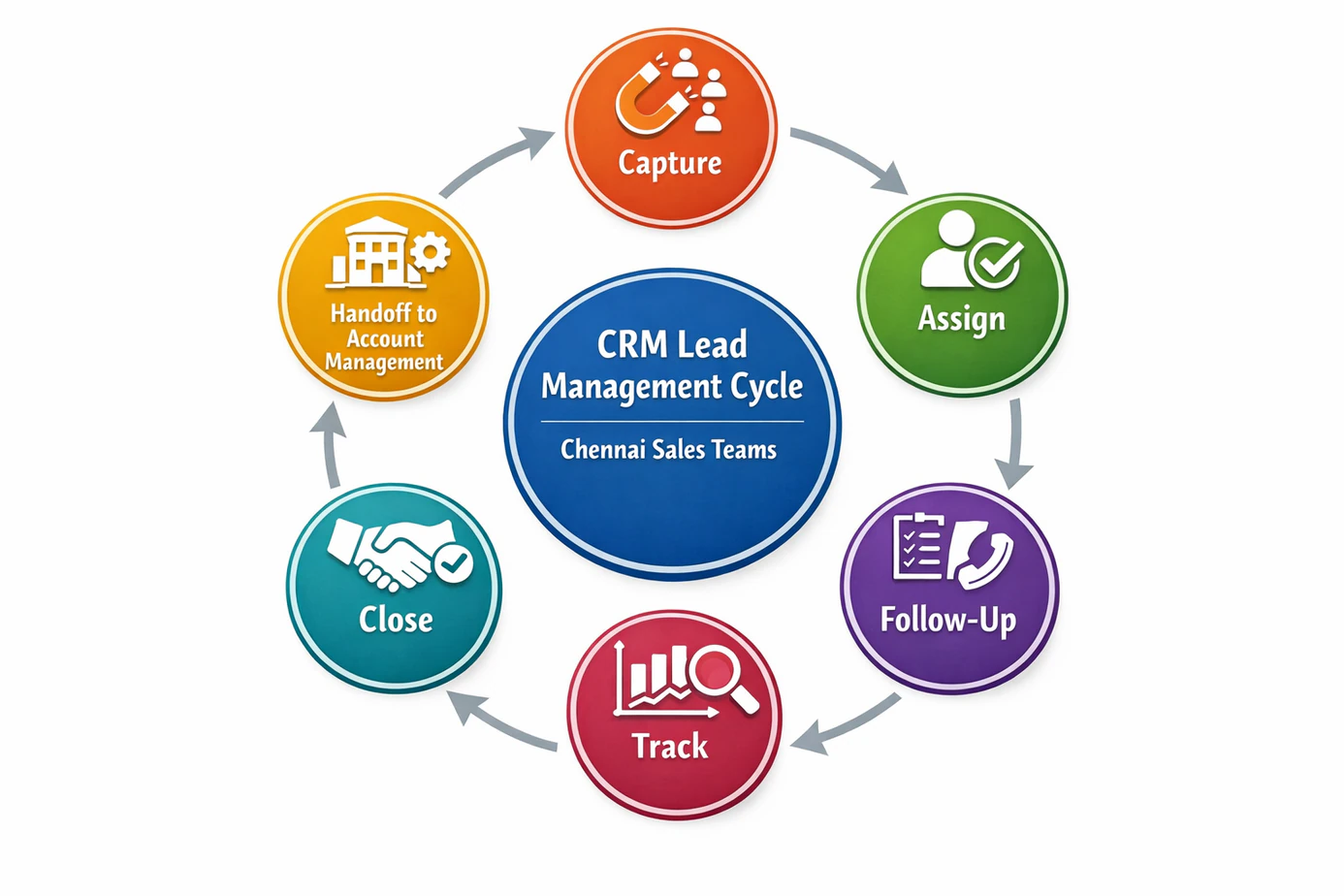
A CRM does not operate in isolation. It is the connective tissue that ties lead generation, follow-up, and tracking into a single coherent system. At the entry point, your CRM receives leads from all capture channels and assigns them using the logic you configured. The broader framework for this is covered in our pillar guide on how to choose a lead management system in Chennai.
Once a lead has an owner, it needs consistent follow-up at the right time. The reminders, WhatsApp templates, email sequences, and SLA rules inside lead follow up software in Chennai are what keep owned leads moving instead of stalling. And as leads progress, managers need daily visibility into stage movement, ageing, and conversion, which is where lead tracking software in Chennai becomes essential.
When all three functions, ownership through CRM lead management, follow-up discipline, and pipeline tracking, operate from one platform, the result is a sales system that is coherent, measurable, and scalable. That is what well-implemented CRM lead management looks like in practice.
Conclusion
A lead is not truly managed until it has a clear owner, a visible history, a defined next action, and a structured path to closure. That is the difference between using a CRM as storage and using it as a real operating system for sales.
For Chennai sales teams, the practical path is clear: capture every lead automatically, assign it with logic, control access by role, document every handoff, and review the handful of manager reports that actually change behaviour. When those pieces work together, accountability stops being a slogan and becomes part of the workflow.
Ready to build a sales system where every lead has a clear owner, every handoff is documented, and every manager has the reports they need to lead effectively? Explore CRM lead management software in Chennai built for teams that are serious about closing more deals with less chaos.