
Overview
Open Configuration > Preferences. It has two tabs: Preferences and Voucher Config. On each, click Edit to make changes — the options are greyed out until you do.
Transaction Preferences
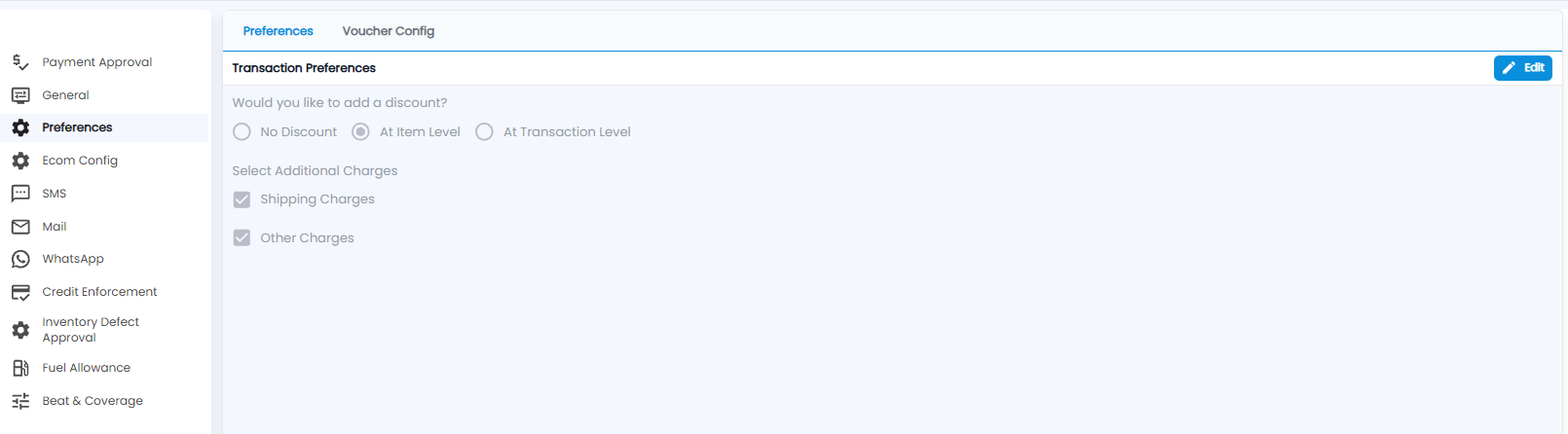
- Would you like to add a discount? — No Discount, At Item Level (a discount on each line), or At Transaction Level (one discount on the whole document)
- Select Additional Charges — tick Shipping Charges and / or Other Charges to be able to add them to transactions
Voucher Config

| Setting | What it does |
|---|---|
| Roundoff on Payment | Rounds the payment amount to the nearest ₹1 when a receipt or payment voucher is posted |
| Discount on Payments | Allows a discount when recording a payment or receipt |
| Courier Charges | Allows courier charges to be added when recording a payment or receipt |