
Overview
Every day, each salesman opens My Beat and sees a list of shops to visit. Beat & Coverage sets the rules that build that list. Open Configuration > Beat & Coverage.
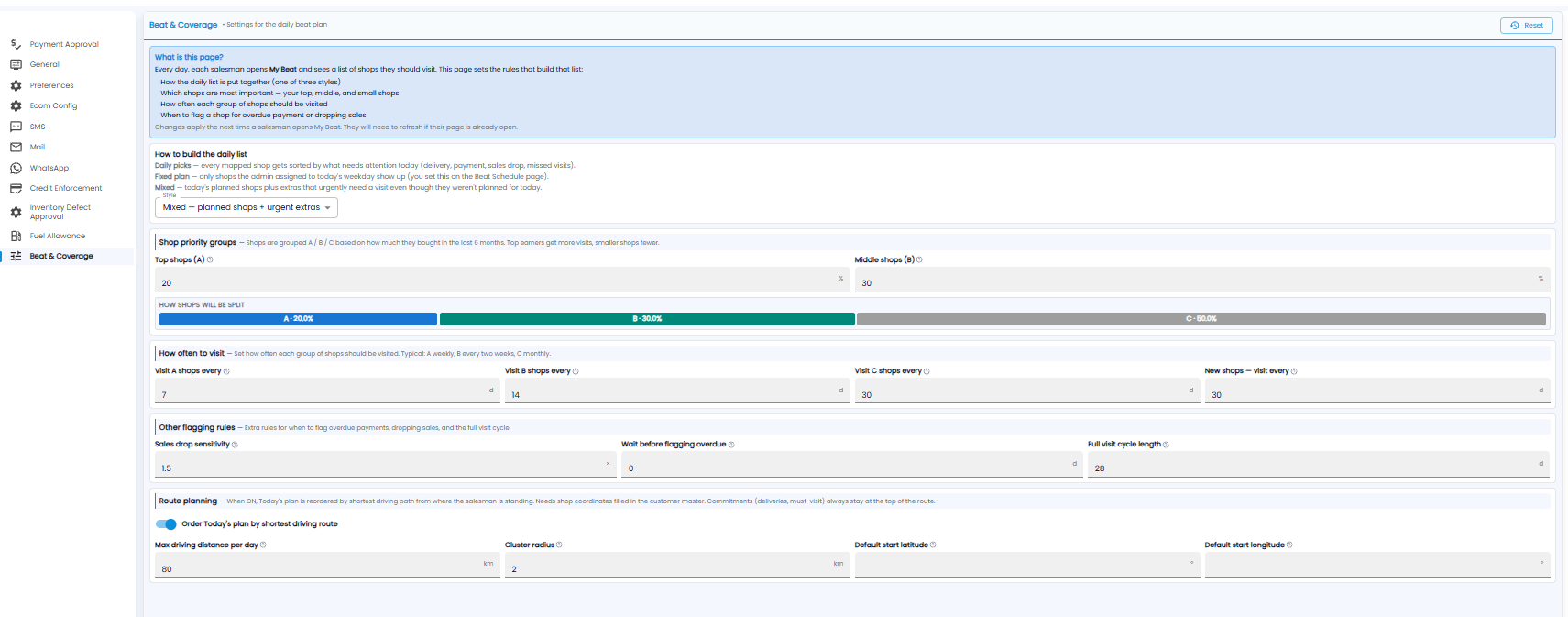
Changes apply the next time a salesman opens My Beat — if it is already open, they need to refresh. Reset at the top right puts the settings back to their defaults.
How to Build the Daily List
| Style | What the salesman sees |
|---|---|
| Daily picks | Every mapped shop, sorted by what needs attention today — delivery, payment, sales drop, missed visits |
| Fixed plan | Only the shops assigned to today's weekday on the Beat Schedule page |
| Mixed | Today's planned shops, plus extras that urgently need a visit |
Shop Priority Groups
Shops are grouped into A, B, and C by how much they bought in the last 6 months. Set the share of Top shops (A) and Middle shops (B); the rest are C. The bar below shows the split — for example A 20%, B 30%, C 50%.
How Often to Visit
Set the days between visits for A, B, and C shops, and for New shops. Typical: A weekly (7 days), B every two weeks (14), C monthly (30).
Other Flagging Rules
- Sales drop sensitivity — how sharp a drop in a shop's sales must be before it is flagged
- Wait before flagging overdue — days after a payment falls due before the shop is flagged
- Full visit cycle length — the days in which every shop should be visited once
Route Planning
Turn on Order Today's plan by shortest driving route to sort the plan by the shortest drive from where the salesman is standing. Shops need their coordinates filled in on the customer record. Deliveries and must-visit shops always stay at the top.
- Max driving distance per day (km)
- Cluster radius (km) — shops within this distance are grouped together
- Default start latitude / longitude — the starting point when the salesman's location is not known