
Overview
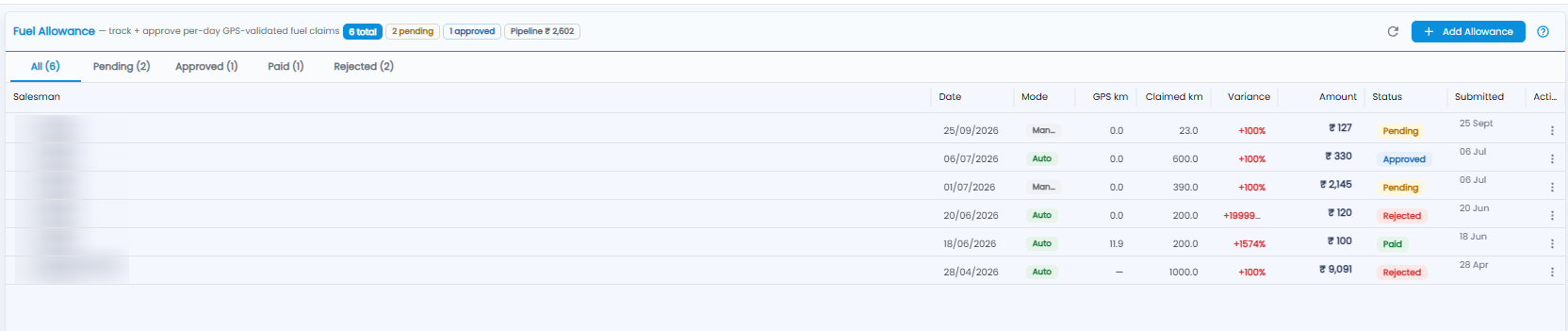
Fuel Allowance is where you track and approve salesmen's per-day fuel claims. Each claim is checked against the distance recorded by GPS. Open Sales Man > Fuel Allowance.
Summary and Tabs
The badges next to the title show the total number of claims, how many are pending and approved, and the Pipeline — the amount still to be paid. Filter the list with the tabs: All, Pending, Approved, Paid, and Rejected.
The Claims List
| Column | What it shows |
|---|---|
| Salesman | Who claimed |
| Date | The day the claim is for |
| Mode | Auto (worked out from GPS) or Manual (entered by hand) |
| GPS km / Claimed km | The distance recorded by GPS, and the distance claimed |
| Variance | How far the claimed distance is above the GPS distance, in red |
| Amount | The allowance claimed |
| Status | Pending, Approved, Paid, or Rejected |
| Submitted | When the claim was made |
| Actions | ⋮ gives the actions for the claim |
Click + Add Allowance to add a claim, the refresh icon to reload, and ? for help.
Important: Look at the Variance before you approve — a large difference between claimed km and GPS km is worth a question.