
Overview
Payables shows everything you still owe your vendors, bill by bill, and how overdue it is. Open Purchases > Payables.
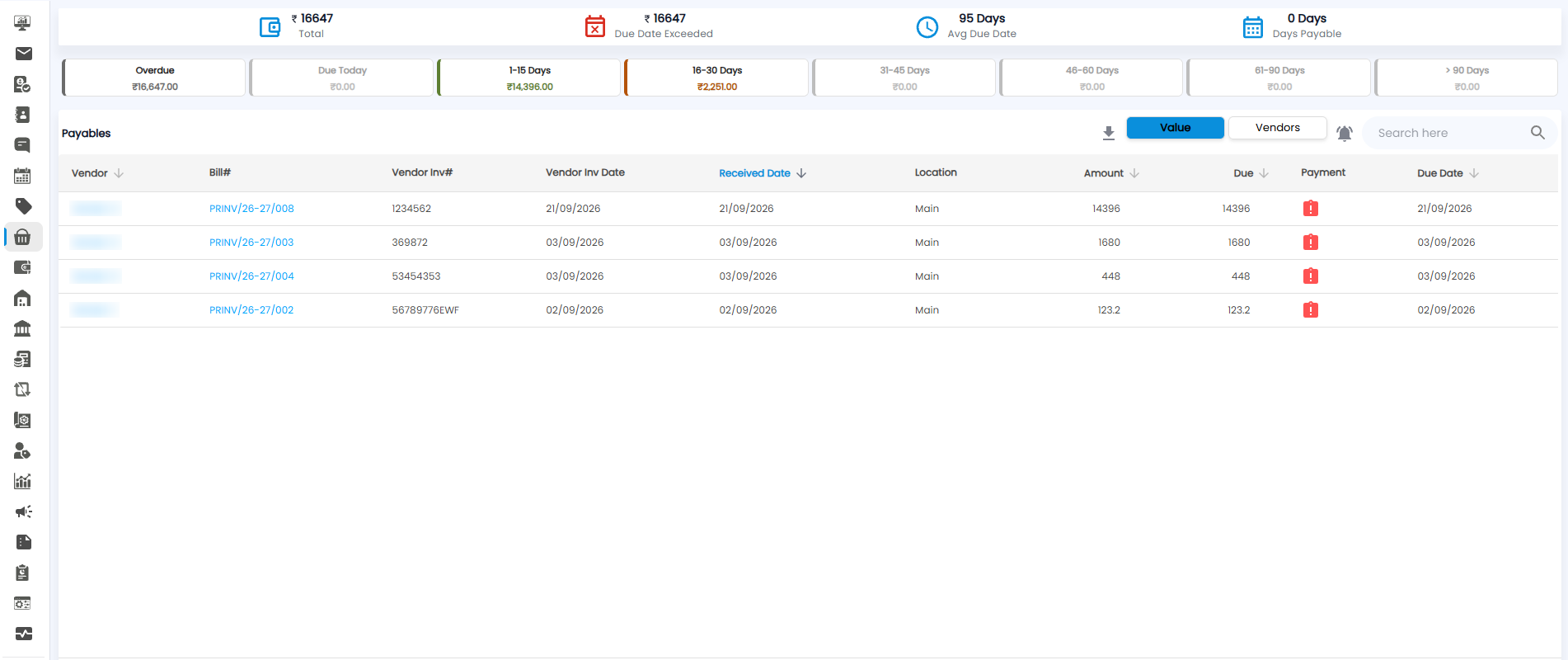
Summary Figures
| Figure | What it shows |
|---|---|
| Total | Everything you owe vendors |
| Due Date Exceeded | The amount past its due date |
| Avg Due Date | How many days bills are due, on average |
| Days Payable | How long, on average, you take to pay |
Ageing Buckets
The buckets split what you owe by how long it has been due: Overdue, Due Today, 1–15 Days, 16–30 Days, 31–45 Days, 46–60 Days, 61–90 Days, and > 90 Days.
The Payables Table
| Column | What it shows |
|---|---|
| Vendor / Bill# | Who you owe, and your bill number |
| Vendor Inv# / Vendor Inv Date | The vendor's invoice number and date |
| Received Date / Location | When and where the goods arrived |
| Amount / Due | The bill value, and how much is still unpaid |
| Payment | Record a payment against the bill |
| Due Date | When it is due |
Click the arrows next to a column heading to sort by it. In the toolbar, switch between Value (bill by bill) and Vendors (grouped by vendor), download the list, use the bell icon for reminders, and search.
Tip: Sort by Due Date and pay the oldest bills first to protect your relationship with your vendors.