Salary Calculation Guide: CTC, Gross, Net Pay Examples & Payslip Formats.
15 min | By Lokesh A
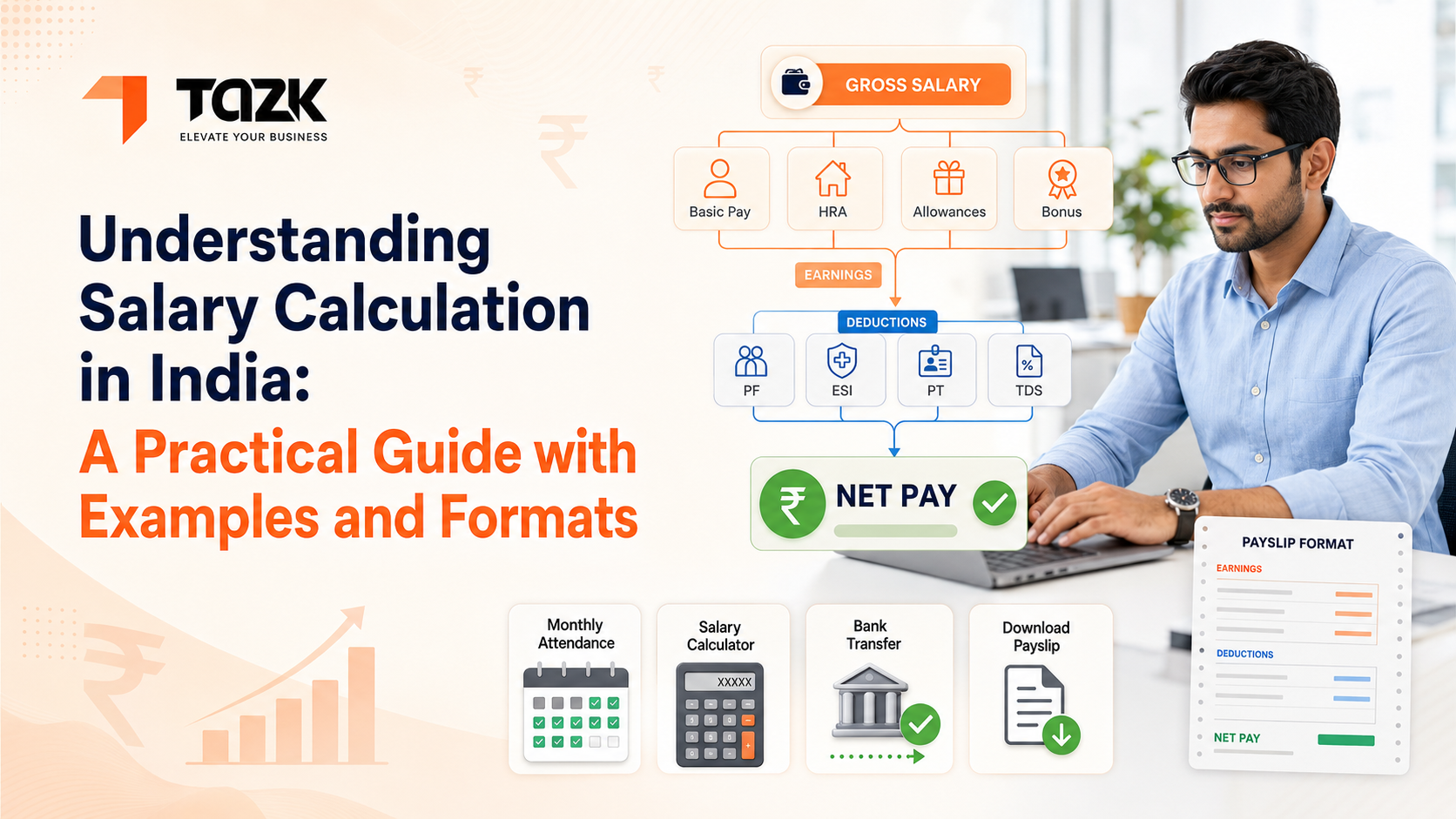
Table Of Contents
Social Media




Last month, I helped my cousin understand his first job offer. The company said they were offering him ₹6 lakhs CTC. He called me excited, thinking he’d get ₹50,000 every month.
I had to break it to him gently—his actual take-home would be around ₹38,000.
He was confused: “Where does the rest go?”
And honestly, that's a question most people have. Whether you're an employee trying to understand your payslip or an HR manager setting up salary structures, the gap between what sounds simple ('we pay X amount') and what actually happens is surprisingly wide.
Let me walk you through exactly how salary calculations work in India, with real examples and formats you can actually use.
The Three Numbers That Matter: CTC, Gross, and Net
Before we dive into calculations, let's get these terms straight because people use them interchangeably—and they're very different.
Cost to Company (CTC)
This is everything your employer spends on you annually—salary, benefits, reimbursements, employer PF contributions, and more. Basically, it’s the total investment the company makes in you.
Gross Salary
Gross salary is what you're paid before deductions. This includes your basic pay, and bonuses but excludes employer contributions like PF and ESI.
Net Salary (Take-Home Pay)
This is what hits your bank account after all mandatory deductions—PF, ESI, Professional Tax, TDS, and other recoveries.
Here’s an easy way to remember it: CTC is the company’s budget. Gross is your salary structure. Net is what you can actually spend.
Breaking Down a Basic Salary Structure
Let's start with the most common salary structure in Indian companies—a fixed monthly salary.
Example 1: Simple Fixed Salary (₹30,000 per month)
- Basic Salary: ₹15,000 (typically 40–50% of gross)
- HRA: ₹7,500 (usually 50% of basic)
- Conveyance Allowance: ₹1,600
- Special Allowance: ₹5,900
- Gross Monthly Salary: ₹30,000
Now the deductions:
- Employee PF (12% of basic): ₹1,800
- Professional Tax: ₹200 (varies by state)
- TDS: ₹0 (if annual income is below taxable limit)
Net Take-Home: ₹27,800. The employer also contributes ₹1,800 to PF. So the company’s cost becomes ₹31,800 monthly. Annual CTC: ₹3,81,600—while the employee receives only ₹3,33,600 in hand.
The employer also contributes ₹1,800 to PF. So the company’s cost becomes ₹31,800 monthly. Annual CTC: ₹3,81,600—while the employee receives only ₹3,33,600 in hand.
See the difference? This is why CTC figures always sound better than take-home pay.
Why Salary Components Are Structured This Way
Why not simply say “₹30,000 salary”? Why split it into basic, HRA, and allowances?
Three reasons: tax benefits, statutory calculations, and flexibility.
Tax Benefits
HRA is partially tax-exempt. Conveyance and certain allowances may reduce taxable income.
Statutory Calculations
PF and ESI are calculated only on basic salary (plus DA), not on gross. This is why companies often keep the basic salary at 40–50% of the gross.
Flexibility
Different components can be adjusted based on employee needs. Someone not paying rent might prefer lower HRA and higher special allowance.
When you're using attendance software in India, these components need to be configured correctly because the system calculates everything based on this structure.
Moving to Variable Pay Structures
Example 2: Fixed + Variable Salary
Let's look at a sales executive's salary:
Fixed Component (₹25,000/month)
- Basic: ₹12,500
- HRA: ₹6,250
- Fixed Allowance: ₹6,250
Variable Component
- Sales Incentive: 2% of monthly sales
- Target Achievement Bonus: ₹5,000
In a good month where the executive achieves ₹10 lakhs in sales and meets targets:
- Fixed: ₹25,000
- Sales Incentive: ₹20,000
- Bonus:₹5,000
- Gross for the month: ₹50,000
But in a slower month with ₹3 lakhs in sales and target missed:
- Fixed: ₹25,000
- Sales Incentive: ₹6,000
- Bonus:₹0
- Gross for the month: ₹31,000
Here's where calculation gets tricky—PF is calculated only on the fixed basic salary (₹12,500), not on incentives. But TDS for the year needs to factor in the total annual earnings.
This is exactly why manual salary calculation becomes a nightmare. You're tracking different rules for different components. A good payroll management software handles these variations automatically.
Example 3: Daily Wage Structure
- Daily wage: ₹800
- Days worked in March: 26 days
- Total basic earning: ₹20,800
- Overtime hours: 20 hours at 1.5x rate
- Hourly rate: ₹800 ÷ 8 = ₹100
- Overtime pay: 20 × ₹150 = ₹3,000
- Gross for March: ₹23,800
Gross: ₹23,800. ESI employee contribution(0.75%): ₹179. Net pay: ₹23,621. Since gross is below ₹21,000, ESI applies instead of PF.
Notice ESI applies here instead of PF because the monthly gross is below ₹21,000. These threshold-based rules are why getting compliance right matters so much. You can read more about these specifics in our detailed compliance guide
Understanding Statutory Deductions in Detail
Let's break down exactly what gets deducted and why.
Provident Fund (PF)
PF is mandatory for companies with 20+ employees and calculated at 12% each from employee and employer on basic + dearness allowance, with a ceiling of ₹15,000.
Example:
- If basic salary is ₹18,000, PF calculation uses only ₹15,000 (the ceiling).
- Employee PF: ₹1,800
- Employer PF: ₹1,800
- If basic salary is ₹12,000, there's no ceiling limitation.
- Employee PF: ₹1,440
- Employer PF: ₹1,440
The employee contribution reduces take-home pay. The employer contribution increases CTC but doesn't show up in the employee's salary slip directly—it goes straight to the PF account.
Employee State Insurance (ESI)
ESI applies when gross salary is below ₹21,000 per month.
- Gross salary: ₹18,000
- Employee ESI: ₹135
- Employee ESI: ₹585
ESI applies when gross is below ₹21,000/month.
Employee contribution: 0.75%. Employer contribution: 3.25%.
Once someone crosses ₹21,000 gross for even one month, they exit the ESI scheme and typically come under PF instead. This transition needs careful handling during salary revisions.
Professional Tax (PT)
PT varies by state. Maharashtra, Karnataka, and Tamil Nadu all have different slabs.
Maharashtra example:
- Gross ₹10,000 or less: ₹175/month
- Gross ₹10,001 to ₹25,000: ₹300/month (₹2,850 annually, so ₹300 × 11 months + ₹200 in February)
Karnataka example::
- Gross up to ₹15,000: Nil
- Gross ₹15,001 to ₹20,000: ₹150/month
This is one area where automated payroll processing saves massive headaches. The software knows each state's current rules and applies them correctly.
Tax Deducted at Source (TDS)
TDS is the most complex because it depends on the employee's annual income, chosen tax regime, and declared investments.
Example: Tax Calculation Under Old Regime
- Annual salary: ₹8,00,000
- Standard deduction: ₹50,000
- HRA exemption: ₹1,00,000
- Section 80C investments: ₹1,50,000
- Taxable income: ₹5,00,000
Under the old tax regime:
- First ₹2.5 lakhs: Nil
- ₹2.5 to ₹5 lakhs: 5% = ₹12,500
- 4% Health & Education Cess: ₹500
- Total annual TDS: ₹13,000
- Monthly TDS: ₹1,083
This changes if the employee chooses the new tax regime, gets a salary hike mid-year, or changes their investment declarations. The calculation needs to be redone each change.
For detailed information on compliance deadlines and filing procedures for all these statutory components, check out our comprehensive compliance guide with checklists.
Handling Special Scenarios
Real-world payroll involves situations that don't fit neat formulas
Mid-Month Joining or Exit
When someone joins or leaves mid-month, you need a pro-rata salary calculation.
Example: Pro-Rata Salary, PF, and ESI Calculation
- Monthly salary: ₹45,000
- Calendar days in month: 30
- Days worked: 18 (joined on the 13th)
Calculation:
- ₹45,000 ÷ 30 × 18 = ₹27,000
PF and ESI are calculated on **pro-rata basic salary**, not the full monthly basic.
- Monthly basic: ₹20,000
- Pro-rata basic: ₹20,000 ÷ 30 × 18 = ₹12,000
- Employee PF: ₹12,000 × 12% = ₹1,440
Salary is calculated on a pro-rata basis. PF and ESI are also prorated based on worked days.
Loss of Pay (LOP) Calculation
When employees take unpaid leave:
Salary structure:
- Gross monthly: ₹40,000
- LOP days: 3
Method 1 (Calendar days):
- ₹40,000 ÷ 30 × 3 = ₹4,000 deduction
Method 2 (Working days):
- If there are 22 working days in the month:
- ₹40,000 ÷ 22 × 3 = ₹5,455 deduction
Companies must define their LOP policy clearly—including which method is used and whether statutory deductions reduce proportionally.
Arrears and Backdated Salary Revisions
When salary increases are backdated:
- Old salary: ₹35,000 from January–March
- Revised salary: ₹40,000 effective from January
- Arrears due: (₹40,000 - ₹35,000) × 3 = ₹15,000
This arrear is added to the current month's salary but introduces a TDS complication. The annual income increases, so TDS for the remaining months must be recalculated to recover the correct annual tax.
Handling these scenarios manually is error-prone. In automated systems with biometric or mobile attendance integration, these calculations flow automatically from attendance data into payroll.
The Payslip: What It Should Contain
A proper payslip is both a legal requirement and a communication tool. Here's what needs to be included:
Standard Payslip Format
Header Section
- Company name and logo
- Employee ID and designation
- Bank account number
- PAN and UAN
- Pay period
Earnings Section
- Basic salary
- HRA
- Conveyance
- Special allowance
- Incentives
- Arrears
- Gross earnings
Deductions Section
- PF
- ESI
- Professional Tax
- TDS
- Loan recovery
- Total deductions
Summary Section
- Gross earnings
- Total deductions
- Net pay
Additional Information:
- Leave balance (casual, sick, earned leave)
- Days present/absent/on leave
- LOP days (if any)

Digital vs. Physical Payslips
Most modern companies provide digital payslips through employee self-service portals. This is better for several reasons:
- Employees can download payslips anytime without waiting for HR.
- Historical payslips are instantly accessible—useful for loan applications.
- It's environmentally friendly and reduces printing costs.
- Password protection makes it more secure than physical payslips lying around.
When implementing HR and payroll software, ensure employees can easily access their payslips through a mobile app or web portal. This one feature dramatically reduces HR queries.
Common Calculation Mistakes to Avoid
Even experienced HR teams often make the following errors:
Wrong PF Ceiling
Calculating PF on the entire basic salary even when it exceeds ₹15,000. The ceiling must be applied.
ESI on Wrong Components
Including reimbursements or one-time bonuses in ESI calculation when they shouldn't be counted.
PT Slab Confusion
Using the wrong state's PT rates for employees working in different locations.
TDS Projection Errors
Not recalculating TDS when salary changes mid-year, resulting in under or over-deduction.
LOP on Fixed vs. Variable Components
Deducting LOP from components that should remain unchanged, such as fixed transport allowance.
Rounding Errors
Not following consistent rounding rules, causing small discrepancies that add up over time.
When implementing Good payroll software eliminates these errors by embedding the rules directly into the calculation engine. You configure the rules once, and every salary is calculated consistently.
Moving from Manual to Automated Calculations
If you're still using Excel sheets, here's what changes when you shift to automated systems:
Setup Phase
You define your salary structures, components, and calculation rules in the system. This takes some initial effort, but it's done only once.
Monthly Processing
Instead of entering formulas and manually updating attendance, the system pulls attendance automatically and finishes all calculations in minutes.
Verification
You review summary reports instead of checking individual employee calculations. The system flags anomalies like unexpected spikes in earnings.
Distribution
Payslips are generated automatically, shared with employees, and bank transfer files are created instantly.
What once took 2–3 days now takes 2–3 hours—with far better accuracy and consistency.
For information on how attendance data flows automatically into these calculations, read our guide on biometric and mobile attendance setup.
Making the Salary Structure Work for Your Business
As a final thought, remember that salary structure isn't just about compliance and calculations. It's a strategic tool.Your structure should align with your business model. A startup might offer more stock options and less fixed pay. A traditional manufacturer might focus on stable fixed salaries with production bonuses. A services company might tie more compensation to billable hours or project completion.
It should grow with your team. As employees move into senior roles, their structure evolves: more basic pay, car allowance, higher variable pay, and role-based benefits.
The best payroll software lets you create multiple salary lets you create multiple salary templates and apply them to different employee groups. You're not locked into one structure for everyone.
And ultimately, whatever structure you choose should be transparent and understood by employees. When people know exactly how their pay is calculated, what components they receive, and what deductions apply, trust increases. Queries decrease. Everyone wins.
Getting Your Calculations Right Matters
Whether you're processing payroll for 10 people or 1,000, accuracy isn't optional. Employees trust you to pay them correctly and on time. The government expects statutory compliance. Your business needs accurate labor cost data for planning.
The examples and formats we've covered here give you a foundation. But real-world scenarios will throw curves—salary revisions, notice period pay, full and final settlements, bonus calculations, and more.
The good news? You don't have to figure out every edge case manually. Modern payroll systems have these scenarios built in. You just need to understand the basics well enough to configure the system correctly and verify that results make sense.
Start with getting your salary structure right. Make sure every component is defined clearly and serves a purpose. Then build your calculation workflows around that structure. And finally, choose tools that automate the repetitive parts while keeping you in control of the decisions that matter.
For complete guidance on implementing an integrated attendance and payroll system, including compliance automation and employee self-service, visit our comprehensive guide to attendance and payroll software.