
Overview
The Calendar puts your money dates on a monthly calendar, so you can see at a glance what is due and when. Click Calendar in the sidebar to open it. The left panel has five views:
| View | What it shows |
|---|---|
| Payables | Payments you owe your vendors (this article) |
| Receivables | Payments your customers owe you |
| Manual Reminders | Reminders you add yourself |
| Company Loan Dues | Repayments due on your company loans |
| Report Schedule | Reports scheduled to run |
The Payables View
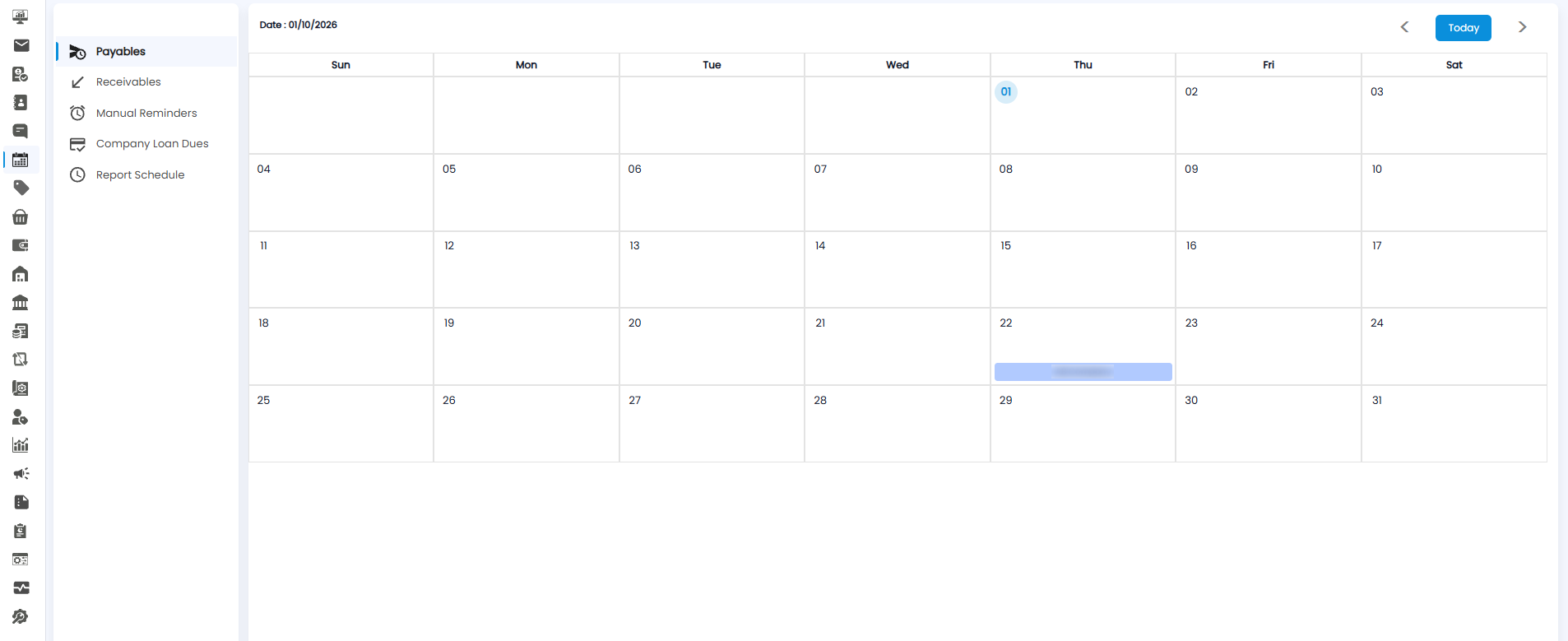
Payables opens first. Each payment due to a vendor appears as a blue bar on its due date, showing the vendor's name — for example AB Company on the 22nd.
Using the Calendar
All five views work the same way:
- Date — the top left shows the date you are viewing, for example Date : 01/10/2026.
- < and > — move to the previous or next month.
- Today — jump back to the current month. Today's date is circled in blue.
- Days — the calendar runs Sunday to Saturday, one row per week.
- +1 More — when a day has more entries than fit, click it to see the rest.
Tip: Check Payables at the start of each week so you know which vendor payments are coming up and can keep enough in the bank.