
Overview
A journal entry moves amounts between ledgers without any cash or bank changing hands — for example correcting an entry posted to the wrong ledger, or booking an adjustment at month end. Open Accounts > Journal Entry. The page is titled Journals.

The Journals List
| Column | What it shows |
|---|---|
| Transaction Date / Entry Date | The date the entry is for, and the date it was made |
| Journal Number | For example JV/26-27/0001 |
| Ledger Name | The ledger affected, for example Accounts Receivable. The name links to the ledger |
| Notes | The note on the entry |
| Debit / Credit | The amount on each side |
Use + to add an entry, the filter icon to narrow the list, Search here to find one, and ⋮ for more options.
Recording a Journal Entry
Click +. The form opens with the next number, for example New Journal - JV/26-27/0002, and the Transaction Date at the top right.
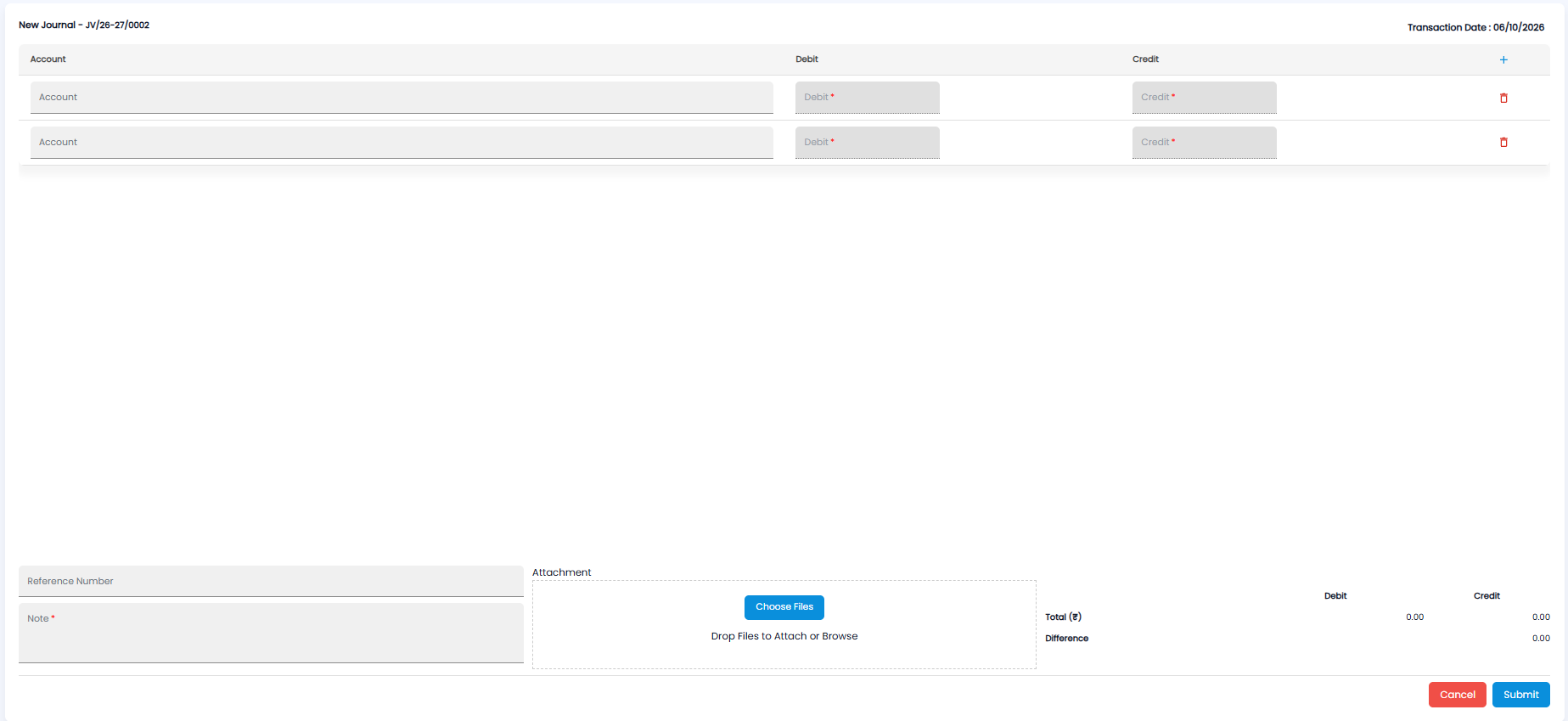
- On each row, pick the Account (ledger) and enter the amount under Debit or Credit. The form starts with two rows; click + in the heading to add more, and the red bin to remove one
- Add a Reference Number if there is one, and a Note* saying why the entry is being made
- Attach supporting papers under Attachment — click Choose Files, or drop files on the box
- Check the totals at the bottom right: Total (₹) for Debit and Credit, and the Difference between them
- Click Submit, or Cancel to leave without saving
Important: Total debits must equal total credits. Make sure the Difference is 0.00 before you submit.
Note: Journal entries are counted as Journal Adjustments on Payments > Analytics — book entries where no cash moved.