
Overview
The Chart of Accounts shows every ledger in your books arranged in a tree, by type and group, with a total at each level. Open Accounts > Chart of Accounts.
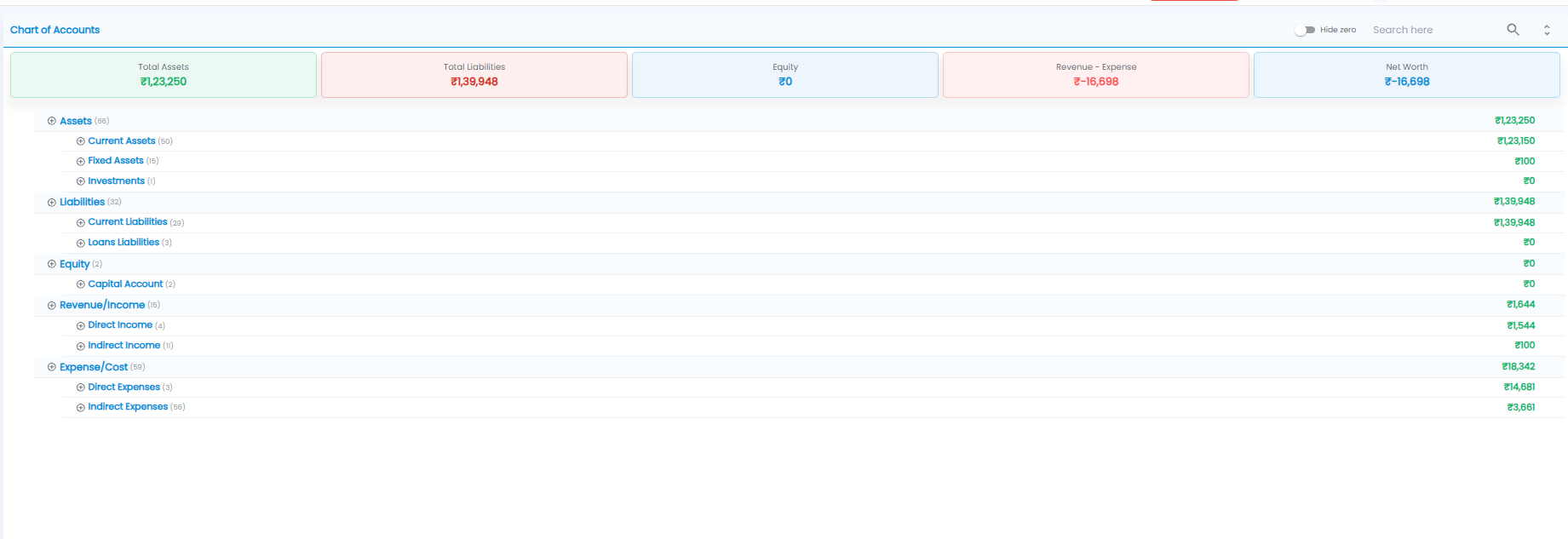
Summary Tiles
| Tile | What it shows |
|---|---|
| Total Assets | Everything you own or are owed |
| Total Liabilities | Everything you owe |
| Equity | The owners' capital |
| Revenue - Expense | Income minus expenses — your profit, or a loss if it is negative |
| Net Worth | Total Assets minus Total Liabilities |
The Tree
The tree has five account types, each split into groups. The number in brackets is how many ledgers are inside, and the amount on the right is the total.
| Type | Groups |
|---|---|
| Assets | Current Assets, Fixed Assets, Investments |
| Liabilities | Current Liabilities, Loans Liabilities |
| Equity | Capital Account |
| Revenue/Income | Direct Income, Indirect Income |
| Expense/Cost | Direct Expenses, Indirect Expenses |
- Click ⊕ next to a type or group to open it and see what is inside, down to each ledger
- The arrows icon at the top right opens or closes the whole tree at once
- Turn on Hide zero to hide ledgers and groups with no balance
- Use Search here to find a ledger
Tip: Turn on Hide zero to see only the accounts that actually carry a balance — it makes the tree much shorter.