
Overview
GST Returns takes you through filing your GST return month by month, and keeps track of what you have declared and paid. Open Accounts > GST Returns. The page is titled GST Filing.
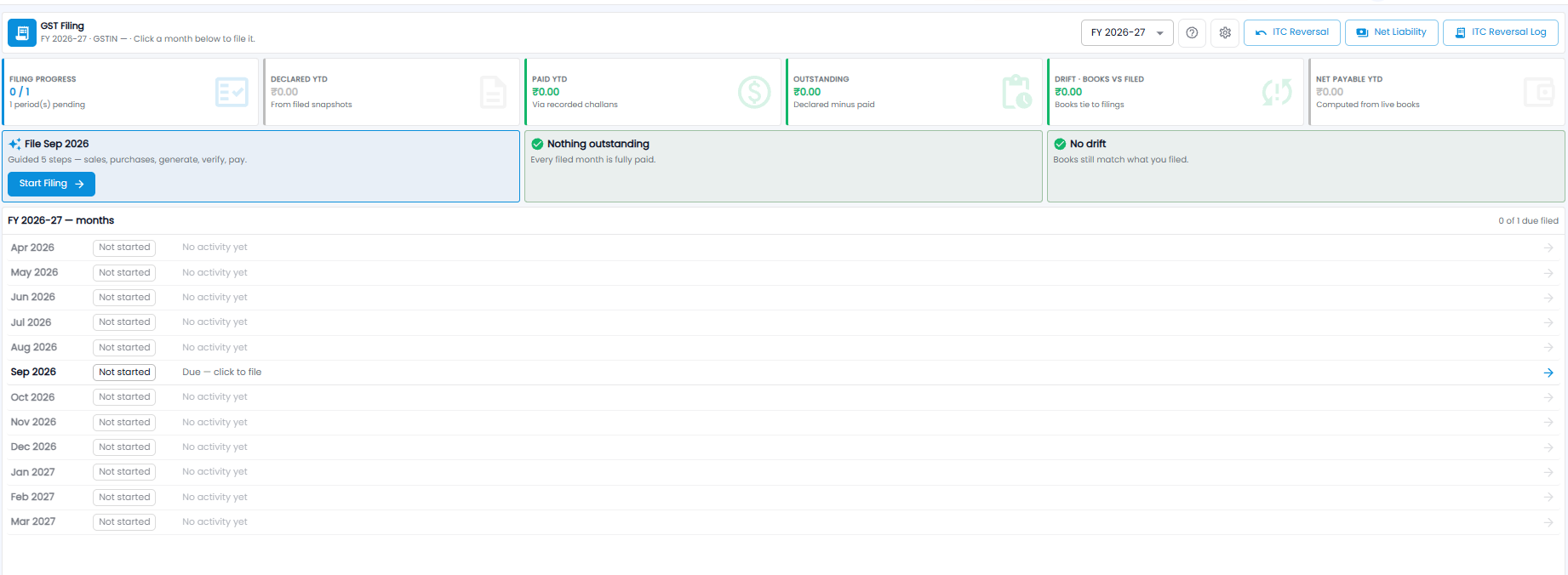
The line under the title shows the financial year and your company GSTIN. Click a month in the list to file it.
The Toolbar
| Item | What it does |
|---|---|
| Year drop-down | Pick the financial year, for example FY 2026-27 |
| ? | Opens help for the page |
| Gear icon | GST filing settings |
| ITC Reversal | Reverse input tax credit you can no longer claim |
| Net Liability | Your GST payable after input tax credit |
| ITC Reversal Log | The ITC reversals made so far |
Summary Tiles
| Tile | What it shows |
|---|---|
| Filing Progress | Months filed out of months due, for example 0 / 1 with 1 period(s) pending |
| Declared YTD | GST declared so far this year, from the returns you filed |
| Paid YTD | GST paid so far this year, from the challans you recorded |
| Outstanding | Declared minus paid |
| Drift · Books vs Filed | The difference between your books today and what you filed — for example after an invoice is changed later |
| Net Payable YTD | GST payable worked out from your books as they are now |
Status Cards
- File … — the next month due, for example File Sep 2026. It takes you through five guided steps: sales, purchases, generate, verify, and pay. Click Start Filing to begin
- Nothing outstanding — every filed month is fully paid
- No drift — your books still match what you filed
The Months List
Every month of the year is listed, with how many of the months due have been filed (for example 0 of 1 due filed). Each month shows its status — for example Not started — and either No activity yet or Due — click to file. The month that is due is in bold with a blue arrow; click a month to open it.
Important: If the GSTIN in the line under the title shows a dash, your company GSTIN is not set yet — add it before you file.
Tip: If the Drift tile is not zero, something in your books changed after you filed — check it before the next return so the difference is not missed.