
How do I connect my lead sources to Tazk CRM?
Open Integrations › All Connections — the Get Leads overview. Each card is a place your enquiries come from: Facebook & Instagram ads, Google Ads & YouTube lead forms, WhatsApp, your own website, IndiaMART & JustDial, or a list you already have. Pick the one that brings you the most business, click its connect button, then use Send a test lead to check it works.
What does the Get Leads overview show?
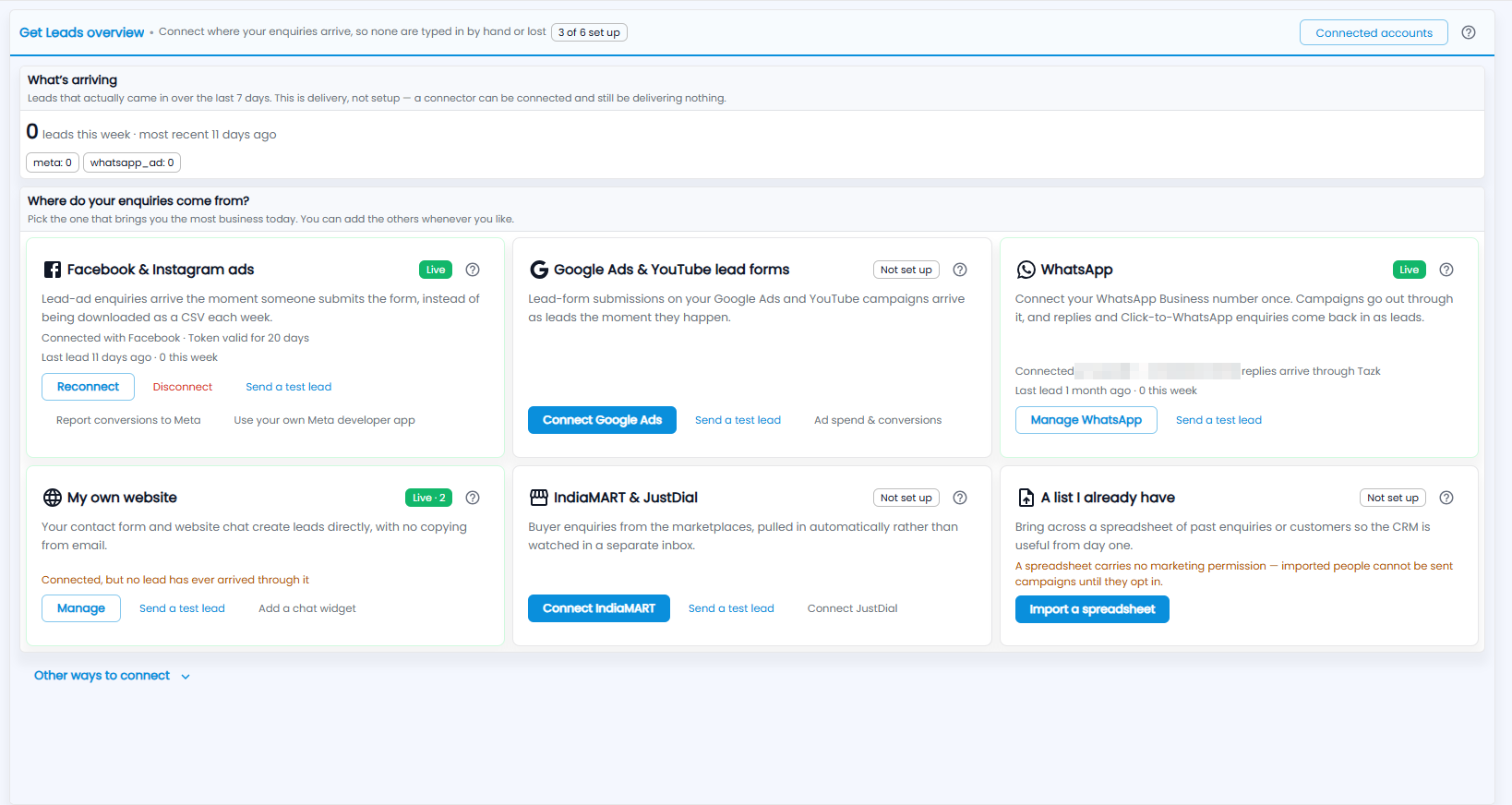
Connect where your enquiries arrive, so none are typed in by hand or lost. The chip next to the title shows how many sources are set up (3 of 6 set up). Connected accounts and the ? guide are at the top right.
What's arriving — the leads that actually came in over the last 7 days, with when the most recent arrived and a count per source. This is delivery, not setup: a connector can be connected and still be delivering nothing.
What does each source card show?
Where do your enquiries come from? — pick the one that brings you the most business today; you can add the others whenever you like. Each card shows its status (Live or Not set up), what it does, the last lead and this week's count, and its buttons:
| Card | What it does |
|---|---|
| Facebook & Instagram ads | Lead-ad enquiries arrive the moment someone submits the form, instead of being downloaded as a CSV each week. Shows the connection and how long the token is valid, with Reconnect, Disconnect, Send a test lead, Report conversions to Meta and Use your own Meta developer app. |
| Google Ads & YouTube lead forms | Lead-form submissions on your Google Ads and YouTube campaigns arrive as leads the moment they happen. Connect Google Ads, Send a test lead, Ad spend & conversions. |
| Connect your WhatsApp Business number once; campaigns go out through it, and replies and Click-to-WhatsApp enquiries come back in as leads. Manage WhatsApp opens WhatsApp Business. | |
| My own website | Your contact form and website chat create leads directly, with no copying from email. Manage opens Website Forms; Add a chat widget. |
| IndiaMART & JustDial | Buyer enquiries from the marketplaces, pulled in automatically rather than watched in a separate inbox. Connect IndiaMART, Connect JustDial. |
| A list I already have | Bring across a spreadsheet of past enquiries or customers so the CRM is useful from day one. Import a spreadsheet opens Import Leads. A spreadsheet carries no marketing permission — imported people cannot be sent campaigns until they opt in. |
A card can also warn you — for example Connected, but no lead has ever arrived through it. Other ways to connect at the bottom lists more options.
What is Connected accounts?
Click Connected accounts to check each Facebook and Google sign-in and pick the Pages and ad accounts Tazk uses. A banner tells you if something needs your attention.
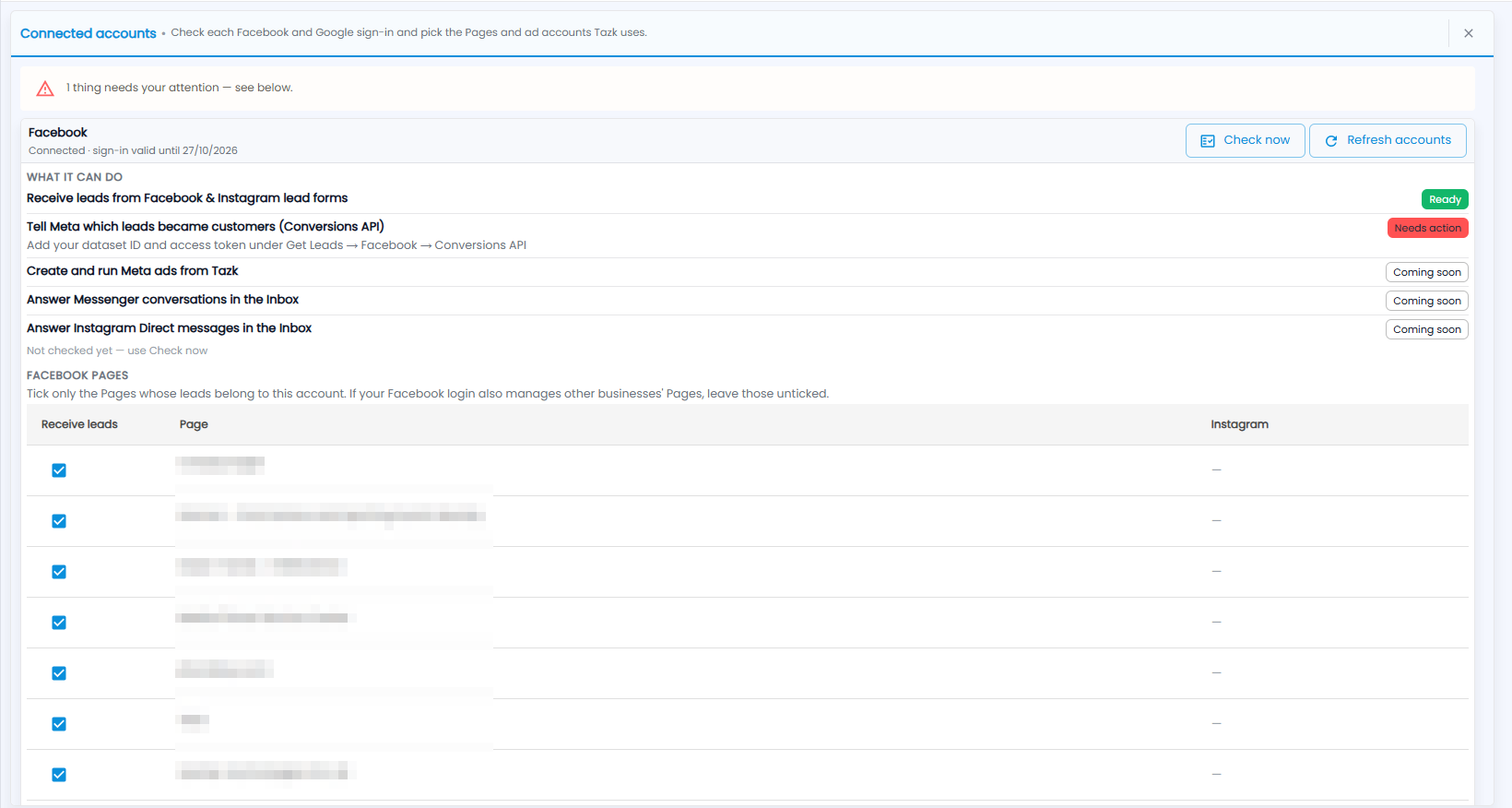
- The sign-in and how long it is valid, with Check now and Refresh accounts.
- What it can do — each feature and its status: Ready, Needs action (with what to do — for example, add your dataset ID and access token under Get Leads → Facebook → Conversions API) or Coming soon.
- Facebook Pages — tick Receive leads only for the Pages whose leads belong to this account. If your Facebook login also manages other businesses' Pages, leave those unticked.