
Where do I see customer WhatsApp messages and emails in Tazk CRM?
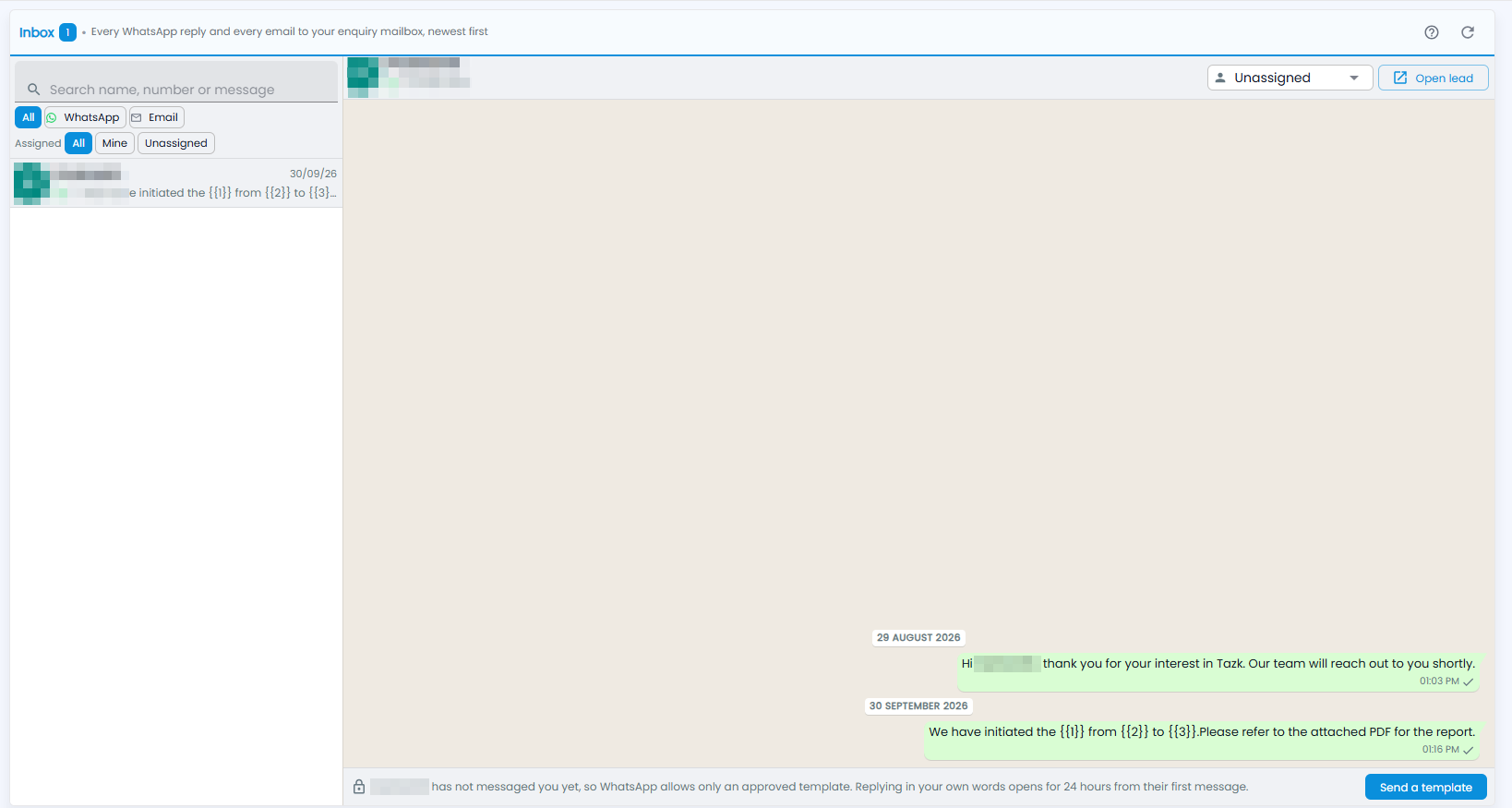
Open Inbox › WhatsApp & Email. Every WhatsApp reply and every email to your enquiry mailbox is listed there, newest first. Click a conversation to read it on the right, and use Open lead to go to the person's lead. If the customer has not messaged you in the last 24 hours, WhatsApp allows only an approved template — click Send a template.
How do I find a conversation?
The number next to Inbox is how many conversations there are. On the left:
- Search name, number or message — find a conversation.
- All, WhatsApp and Email — show every conversation, or one channel.
- Each conversation shows the person, the last message with its channel and tick, and the date.
Refresh and the ? guide are at the top right.
What do I see in a conversation?
Click a conversation. The person's name and number are at the top, and the messages run oldest to newest, grouped by date, each with its time and tick. Click Open lead at the top right to open the person's lead.
How do I reply?
The box at the bottom is for your reply. WhatsApp lets you reply in your own words for 24 hours from the customer's last message. If they have not messaged you yet — or not in the last 24 hours — the box says so, and WhatsApp allows only an approved template: click Send a template and choose one.