
Overview
Before depreciation can be calculated, each asset category (such as Laptop or Car) needs to be linked to a depreciation group, which sets its rate. Asset Type Setup is where you do this. Tazk suggests a group for each category and shows how sure it is, so most of the time you only need to check and accept.
Open it from the sidebar: Depreciation > Asset Type Setup.
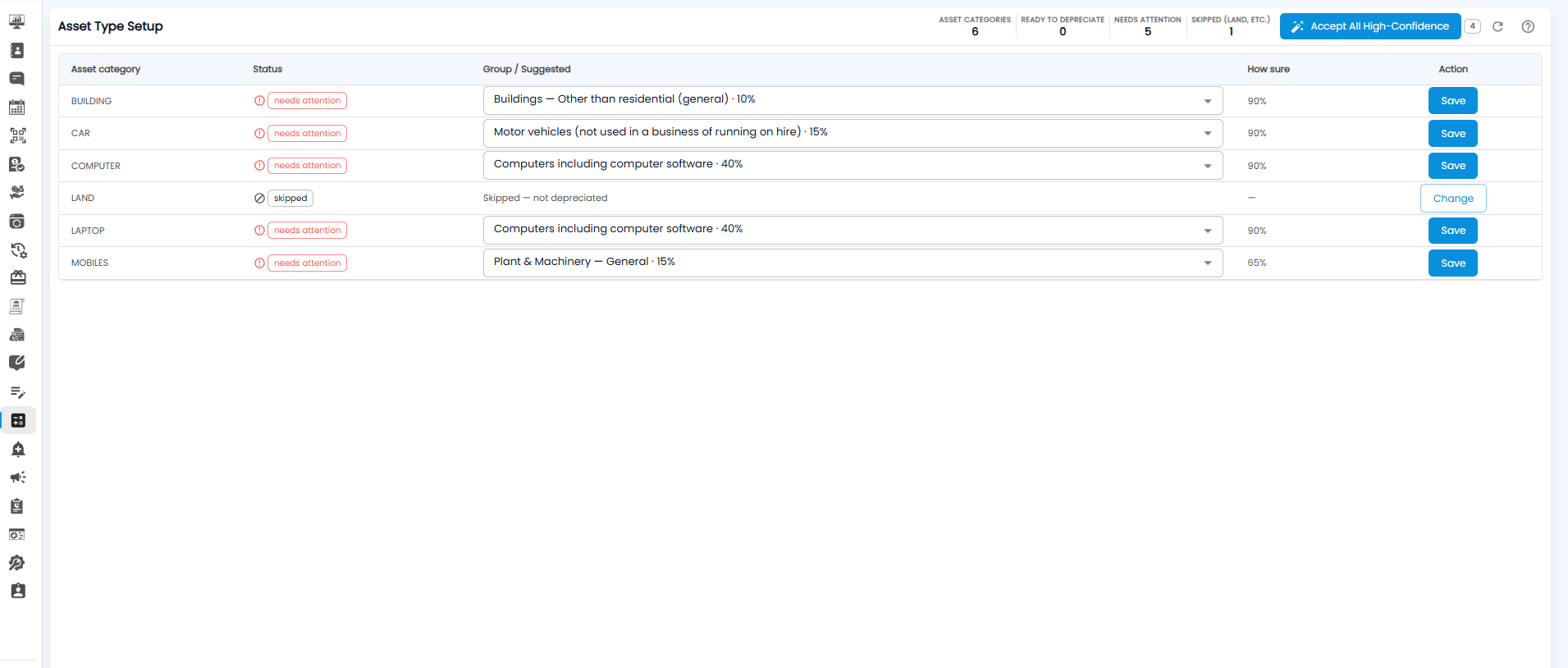
Summary Counters
| Counter | What it shows |
|---|---|
| Asset Categories | How many asset categories you have |
| Ready to Depreciate | Categories already linked to a group |
| Needs Attention | Categories that still need a group saved |
| Skipped (Land, etc.) | Categories that are not depreciated, such as land |
The Asset Category Table
| Column | What it shows |
|---|---|
| Asset category | The category, for example LAPTOP |
| Status | needs attention until a group is saved, or skipped for categories that are not depreciated |
| Group / Suggested | The suggested depreciation group and its rate, for example Computers including computer software · 40%. Open the dropdown to pick a different group |
| How sure | How confident Tazk is in the suggestion, for example 90% |
| Action | Save confirms the group for that category; Change lets you edit a skipped category |
Setting Up Your Asset Types
- Check the suggested group for each category
- If a suggestion is wrong, open the dropdown and pick the right group
- Click Save on that row
To accept all the confident suggestions at once, click Accept All High-Confidence at the top right. The number beside it shows how many suggestions it will accept. Rows with a lower How sure score are left for you to check one by one.
Tip: Look closely at rows with a low How sure score — for example a Mobiles category suggested as Plant & Machinery. Pick the group your accountant uses.
Note: Categories marked skipped, such as land, are not depreciated. Click Change if one was skipped by mistake.