Loading...
Leads
Lead Management System in Chennai | Guide
15 min | By Tazk Team
Table Of Contents
Social Media


How to Choose a Lead Management System in Chennai — Features, Cost, and Setup Checklist
Running a business in Chennai today means one thing is non-negotiable: you cannot afford to lose leads. Whether you are a real estate agency in Anna Nagar, an ed-tech startup in OMR, or a manufacturing company in Ambattur, every inquiry that falls through the cracks is revenue walking out the door.
That is exactly why more Chennai-based businesses are investing in a proper lead management system in Chennai — not just a spreadsheet, not just a CRM with a fancy name, but a purpose-built platform that captures, tracks, assigns, nurtures, and closes leads with full visibility for the entire sales team.
This guide covers everything you need to know: what to look for, how much it costs, how to set it up, and how to avoid the common mistakes teams make when they are evaluating lead management tools in Chennai.
Why Chennai Businesses Are Switching to Dedicated Lead Management Platforms
Chennai has one of the fastest-growing SME ecosystems in South India. From IT services on the Old Mahabalipuram Road corridor to automobile dealerships along GST Road, businesses here handle a high volume of inbound and outbound leads every single day. Many of them still manage these leads through WhatsApp groups, Excel sheets, or basic email inboxes.
The problem is not the intention. The problem is the system.
When a lead comes in at 11 PM through your website's lead capture form and nobody sees it until the next afternoon, your competitor has already called them twice. When your sales rep leaves the company and takes all the lead history with him in a personal notebook, the pipeline collapses. When the manager has no sales pipeline dashboard to look at, they are flying blind.
A dedicated lead management platform in Chennai solves all of this in a structured, repeatable way. It brings every lead into one place, routes them to the right person automatically, tracks every follow-up, and gives management real-time visibility into what is actually happening on the ground.
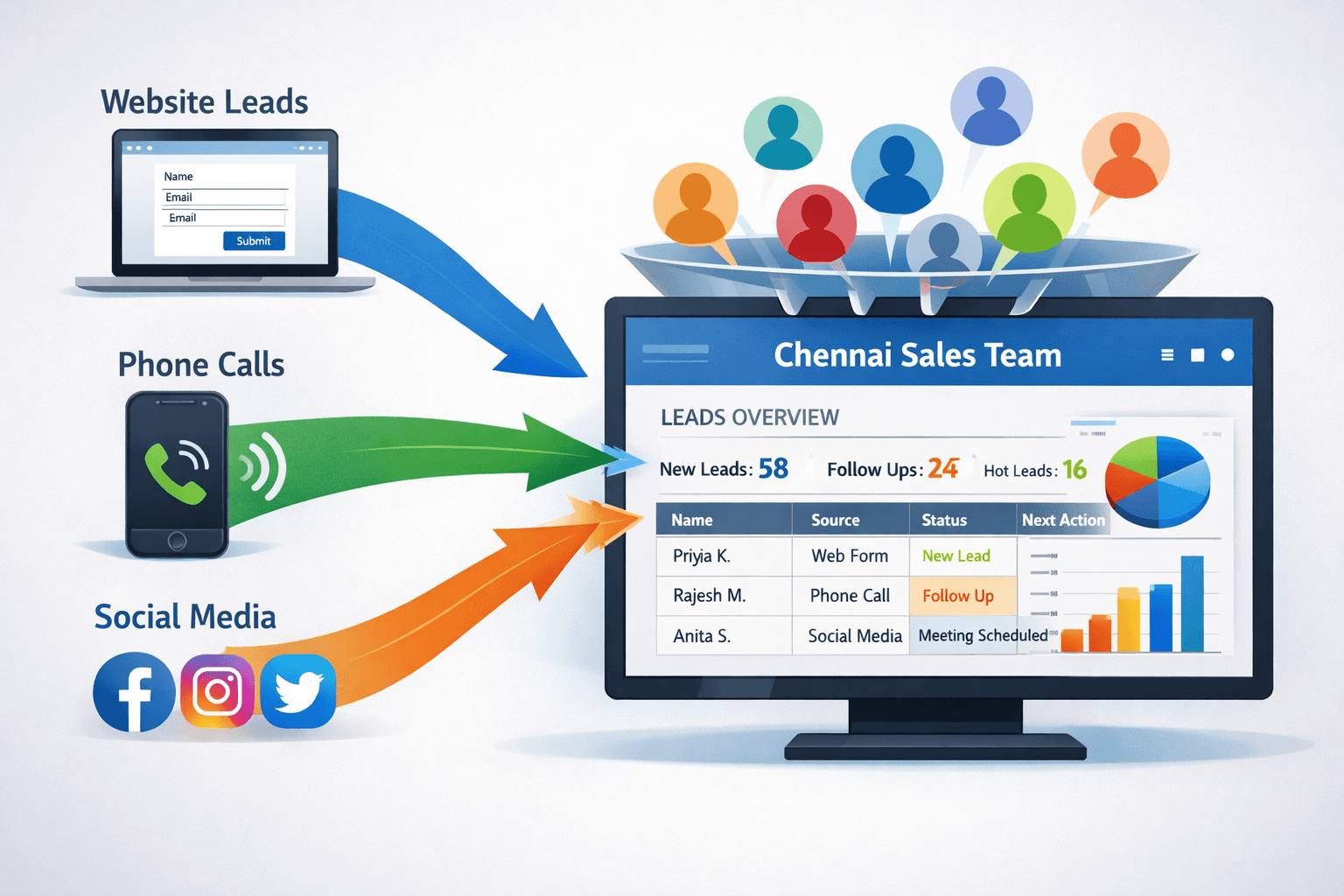
figure:A visual showing leads coming in from multiple sources (website, phone, social media) into one centralized dashboard
What Is a Lead Management System and What Should It Actually Do?
Before you evaluate any software, it helps to understand what a lead management system is supposed to do — not in theory, but in practice.
At its core, a lead management system is software that handles the complete lifecycle of a sales lead from the moment it enters your pipeline to the moment it is either converted into a customer or marked as dead. This lifecycle includes six key stages: capture, qualification, assignment, nurturing, tracking, and closure.
Here is how each of these works in a real business context.
Lead Capture is the starting point. Every time someone fills out a form on your website, calls your office, sends a message on Instagram, or walks into your store, that interaction should automatically enter the system as a new lead. Good leads management software in Chennai will have integrations with your website forms, Facebook Lead Ads, IndiaMART, JustDial, and other platforms that your business actually uses.
Lead Qualification is about deciding how valuable that lead is before you spend time on it. A good system will let you define lead qualification stages — such as cold, warm, and hot — based on criteria like the lead's budget, timeline, geography, or intent. This helps your sales team focus on the leads most likely to convert rather than treating every inquiry with equal urgency.
Lead Assignment is where most manual processes break down. Who gets the new lead? The first person to see it? The person who handles that territory? A round-robin assignment among available reps? A proper system comes with configurable lead assignment rules so this question is answered automatically and consistently every time.
Lead Nurturing is the process of staying in touch with leads who are not ready to buy today but might be ready next month. This means sending follow-up emails, scheduling calls, sharing content, and maintaining a relationship over time. Without a system, these leads simply fall off the radar.
Lead Tracking is the ongoing monitoring of where each lead is in your pipeline. Your team needs to know the pipeline stages, the history of every interaction, and the current status of each deal. This is what a sales pipeline dashboard is designed to show.
Lead Closure is the final step — converting the lead or closing it as lost, with documentation on the reason. This data is gold for refining your qualification criteria and pitch over time.
Key Features to Look for in a Lead Management System in Chennai
Not every platform is built the same way. When you are evaluating leads management software in Chennai, these are the features that actually matter for day-to-day use.
1. Multi-Source Lead Capture Form Integration
Chennai businesses receive leads from more places than ever before — websites, Google Ads, Facebook campaigns, JustDial listings, IndiaMart profiles, and even WhatsApp. Your lead management system needs to pull all of these into a single inbox without manual copy-pasting.
Look for platforms that have pre-built integrations with the lead sources you already use. If the software can only connect to your website form and nothing else, you will end up with a fragmented picture.
2. Configurable Lead Qualification Stages
Different businesses define a quality lead differently. A high-ticket B2B company in Chennai might qualify a lead based on company size, budget, and decision-making authority. A residential real estate developer might qualify based on property type interest, location preference, and loan eligibility.
Your platform should let you define custom lead qualification stages that match your actual sales process — not a generic template that was built for a company in a different industry or geography.
3. Intelligent Lead Assignment Rules
Manual lead distribution creates politics, delays, and lost opportunities. A good system will assign leads automatically based on rules you define: geography (leads from North Chennai go to one rep, South Chennai to another), product interest, source, or simple round-robin rotation across the team.
Look for lead assignment rules that are flexible enough to handle your edge cases — such as what happens when a rep is on leave, or when a high-value lead needs to go directly to a senior team member.
4. Real-Time Sales Pipeline Dashboard
Your sales manager should be able to open the system on any device and immediately see how many leads are at each stage of the pipeline, which deals are overdue for follow-up, and where the bottlenecks are.
A strong sales pipeline dashboard will show you pipeline value, conversion rates by stage, individual rep performance, and trends over time. This is the difference between a manager who is guessing and a manager who is leading with data.
5. Lead Source Tracking
Chennai businesses invest money across multiple channels — Google Ads, social media, events, referrals, cold calling. Lead source tracking tells you which of these channels is actually delivering leads that convert, not just leads that click.
When you can see that your Google Ads campaigns are delivering three times the conversion rate of your IndiaMart listing, you can make smarter decisions about where to invest your marketing budget.
6. Lead Response Time Tracking
Studies consistently show that responding to a lead within the first five minutes dramatically increases your chance of conversion. After an hour, that chance drops significantly. After 24 hours, most leads have moved on.
Lead response time tracking shows you exactly how long your team is taking to make first contact on new leads. This metric alone can be transformative for Chennai sales teams that are handling high volumes of inbound inquiries from campaigns.
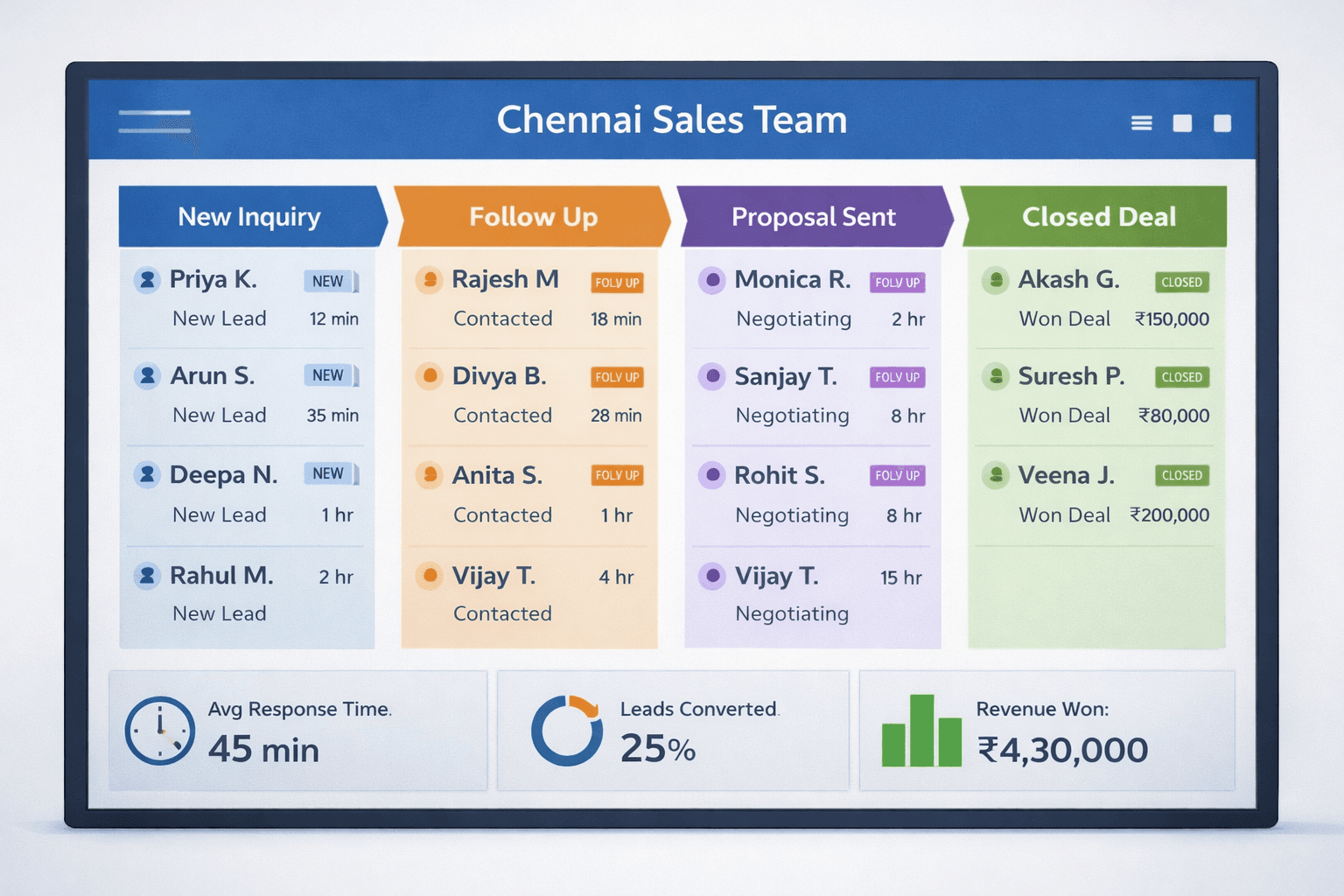
figure:A sales pipeline dashboard showing stages from new lead to closed deal, with colored status indicators
Topic: A sales pipeline dashboard showing stages from new lead to closed deal, with colored status indicators
Alt Text: Sales pipeline dashboard displaying lead stages from new inquiry to closed deal with response time and conversion metrics for a Chennai-based sales team
7. Sales Activity Log
Every call, email, meeting, and note should be recorded automatically or with minimal effort from the rep. A sales activity log gives management complete visibility into what is happening with each lead — without having to interrogate the sales team in daily meetings.
This is also critical for continuity. If a rep goes on leave or leaves the company, the next person can pick up the lead without starting from scratch.
8. Lead Nurturing Workflows
Not every lead is ready to buy on day one. A proper lead nurturing system will let you build automated follow-up sequences — emails, SMS, task reminders — triggered by specific actions or time intervals.
For example: if a lead has not responded in three days, the system automatically sends a follow-up message and creates a task for the rep to call. This keeps your pipeline moving without relying on individual reps to remember everything.
How Much Does a Lead Management System Cost in Chennai?
This is the question every business owner asks first, and it is a fair one. The good news is that there are options at every budget level. The important thing is to evaluate cost against the value of the leads you are currently losing.
Entry-Level Platforms (₹500 – ₹2,000/user/month) These are typically cloud-based SaaS tools with basic lead capture, simple pipeline views, and limited integrations. They work for small teams of two to five people who are just getting started with structured lead management. Features like automation, advanced reporting, and multi-source integrations are usually missing or locked behind higher tiers.
Mid-Range Platforms (₹2,000 – ₹6,000/user/month) This is where most growing Chennai businesses will land. Platforms in this range typically include configurable pipelines, lead assignment automation, email integration, basic reporting, and mobile apps. This is enough for a team of 5 to 25 people handling a decent volume of leads.
Enterprise Platforms (₹6,000+/user/month or custom pricing) Large enterprises with complex workflows, multiple product lines, or large sales teams will need enterprise-grade platforms with custom integrations, advanced analytics, dedicated support, and role-based access controls. These platforms often price based on the number of contacts in the system, not just users.
What to Watch Out For Many platforms advertise a low per-user price but charge separately for API access, integrations, storage, and advanced features. Always ask for a fully loaded price that includes everything your team will actually use before signing a contract.
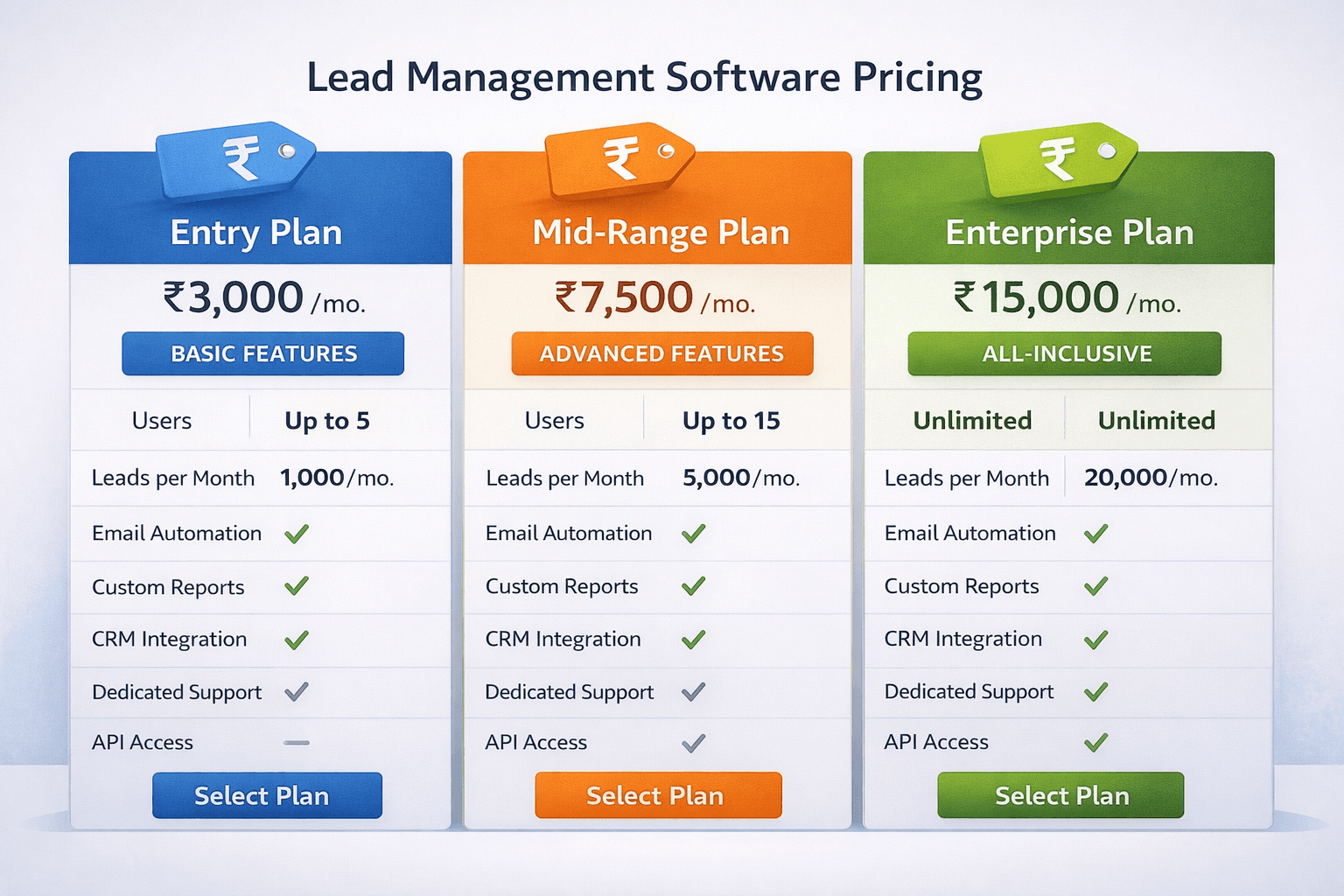
figure:A comparison table or visual showing different pricing tiers for lead management software
Alt Text: Pricing tier comparison for lead management software in Chennai showing entry, mid-range, and enterprise plan features and costs
The Lead Management System Setup Checklist for Chennai Teams
Once you have selected a platform, the setup process determines whether the system actually gets adopted or sits unused after two weeks. Follow this checklist to get your lead management system working properly from day one.
Before You Set Anything Up
Before you even log into the platform, spend time mapping your actual sales process on paper. How does a lead enter your business today? Who handles it first? What are the steps from first contact to closed deal? How many days does the average deal take? What reasons do leads give for not converting?
This clarity will save you from building a system that looks good in a demo but does not match how your team actually works.
Week 1: Core Configuration
Start by setting up your lead sources and connecting your lead capture forms. If you run Google Ads, connect your lead forms. If you have a website contact form, connect it. If you list on JustDial or IndiaMart, set up the integration or create a way to import those leads automatically.
Next, define your pipeline stages. Most Chennai businesses do well with five to seven stages: New Lead, Contacted, Qualified, Proposal Sent, Negotiation, Closed Won, and Closed Lost. Keep it simple to start.
Then configure your lead assignment rules. Decide whether you want round-robin distribution, territory-based assignment, or manual assignment with notifications. Set up the rules in the system and test them with a few dummy leads before going live.
Week 2: Team Onboarding
Bring your sales team into the system one group at a time. Start with your most tech-comfortable reps and have them use the system for a week before rolling it out to everyone. Their experience will surface issues early.
Train the team on the sales activity log — specifically, how to log calls, notes, and follow-ups without it feeling like extra work. The goal is to make logging so quick and easy that it becomes automatic.
Set up the sales pipeline dashboard so managers can review it in the daily huddle. When the team sees that the manager is using the data, they take data entry more seriously.
Week 3: Automations and Workflows
Now that the basics are working, layer in your lead nurturing workflows. Build a simple follow-up sequence for new leads: an immediate acknowledgment message, a follow-up call reminder after 24 hours, and an email after 72 hours if there has been no response.
Enable lead response time tracking and share the data with the team. This creates healthy accountability without micromanagement.
Set up lead source tracking reports so you can see at the end of the month which channels are bringing in the best leads.
Week 4: Review and Refine
After a month of real data, sit down with your team and review what is working. Are your pipeline stages accurate or do you need to add or remove one? Are your qualification criteria selecting the right leads? Are the assignment rules creating any bottlenecks?
The first month of data will tell you more about your sales process than years of gut instinct. Use it to refine the system before it becomes set in stone.

figure:IA four-week setup timeline or onboarding checklist graphic for implementing a lead management system
Common Mistakes Chennai Businesses Make When Choosing Lead Management Tools
After helping many businesses in Chennai set up their sales infrastructure, a few patterns of mistakes come up repeatedly.
Buying Based on Features You Will Not Use Many teams get excited about AI-powered lead scoring or complex predictive analytics during demos but their team is still manually logging calls six months later. Start with the fundamentals — capture, assign, track, follow up — and add complexity only when your team has fully adopted the basics.
Not Involving the Sales Team in the Decision Managers often choose software without asking the sales team what they actually need. When the team feels like a system was imposed on them, adoption suffers. Involve your top-performing reps in the evaluation and demo process. Their buy-in is worth more than any feature comparison table.
Underestimating the Importance of Mobile Access Chennai sales teams are often on the road — visiting clients in Ambattur, doing site visits in Perungalathur, attending trade shows at ITPB. If the lead management system is desktop-only, it will not be used. Make sure the mobile app is genuinely functional, not just a stripped-down version that shows basic information.
Ignoring Data Migration and Integration Work If you have two years of lead data in an Excel file, moving that into a new system takes effort. If your new software does not integrate with your existing marketing tools, you will end up with siloed data. Always ask about data import capabilities and integration options before committing.
Choosing the Cheapest Option Without Thinking About Scale A platform that works for a five-person team may not work when you grow to twenty. Think about where your business will be in two years and choose a platform that can grow with you without requiring a full migration.
How to Evaluate a Lead Management Platform in Chennai: A Practical Framework
When you are shortlisting lead management platforms in Chennai, use this simple framework to compare your options objectively.
Does it fit your actual lead flow? Take your most common lead journey — from first inquiry to first contact to proposal to closure — and walk through it in the system during the demo. Does it feel natural or are you constantly working around the system?
Can your team use it without extensive training? Open the system in front of one of your less tech-savvy sales reps and ask them to log a lead and set a follow-up reminder. If they can do it in under three minutes, the system is usable. If they need help, the adoption rate will be low.
Does it integrate with what you already use? Make a list of every tool your team currently uses — your email client, your WhatsApp, your marketing platforms, your lead sources — and verify that the platform integrates with at least the top three.
What does support look like? As a Chennai-based business, you want support that works in your time zone and preferably in your language. Ask about response times, whether there is a dedicated account manager, and what happens when something breaks on a Monday morning before a major sales push.
Is the pricing honest? Ask for a full breakdown of all costs for the next 12 months based on your current team size and expected lead volume. Include any setup fees, integration fees, and training costs.
Why Local Context Matters When Choosing Lead Management Tools in Chennai
This may seem like a minor point, but it matters more than most vendors will tell you.
Chennai's sales culture has specific rhythms. Festival seasons like Pongal and Diwali see spikes in certain industries. The IT sector has its own hiring and budget cycles that affect B2B lead quality. Real estate in Chennai operates on very different timelines than real estate in Bangalore or Mumbai.
A lead management platform built for a generic global audience may not account for these realities. When evaluating leads management software in Chennai, look for vendors who understand the local market, have customers in your industry, and offer the kind of support that works within Indian business hours.
For teams that want a platform designed with Indian sales workflows in mind,Tazk lead management software built specifically for teams like yours is worth exploring.
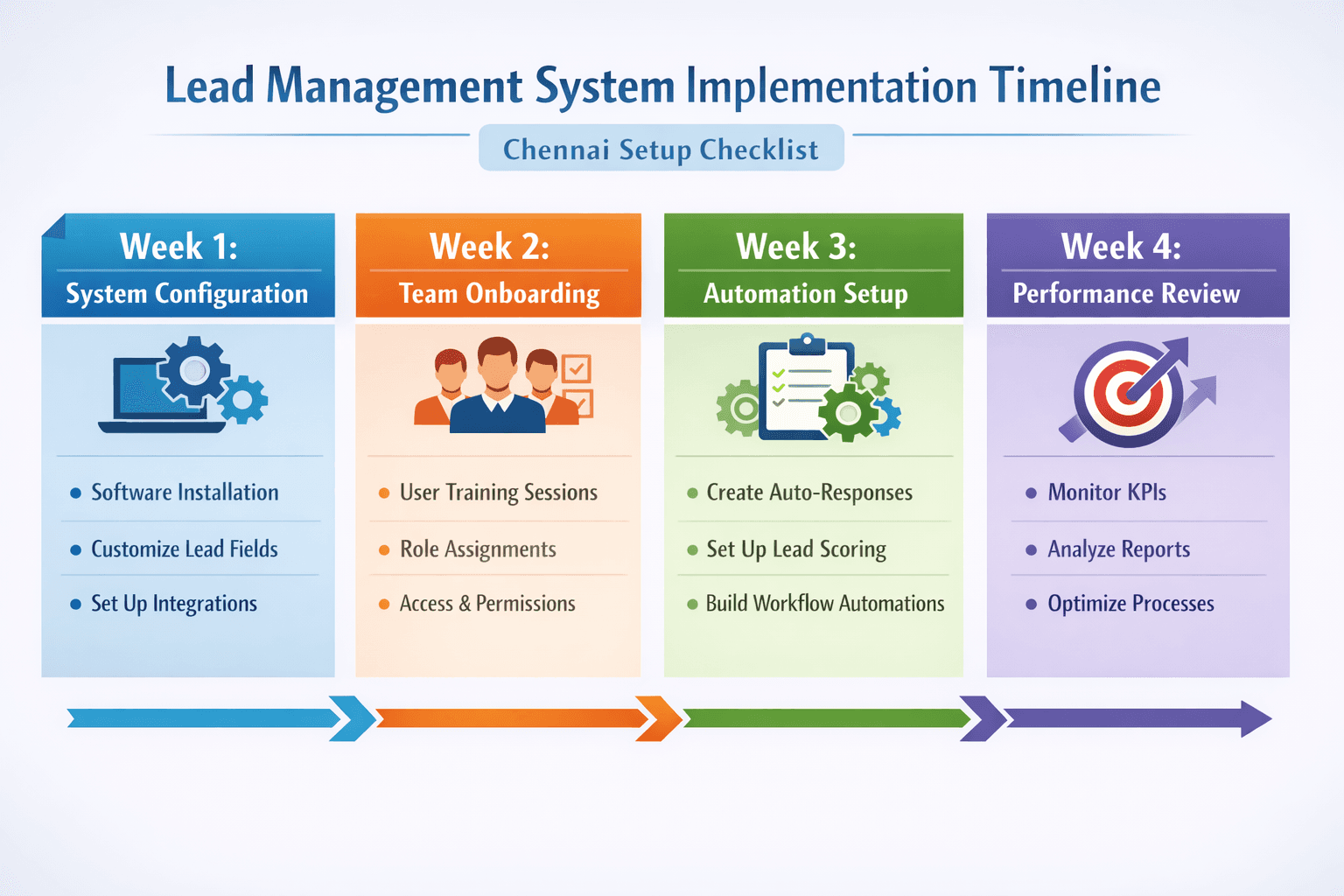
figure: Chennai business sales team reviewing lead data on a laptop and phone in a modern office
Connecting Lead Management to the Bigger Picture
A lead management system does not exist in isolation. It is part of a larger ecosystem that includes your marketing, your customer service, and your post-sale operations.
Once your lead management is working well, you will naturally start asking questions like: How do I make sure my team follows up consistently and on time? How do I build reports that show pipeline health every week? How do I ensure that when a lead converts, the handover to the account management team is clean and documented?
These questions are answered by building on top of your lead management foundation with structured follow-up processes, detailed daily tracking and pipeline reports for your team, and a clear system to capture, assign, and close leads with clear ownership.
The best time to think about these connected processes is before you implement your lead management system, not after. That way, your platform choice can accommodate the full workflow rather than just the first part of it.
Building a follow-up schedule and automated reminders into your system from the start will also dramatically improve your team's consistency and reduce the time lost between lead entry and first contact.
Summary: What Good Lead Management Looks Like in Practice
To bring this together, let us paint a picture of what a well-run lead management system looks like for a mid-sized business in Chennai.
A lead comes in at 9:30 AM through a Google Ads campaign. The lead capture form on the website automatically sends the data to the lead management system. Within seconds, the lead is assigned to a sales rep based on the lead assignment rules — in this case, the rep who handles digital marketing inquiries and is currently on duty.
The rep gets a notification on their phone. They call the lead within 8 minutes. The call is logged in the sales activity log automatically. The lead is moved from "New" to "Contacted" in the pipeline. The rep adds a note: the prospect is interested but wants a proposal by Friday.
The system creates a task for the rep to send the proposal by Thursday and a follow-up reminder for Friday afternoon. If the proposal is not opened by Friday morning, a gentle automated email goes out with a soft nudge.
The sales manager opens the sales pipeline dashboard at 6 PM and can see exactly where every lead in the team stands, how quickly the team is responding, and which deals are at risk of going cold. No morning meetings required to get this information. No chasing reps for updates.
At the end of the month, the lead source tracking report shows that the Google Ads campaign is delivering 40% of the leads but 65% of the closed deals. Budget gets reallocated accordingly.
This is not a fantasy. This is what a properly implemented lead management system in Chennai can deliver for a team that commits to using it consistently.
Frequently Asked Questions (FAQ)
Losing leads to slow follow-ups?
Tazk Leads captures leads from all channels, auto-assigns them, and tracks every touchpoint through the pipeline.
Free plan available. No credit card required. Go live in hours.
Related Blogs

Frequently asked questions
1
What is a lead management system and how is it different from a CRM?

2
How do I know which lead management platform in Chennai is right for my business?
3
How long does it take to set up a lead management system?
4
What are lead assignment rules and why do they matter?
5
Can a lead management system integrate with WhatsApp, JustDial, and IndiaMart?
6
What is lead response time tracking and how does it impact sales?