
Overview
Open Schemes > New Schemes to see every scheme you have recorded and to add a new one. The page is titled Schemes.

The Schemes List
| Column | What it shows |
|---|---|
| Sl | The row number |
| Scheme name / Doc id | The scheme's name, and the scheme ID you gave it |
| Brand | The brand the scheme is for, for example VIVO |
| Target status | Whether the target is counted total or for each product |
| From / To | The period the scheme runs |
| From Target / To Target | The target range you need to reach |
| Scheme Award | What the vendor pays you for reaching the target |
| Notes / Description | Any notes and description |
| Vendor name | The vendor offering the scheme |
| Actions | Edit (pencil) or delete (bin) |
Use + to add a scheme, Search here to find one, and ⋮ for more options.
Adding a Scheme
Click + to open New Schemes. Fields marked * are required.
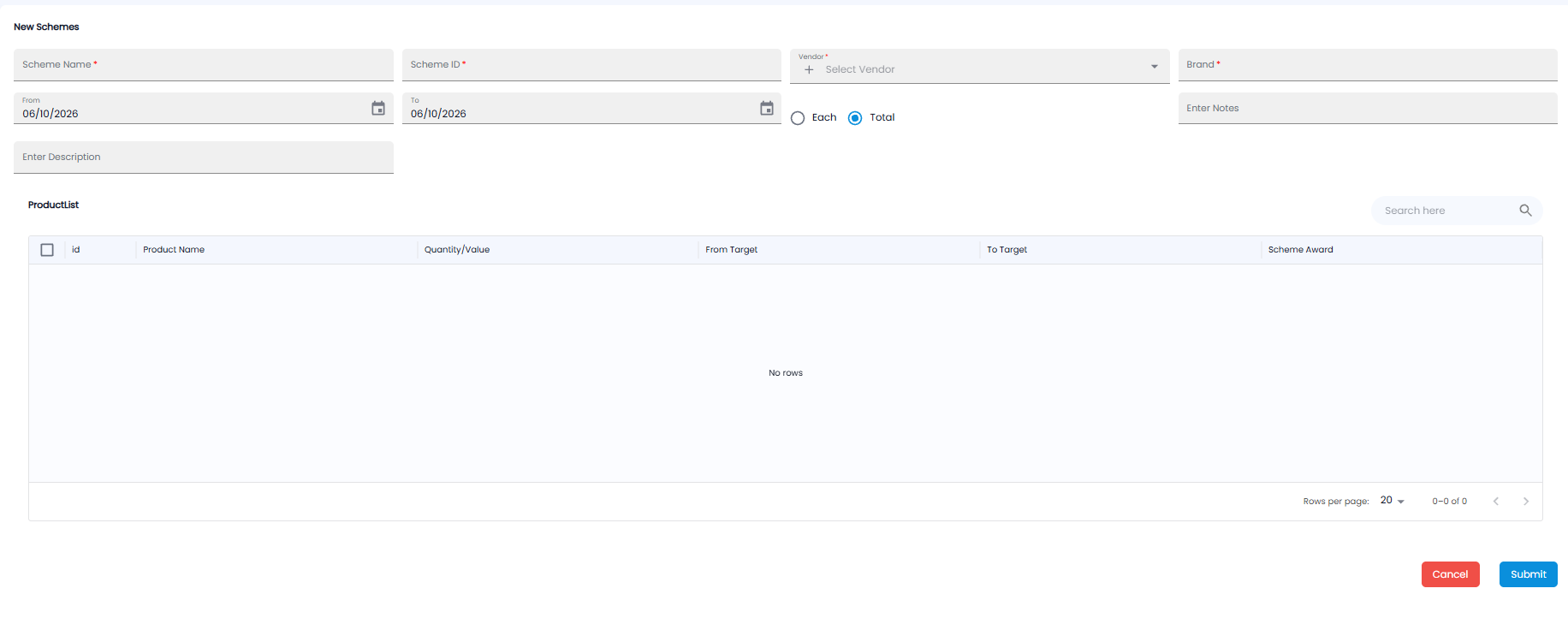
| Field | Required | Description |
|---|---|---|
| Scheme Name | Yes | A name for the scheme |
| Scheme ID | Yes | The vendor's reference for the scheme |
| Vendor | Yes | The vendor offering it. Click + to add a new vendor |
| Brand | Yes | The brand it covers |
| From / To | — | The period it runs. Today by default |
| Each / Total | — | Count the target for Each product separately, or for the Total of all products together (the default) |
| Enter Notes / Enter Description | No | Any notes, and a description of the scheme |
Product List
The ProductList table lists the products the scheme can cover. Tick the products in the scheme, and for each one enter the Quantity/Value, From Target, To Target, and Scheme Award. Use Search here to find a product. It says No rows until there are products to show.
Click Submit to save the scheme, or Cancel to leave without saving.
Note: Scheme amounts a vendor owes you can be claimed with a manual debit note against the schemes ledger — see Debit Notes in Purchases.