
Overview
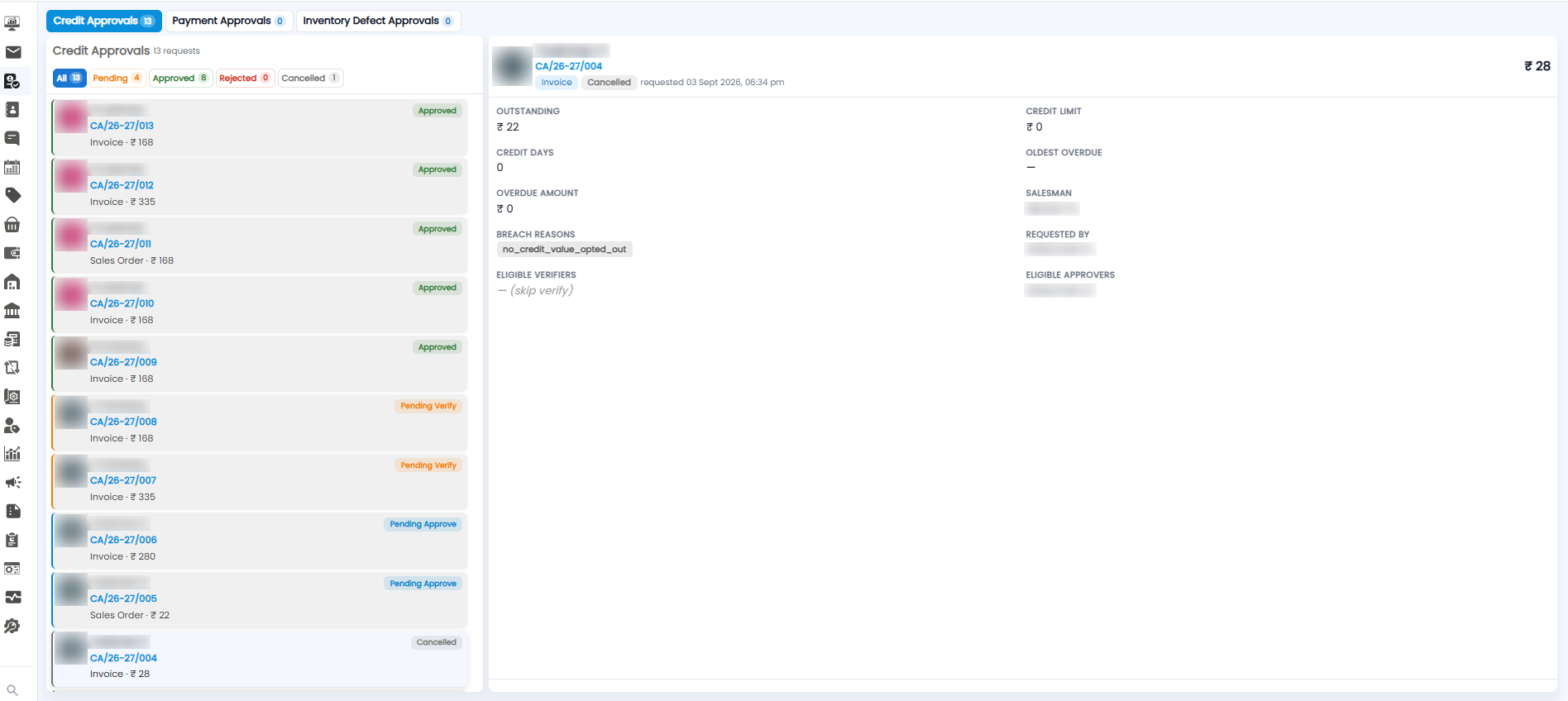
Some transactions need a second pair of eyes before they go through — for example an invoice or sales order for a customer who is over their credit rules. These arrive on the Approvals page as requests. Click Approvals in the sidebar to open it.
Approval Types
The tabs at the top split requests by type. The number on each tab shows how many requests it has.
| Tab | What it is for |
|---|---|
| Credit Approvals | Invoices and sales orders that need approval because of the customer's credit position |
| Payment Approvals | Payments that need approval |
| Inventory Defect Approvals | Defective stock that needs approval |
The Request List
The heading shows how many requests the tab has, for example Credit Approvals 13 requests. Use the status filters below it to show only some of them — the number on each filter shows how many requests have that status:
- All — every request
- Pending — still waiting to be verified or approved
- Approved — approved
- Rejected — turned down
- Cancelled — withdrawn
Each card in the list shows the customer, the request number (for example CA/26-27/013), the document and amount (for example Invoice · ₹168 or Sales Order · ₹168), and its status.
Request Statuses
| Status | What it means |
|---|---|
| Pending Verify | Waiting for a verifier to check it |
| Pending Approve | Verified (or no verifier needed), now waiting for an approver |
| Approved | Approved — the transaction can go ahead |
| Cancelled | The request was withdrawn |
Request Details
Click a card to see the full request on the right. The top shows the customer, the request number, the document type (for example Invoice), the status, when it was requested, and the amount.
Below that are the figures the approver needs to decide:
| Field | What it shows |
|---|---|
| Outstanding | What the customer already owes you |
| Credit Limit | The most credit the customer is allowed |
| Credit Days | How many days the customer has to pay |
| Oldest Overdue | The customer's oldest unpaid overdue bill, or — if none |
| Overdue Amount | How much of what they owe is overdue |
| Salesman | The salesman for this customer |
| Breach Reasons | Which credit rule the transaction broke — the reason the request was raised |
| Requested By | Who raised the request |
| Eligible Verifiers | Who can verify it. — (skip verify) means no verifier is needed and it goes straight to the approver |
| Eligible Approvers | Who can approve it |
How a Request Moves Through
- A transaction breaks a credit rule, and a request is raised
- If there are eligible verifiers, it waits as Pending Verify until one of them checks it
- It then waits as Pending Approve for one of the eligible approvers
- Once approved, its status changes to Approved