
Overview
The Announcement Center is where you create, manage, and track announcements across your organisation — for example a holiday notice or a change in working hours. Click Announcement in the sidebar.

Finding an Announcement
Use the tabs to filter: All, Active (live now), and Scheduled (set to go live later). Type in Search announcements to find one.
The Announcement Card
| Part | What it shows |
|---|---|
| Type / Status | For example General, and Active or Scheduled |
| Title and message | The announcement itself. No further details means there is no message text |
| Location / Department | Who it is for |
| Employee | The employee it is addressed to |
| Expiry | How long it stays live, for example Expires in 1 day |
| Footer | Who created it and when, with View, Edit, and Delete |
Creating an Announcement
Click + New Announcement. Fields marked * are required.
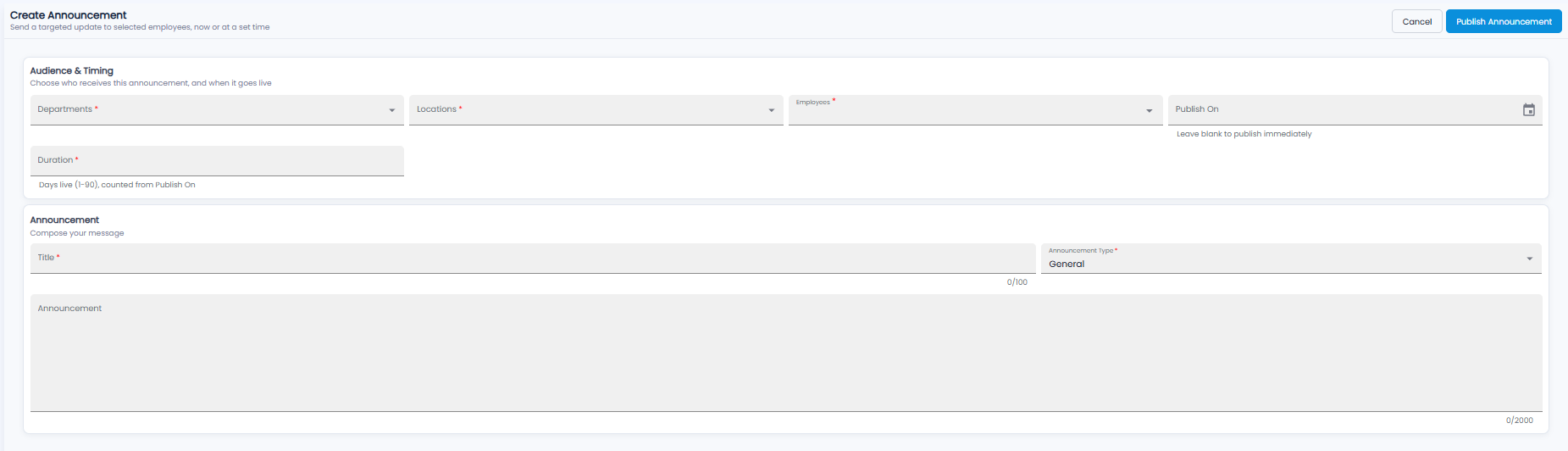
Audience & Timing
| Field | Required | Description |
|---|---|---|
| Departments / Locations / Employees | Yes | Who receives it |
| Publish On | No | When it goes live. Leave it blank to publish straight away |
| Duration | Yes | How many days it stays live (1 to 90), counted from Publish On |
Announcement
- Title* — up to 100 characters
- Announcement Type* — for example General
- Announcement — the message, up to 2,000 characters
Click Publish Announcement, or Cancel. With a Publish On date, the announcement shows as Scheduled until that time.
Tip: Set a short Duration for time-bound notices, so old announcements drop off by themselves.