
What does the Tazk Payroll Calendar show?
Calendar shows one month at a time. Tiles at the top count present, absent and week-off employees for the selected day, the month's holidays and events, and the month's EMI dues and new loans. Each day in the grid shows small chips with that day's counts. Click a day — or a chip — to open the day view: the Payroll tab lists who was present, absent or on a week off, holidays and events, and the Loan Dues tab lists installments and loans.
Overview

Click Calendar in the sidebar. The month is shown at the top with ‹ and › to move between months; Today brings you back to the current day.
What do the tiles at the top show?
| Tile | What it counts |
|---|---|
| Present | Employees who were present on the selected day ("Today" or a date) |
| Absent | Employees absent on the selected day |
| Week Off | Employees on their weekly off that day |
| Holidays | Holidays in the month |
| Events | Birthdays, work anniversaries and other employee events in the month |
| EMI Due | Loan installments due this month — amount and number of records. Click to open the month's loan dues. |
| New Loans | Loans approved this month — amount and number of records. Click to open them. |
Clicking a day selects it, so Present, Absent and Week Off change to that day. Present and Absent stay at 0 for days that have not happened yet.
What do the chips on each day mean?
Each chip is an icon and a count — hover for its name:
- Present (green), Absent (red), Week Off (blue) — number of employees. Not shown for future days.
- Holidays (purple) and Events (amber bookmark).
- EMI Due (blue) — installments due, always on the 1st of the month, with the amount in the tooltip.
- New Loans (amber) — loans approved that day.
Chips with a count of 0 are hidden. Employees who see only their own attendance get their own status (present, absent or week off) on each day instead of counts.
How do I see who was absent on a day?
Click the day, or click its Absent chip to go straight to the list. The day view opens with two tabs, Payroll and Loan Dues. Use the back arrow (Back to calendar) to return to the month.
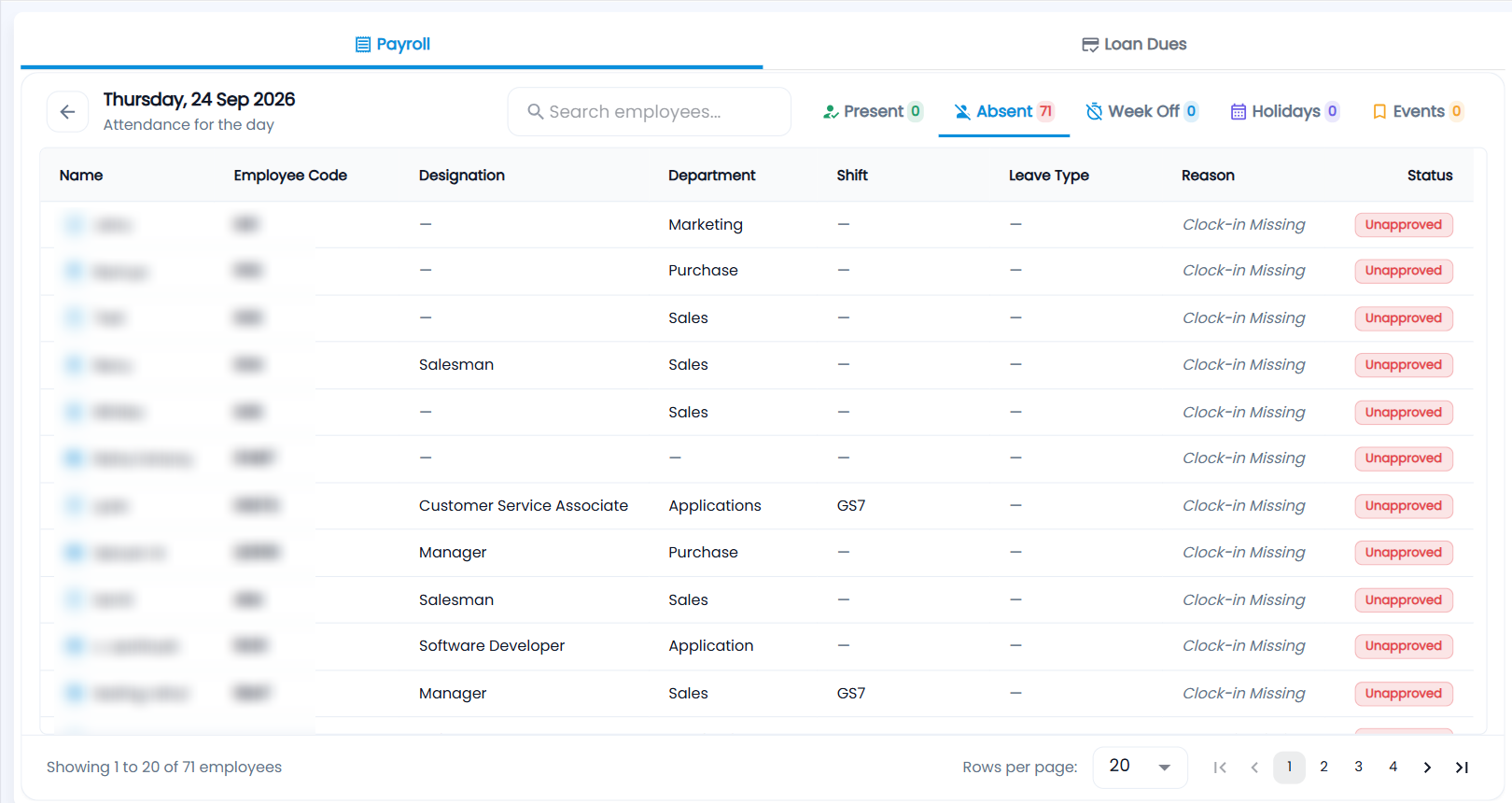
The Payroll tab ("Attendance for the day") has sub-tabs with counts. Search by employee, and choose 20, 50 or 100 rows per page.
| Sub-tab | Shows |
|---|---|
| Present | Name, employee code, designation, department, shift, clock in, clock out and status — On Time, Early In or Late In against the shift start |
| Absent | Name, employee code, designation, department, shift, leave type, reason and status. Status is Approved when the absence is covered by approved leave, otherwise Unapproved — amber if a request exists but is not approved, red if no request was raised. A grey note such as Clock-in Missing is a system note about the punches, not the employee's reason. |
| Week Off | Name, employee code, designation, department and shift |
| Holidays | Each holiday that day, how many employees it covers, whether it is restricted, and the categories it applies to |
| Events | Each birthday or anniversary with the employee — click Send wish to send a message (up to 1,000 characters, with emoji). The card then shows Wish sent. |
How do I see loan installments due?

Open a day (or click the EMI Due or New Loans tile for the whole month) and choose Loan Dues. Each sub-tab shows its total amount:
| Sub-tab | Meaning | Columns after Employee, Loan Number and Repaid By |
|---|---|---|
| EMI Due | Installments scheduled to be repaid | Installment (for example 3 of 12), EMI, Paid, Status, Balance |
| Collected | Repayments recorded — by salary deduction or manual payment | Collected, From Salary, Manual, Balance, Loan |
| Overdue | Installments left short after their month finished | Installment, EMI, Paid, Short by, Balance |
| New Loans | Loans approved | Approved On, Amount, EMI, Tenure, Repay From |
| Closed | Loans fully repaid or written off | Closed On, Amount, Repaid, Written Off, Loan |
Installment status is Paid, Due (this month — not late), Upcoming, Overdue or Written off. Search by employee or loan number. To make a payment or write off a loan, open it from Loans.