
Overview
Receivables shows everything your customers still owe you, invoice by invoice, and how overdue it is. Open Sales > Receivables.
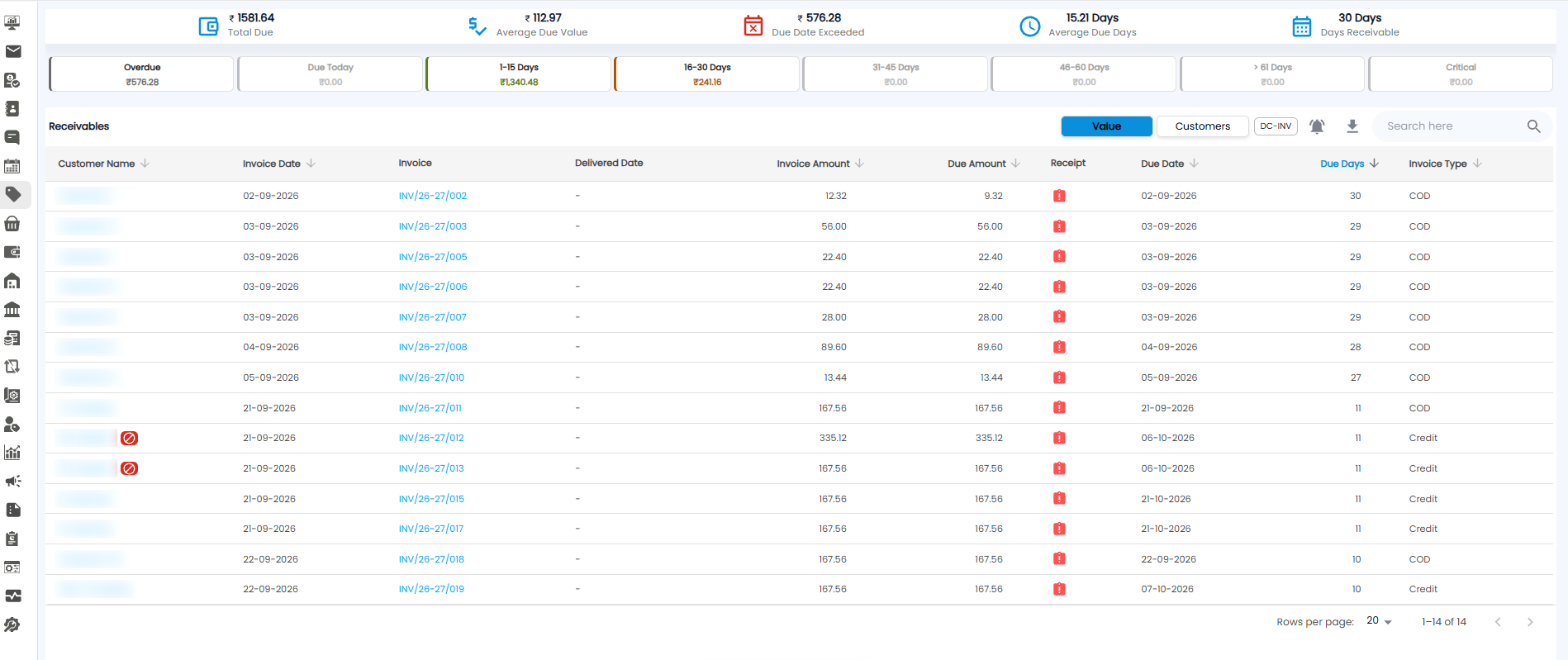
Summary Figures
| Figure | What it shows |
|---|---|
| Total Due | Everything customers owe you |
| Average Due Value | The average amount owed per invoice |
| Due Date Exceeded | The amount that is past its due date |
| Average Due Days | How many days invoices are due, on average |
| Days Receivable | How long, on average, customers take to pay |
Ageing Buckets
The row of buckets splits what is owed by how long it has been due: Overdue, Due Today, 1–15 Days, 16–30 Days, 31–45 Days, 46–60 Days, > 61 Days, and Critical. Each shows the amount in that band.
The Receivables Table
| Column | What it shows |
|---|---|
| Customer Name | Who owes the money |
| Invoice Date / Invoice | The invoice and when it was raised |
| Delivered Date | When the goods were delivered |
| Invoice Amount / Due Amount | The invoice value, and how much is still unpaid |
| Receipt | Record a payment against the invoice |
| Due Date / Due Days | When it is due, and how many days it has been outstanding |
| Invoice Type | Credit or COD |
Click the arrows next to a column heading to sort by it.
The Toolbar
- Value / Customers — show the list invoice by invoice, or grouped by customer.
- DC-INV — include invoices raised from delivery challans.
- Bell icon — send payment reminders.
- Download icon — download the list.
- Search here — find a customer or invoice.
Tip: Sort by Due Days to see the oldest debts first, and chase those customers before the amount moves into the Critical bucket.