
Overview
Delivery Tracking follows each invoice and delivery challan from the warehouse to the customer. Open Sales > Delivery Tracking.
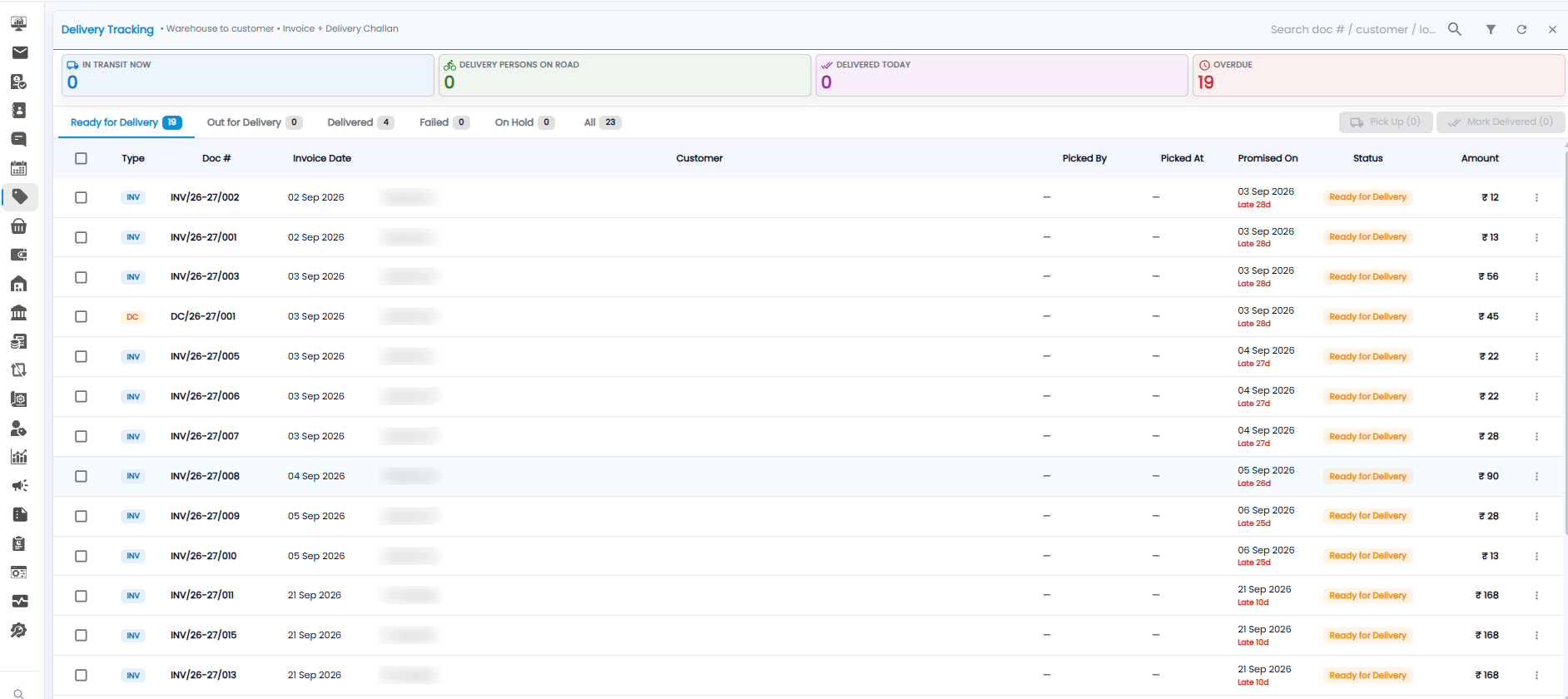
Summary Cards
| Card | What it shows |
|---|---|
| In Transit Now | Deliveries on the way |
| Delivery Persons on Road | How many delivery people are out |
| Delivered Today | Deliveries completed today |
| Overdue | Deliveries past their promised date |
Status Tabs
Switch between Ready for Delivery, Out for Delivery, Delivered, Failed, On Hold, and All. The number on each tab shows how many documents it has.
The Delivery List
| Column | What it shows |
|---|---|
| Type | INV (invoice) or DC (delivery challan) |
| Doc # / Invoice Date / Customer | The document, its date, and who it is going to |
| Picked By / Picked At | Who collected it from the warehouse, and when |
| Promised On | The promised delivery date. If it has passed, it shows how late, for example Late 28d |
| Status / Amount | Where it is, and its value |
Picking Up and Delivering
- Tick the documents you are handling
- Click Pick Up when they leave the warehouse
- Click Mark Delivered once the customer has them
The number on each button shows how many documents you have selected. Use the search box (document number, customer, or location), the filter, and the refresh icon at the top right to find documents.
Tip: Check the Overdue card every morning — anything there has missed its promised date.