
Overview
Click Reports in the sidebar to see every report in Tazk Sales on one page, grouped by topic. Click a report's name to open it — each report opens as a table of the figures it covers.
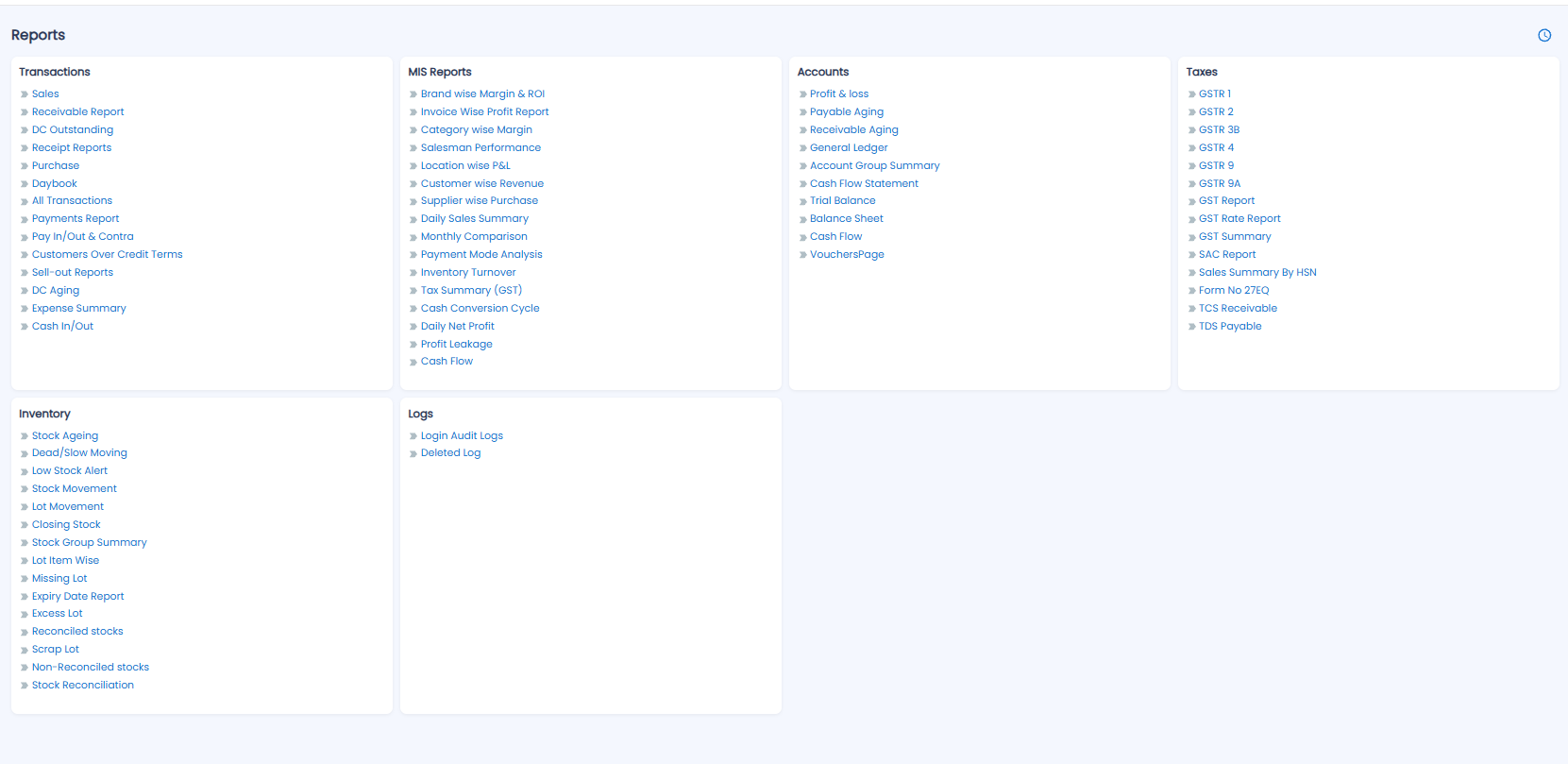
| Group | Use it for |
|---|---|
| Transactions | Lists of what was sold, bought, received, and paid |
| MIS Reports | Management figures — margins, profit, performance, and trends |
| Accounts | Financial statements and ledgers |
| Taxes | GST returns, HSN / SAC summaries, TDS, and TCS |
| Inventory | Stock levels, ageing, movement, and lots |
| Logs | Who logged in, and what was deleted |
Transactions
| Report | What it shows |
|---|---|
| Sales | Your sales invoices |
| Receivable Report | What customers owe you |
| DC Outstanding | Delivery challans not yet invoiced |
| Receipt Reports | Payments received from customers |
| Purchase | Your purchase bills |
| Daybook | Every entry for a day, in order |
| All Transactions | All transactions of every type |
| Payments Report | Payments made to vendors |
| Pay In/Out & Contra | Pay In, Pay Out, and contra entries |
| Customers Over Credit Terms | Customers past their credit days or credit limit |
| Sell-out Reports | What your dealers sold on |
| DC Aging | How long delivery challans have been open |
| Expense Summary | Expenses by ledger |
| Cash In/Out | Cash coming in and going out |
MIS Reports
| Report | What it shows |
|---|---|
| Brand wise Margin & ROI | Margin and return on investment for each brand |
| Invoice Wise Profit Report | The profit on each invoice |
| Category wise Margin | Margin for each product category |
| Salesman Performance | Sales and results for each salesman |
| Location wise P&L | Profit and loss for each location |
| Customer wise Revenue | Revenue from each customer |
| Supplier wise Purchase | Purchases from each vendor |
| Daily Sales Summary | Sales totals day by day |
| Monthly Comparison | One month compared with others |
| Payment Mode Analysis | How customers paid — cash, UPI, card, cheque |
| Inventory Turnover | How quickly stock sells and is replaced |
| Tax Summary (GST) | GST collected and paid |
| Cash Conversion Cycle | How long money is tied up between buying stock and being paid for it |
| Daily Net Profit | Net profit day by day |
| Profit Leakage | Where profit is being lost |
| Cash Flow | Money coming in and going out over time |
Accounts
| Report | What it shows |
|---|---|
| Profit & loss | Income, expenses, and profit for a period |
| Payable Aging / Receivable Aging | What you owe and are owed, by how long it has been due |
| General Ledger | Every entry in a ledger |
| Account Group Summary | Totals for each account group |
| Cash Flow Statement / Cash Flow | Where cash came from and where it went |
| Trial Balance | The debit and credit balance of every ledger |
| Balance Sheet | Assets, liabilities, and equity on a date |
| VouchersPage | Your vouchers |
Taxes
| Report | What it shows |
|---|---|
| GSTR 1 | Outward supplies (sales) for the GSTR-1 return |
| GSTR 2 | Inward supplies (purchases) |
| GSTR 3B | The monthly summary return of tax payable and input tax credit |
| GSTR 4 | The return for composition taxpayers |
| GSTR 9 / GSTR 9A | Annual returns (9A for composition taxpayers) |
| GST Report / GST Rate Report / GST Summary | GST in detail, by rate, and in total |
| SAC Report | Services by SAC code |
| Sales Summary By HSN | Sales by HSN code |
| Form No 27EQ | The quarterly TCS return |
| TCS Receivable / TDS Payable | Tax collected at source to be received, and tax deducted at source to be paid |
Note: To file your monthly GST return step by step, use Accounts > GST Returns.
Inventory
| Report | What it shows |
|---|---|
| Stock Ageing | How long stock has been in hand |
| Dead/Slow Moving | Stock that is not selling, or selling slowly |
| Low Stock Alert | Products below their minimum stock level |
| Stock Movement | Stock in and out over a period |
| Lot Movement / Lot Item Wise | Where each lot went, and lots by item |
| Closing Stock | Stock in hand at the end of a period |
| Stock Group Summary | Stock totals by group |
| Missing Lot / Excess Lot | Lots found missing or extra in a stock reconciliation |
| Expiry Date Report | Stock by expiry date |
| Reconciled stocks / Non-Reconciled stocks / Stock Reconciliation | The results of your stock reconciliations |
| Scrap Lot | Lots written off as scrap |
Logs
| Report | What it shows |
|---|---|
| Login Audit Logs | Who signed in, and when |
| Deleted Log | Records that were deleted, and by whom |
Tip: Reports you need regularly can be scheduled — scheduled reports show on Calendar > Report Schedule.