
Overview
Health Audit runs a set of checks on your data — accounts, stock, GST, receipts, and vouchers — and lists anything that looks wrong, so it can be fixed before it reaches your books, returns, or reports. Click Health Audit in the sidebar. The page is titled Audit Dashboard.
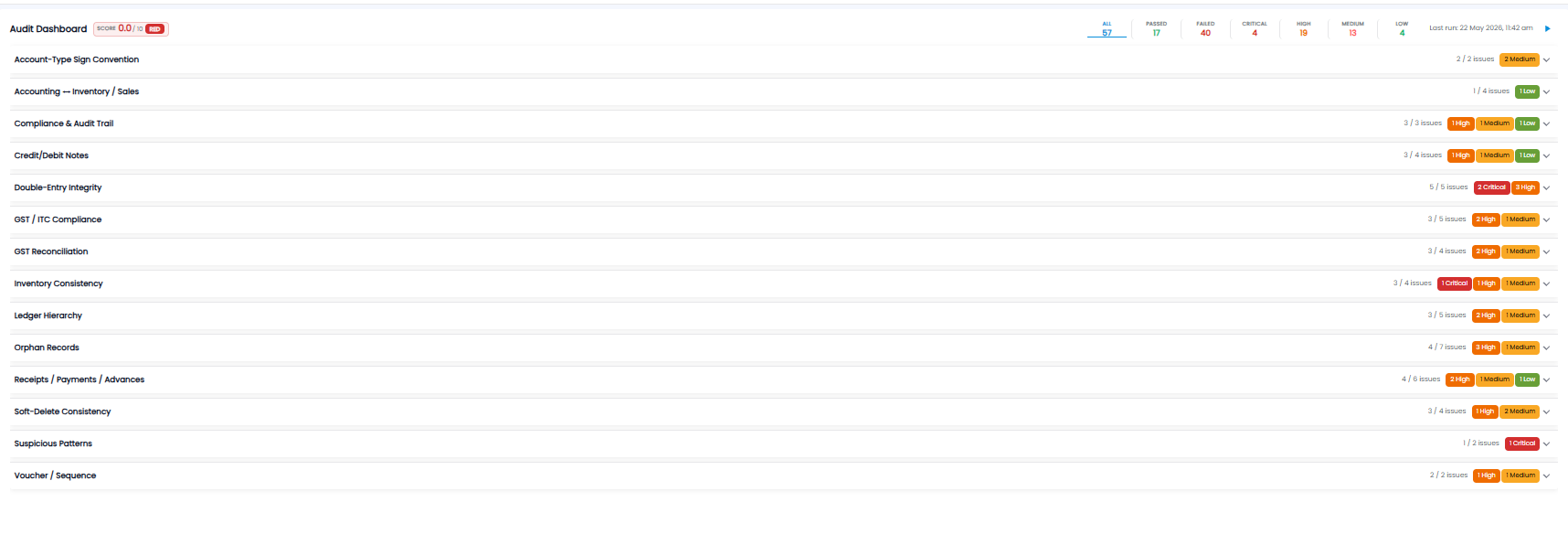
Score and Counts
- Score — next to the title, out of 10, with a colour band such as RED. The higher the score, the healthier your data
- All / Passed / Failed — how many checks ran, passed, and failed
- Critical / High / Medium / Low — the failed checks by severity
- Last run — when the audit last ran. The arrow next to it runs the audit again
Severity
| Badge | Meaning |
|---|---|
| Critical (red) | Fix straight away — your books or stock may be wrong |
| High (orange) | Fix soon — it can affect returns, reports, or balances |
| Medium (amber) | Worth fixing when you can |
| Low (green) | Minor tidy-up |
Check Groups
The checks are grouped by topic. Each group shows how many of its checks found issues (for example 3 / 4 issues) and badges for the severities. Click the arrow at the end of a row to open the group and see each check.
| Group | What it checks |
|---|---|
| Account-Type Sign Convention | Ledger balances are on the side expected for their type — for example assets as debits |
| Accounting ↔ Inventory / Sales | Your accounts agree with your stock and sales records |
| Compliance & Audit Trail | Records keep the history and details compliance needs |
| Credit/Debit Notes | Credit and debit notes are complete and linked correctly |
| Double-Entry Integrity | Every entry's debits equal its credits |
| GST / ITC Compliance | GST and input tax credit are recorded correctly |
| GST Reconciliation | GST in your books agrees with your GST records |
| Inventory Consistency | Stock quantities and lots add up |
| Ledger Hierarchy | Ledgers sit under the right parent and group |
| Orphan Records | Records that point to something that no longer exists |
| Receipts / Payments / Advances | Receipts, payments, and advances are matched and balanced |
| Soft-Delete Consistency | Deleted records are not still being counted elsewhere |
| Suspicious Patterns | Unusual entries that may need a second look |
| Voucher / Sequence | Voucher numbers run in order without gaps or duplicates |
Tip: Fix the Critical and High issues first, then run the audit again to see the score improve.
Note: The Health Audit only reports — it does not change your data. Fix each issue on the page it relates to.